

本文作者:PingCAP
dbt (data build tool)是一款流行的开源数据转换工具,能够通过 SQL 实现数据转化,将命令转化为表或者视图,提升数据分析师的工作效率。TiDB 社区在近日推出了 dbt-tidb 插件,实现了 TiDB 和 dbt 的兼容适配。本文将通过一个简单的案例介绍如何通过 dbt 实现 TiDB 中数据的简单分析。
dbt 主要功能在于转换数据库或数据仓库中的数据,在 E(Extract)、L(Load)、T(Transform) 的流程中,仅负责转换(transform)的过程。 通过 dbt-tidb 插件,数据分析师在使用 TiDB 的过程中,能够通过 SQL 直接建立表单并匹配数据,而无需关注创建 table 或 view 的过程,并且可以直观地看到数据的流动;同时能够运用 dbt 的 Jinja 编写 SQL、测试、包管理等功能,大大提升工作效率。
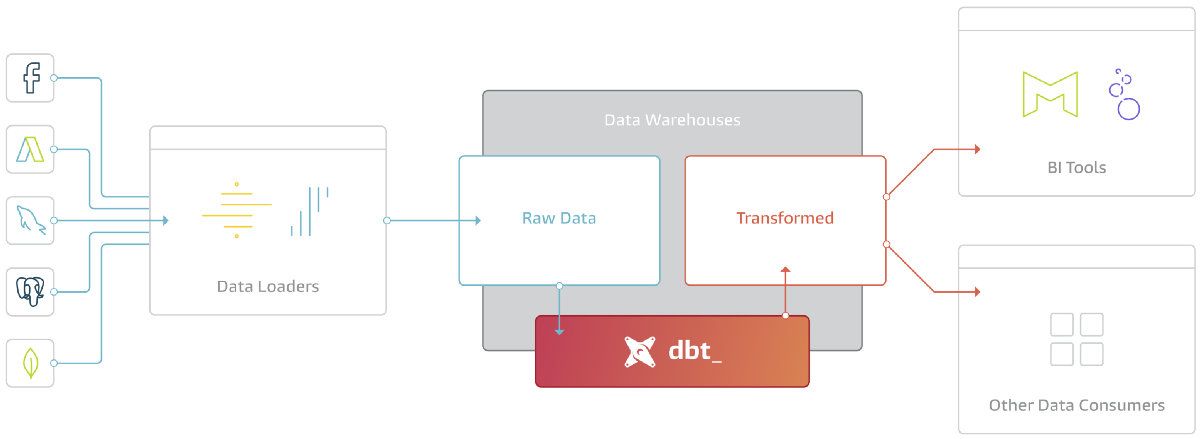
(图片来源:https://blog.getdbt.com/what-exactly-is-dbt/)
接下来,我将以 dbt 官方教程为例,给大家介绍下 TiDB 与 dbt 的结合使用。
本例用到的相关软件及其版本要求:
- TiDB 5.3 或更高版本
- dbt 1.0.1 或更高版本
- dbt-tidb 1.0.0
安装
dbt 除了本地 CLI 工具外,还支持 dbt Cloud (目前,dbt Cloud 只支持 dbt-lab 官方维护的 adapter),其中本地 CLI 工具有多种安装方式。我们这里直接使用 pypi 安装 dbt 和 dbt-tidb 插件。
安装 dbt 和 dbt-tidb,只需要一条命令,因为 dbt 会作为依赖在安装 dbt-tidb 的时候顺便安装。
$ pip install dbt-tidb
dbt 也可自行安装,安装方式参考官方安装教程。
创建项目:jaffle_shop
jaffle_shop 是 dbt-lab 提供的用于演示 dbt 功能的工程项目,你可以直接从 GitHub 上获取它。
git clone https://github.com/dbt-labs/jaffle_shop
cd jaffle_shop
这里展开 jaffle_shop 工程目录下所有文件。
dbt_project.yml是 dbt 项目的配置文件,其中保存着项目名称、数据库配置文件的路径信息等。models目录下存放该项目的 SQL 模型和 table 约束,注意这部分是数据分析师自行编写的。seed目录存放 CSV 文件。此类文件可以来源于数据库导出工具,例如TiDB 可以通过 Dumpling 把 table 中的数据导出为 CSV 文件。jaffle_shop 工程中,这些 CSV 文件用来作为待处理的原始数据。
关于它们更加具体的内容,在用到上面的某个文件或目录后,我会再次进行更详细的说明。
ubuntu@ubuntu:~/jaffle_shop$ tree .
├── dbt_project.yml
├── etc
│   ├── dbdiagram_definition.txt
│   └── jaffle_shop_erd.png
├── LICENSE
├── models
│   ├── customers.sql
│   ├── docs.md
│   ├── orders.sql
│   ├── overview.md
│   ├── schema.yml
│   └── staging
│       ├── schema.yml
│       ├── stg_customers.sql
│       ├── stg_orders.sql
│       └── stg_payments.sql
├── README.md
└── seeds
    ├── raw_customers.csv
    ├── raw_orders.csv
    └── raw_payments.csv
配置项目
1.全局配置
dbt 有一个默认的全局配置文件:~/.dbt/profiles.yml,我们首先在用户目录下建立该文件,并配置 TiDB 数据库的连接信息。
jaffle_shop_tidb:
  # 工程名称
  target: dev  # 目标
  outputs:
    dev:
      type: tidb  # 适配器类型
      server: 127.0.0.1  # 地址
      port: 4000  # 端口号
      schema: analytics  # 数据库名称
      username: root  # 用户名
      password: ""  # 密码
2.项目配置
jaffle_shop 工程目录下,有此项目的配置文件,名为dbt_project.yml。把profile配置项改为jaffle_shop_tidb,即profiles.yml文件中的工程名称。这样此工程在会到 ~/.dbt/profiles.yml文件中查询数据库连接配置。
name: 'jaffle_shop'
config-version: 2
version: '0.1'
profile: 'jaffle_shop_tidb'  # 注意此处修改
model-paths: ["models"]  # model 路径
seed-paths: ["seeds"]  # seed 路径
test-paths: ["tests"]
analysis-paths: ["analysis"]
micro-paths: ["macros"]
target-path: "target"
clean-targets:
  - "target"
  - "dbt_modules"
  - "logs"
require-dbt-version: [">=1.0.0", "<2.0.0"]
models:
  jaffle_shop:
    materialized: table  # models/ 中的 *.sql 物化为表
  staging:
    materialized: view  # models/staging/ 中的 *.sql 物化为视图
3.验证配置
可以通过以下命令,检测数据库和项目配置是否正确。
$ dbt debug
06:59:18 Running with dbt=1.0.1
	dbt version: 1.0.1
	python version: 3.8.10
	python path: /usr/bin/python3
	os info: Linux-5.4.0-97-generic-x86_64-with-glibc2.29
Using profiles.yml file at /home/ubuntu/.dbt/profiles.yml
Using dbt_project.yml file at /home/ubuntu/jaffle_shop/dbt_project.yml
Configuration:
	profiles.yml file [OK found and valid]
	dbt_project.yml file [OK found and valid]
Configuration:
	profiles.yml file [OK found and valid]
	dbt_project.yml file [OK found and valid]
Required dependencies:
	- git [OK found]
Connection:
	server: 127.0.0.1
	port: 4000
	database: None
	schema: analytics
	user: root
Connection test:
	[OK connection ok]
All checks passed!
加载 CSV
加载 CSV 数据,把 CSV 具体化为目标数据库中的表。注意:一般来说,dbt 项目不需要这个步骤,因为你的待处理项目的数据都在数据库中。
$ dbt seed
07:03:24 Running with dbt=1.0.1
07:03:24 Partial parse save file not found. Starting full parse.
07:03:25 Found 5 models, 20 tests, 0 snapshots, 0 analyses, 172 macros, 0 operations, 3 seed files, 0 sources, 0 exposures, 0 metrics
07:03:25
07:03:25 Concurrency: 1 threads (target='dev')
07:03:25
07:03:25 1 of 3 START seed file analytics.raw_customers.................................. [RUN]
07:03:25 1 of 3 OK loaded seed file analytics.raw_customers.............................. [INSERT 100 in 0.19s]
07:03:25 2 of 3 START seed file analytics.raw_orders..................................... [RUN]
07:03:25 2 of 3 OK loaded seed file analytics.raw_orders................................. [INSERT 99 in 0.14s]
07:03:25 3 of 3 START seed file analytics.raw_payments................................... [RUN]
07:03:26 3 of 3 OK loaded seed file analytics.raw_payments............................... [INSERT 113 in 0.24s]
07:03:26
07:03:26 Finished running 3 seeds in 0.71s.
07:03:26
07:03:26 Completed successfully
07:03:26
07:03:26 Done. PASS=3 WARN=0 ERROR=0 SKIP=0 TOTAL=3
上述结果中,可以清楚的看到共执行了三个任务,分别加载了 analytics.raw_customers、analytics.raw_orders、analytics.raw_payments 三张表。
接着,去 TiDB 数据库中看看发生了什么。
发现多出了 analytics 数据库,这是 dbt 为我们创建的工程数据库。
SHOW DATABASES;

+--------------------+
| Database           |
+--------------------+
| INFORMATION_SCHEMA  |
| METRICS_SCHEMA      |
| PERFORMANCE_SCHEMA   |
| analytics           |
| mysql               |
| test                |
+--------------------+
6 rows in set (0.00 sec)
analytics 数据库中有三张表,分别对应着上述三个任务结果。
SHOW TABLES;
model 是什么?
在进行下一个步骤之前,我们有必要先了解下 dbt 中的 model 扮演着什么角色?
dbt 中使用 model 来描述一组数据表或视图的结构,其中主要有两类文件:SQL 和 YML。还需要注意到的是:在 jaffle_shop 这个项目中,根据物化配置,models/ 目录下保存的是表结构,而 models/staging/ 目录下保存的是视图结构。
以 models/orders.sql 为例,它是一句 SQL 查询语句,支持 jinja 语法,接下来的命令中,会根据这条 SQL 创建出 orders 表。
-- Define payment methods
{% set payment_methods = ['credit_card', 'coupon', 'bank_transfer', 'gift_card'] %}

WITH orders AS (
    SELECT * FROM {{ ref('stg_orders') }}
), payments AS (
    SELECT * FROM {{ ref('stg_payments') }}
), order_payments AS (
    SELECT order_id,
        {% for payment_method in payment_methods -%}
            SUM(CASE WHEN payment_method = '{{ payment_method }}' THEN amount ELSE 0 END) AS {{ payment_method }}_amount,
        {% endfor -%}
        SUM(amount) AS total_amount
    FROM payments
    GROUP BY order_id
), final AS (
    SELECT orders.order_id,
        orders.customer_id,
        orders.order_date,
        orders.status,
        {% for payment_method in payment_methods -%}
            order_payments.{{ payment_method }}_amount,
        {% endfor -%}
        order_payments.total_amount AS amount
    FROM orders
    LEFT JOIN order_payments ON orders.order_id = order_payments.order_id
)

SELECT * FROM final;
并且,与这条 SQL 配套的约束信息在 models/schema.yml 文件中。
schema.yml 是当前目录下所有模型的注册表,所有的模型都被组织成一个树形结构,描述了每条字段的说明和属性。其中 tests 条目表示这个字段的一些约束项,可以通过 dbt test 命令来检测,更多信息请查阅官网文档。
version: 2

models:
  - name: orders
    description: This table has basic information about orders, as well as some derived facts based on payments
    columns:
      - name: order_id
        tests:
          - unique
          - not_null
        description: This is a unique identifier for an order
      - name: customer_id
        description: Foreign key to the customers table
        tests:
          - not_null
          - relationships:
              to: ref('customers')
              field: customer_id
      - name: order_date
        description: Date (UTC) that the order was placed
      - name: status
        description: '{{ doc("orders_status") }}'
        tests:
          - accepted_values:
              values: ['placed', 'shipped', 'completed', 'return_pending', 'returned']
      - name: amount
        description: Total amount (AUD) of the order
        tests:
          - not_null
      - name: credit_card_amount
        description: Amount of the order (AUD) paid for by credit card
        tests:
          - not_null
      - name: coupon_amount
        description: Amount of the order (AUD) paid for by coupon
        tests:
          - not_null
      - name: bank_transfer_amount
        description: Amount of the order (AUD) paid for by bank transfer
        tests:
          - not_null
      - name: gift_card_amount
        description: Amount of the order (AUD) paid for by gift card
        tests:
          - not_null
运行
结果中显示成功创建了三张视图(analytics.stg_customers、analytics.stg_orders、analytics.stg_payments)和两张表(analytics.customers、analytics.orders)。
$ dbt run
07:28:43 Running with dbt=1.0.1
07:28:43 Unable to do partial parsing because profile has changed
07:28:43 Unable to do partial parsing because a project dependency has been added
07:28:44 Found 5 models, 20 tests, 0 snapshots, 0 analyses, 172 macros, 0 operations, 3 seed files, 0 sources, 0 exposures, 0 metrics
07:28:44
07:28:44 Concurrency: 1 threads (target='dev')
07:28:44
07:28:44 1 of 5 START view model analytics.stg_customers................................. [RUN]
07:28:44 1 of 5 OK created view model analytics.stg_customers............................ [SUCCESS 0 in 0.12s]
07:28:44 2 of 5 START view model analytics.stg_orders.................................... [RUN]
07:28:44 2 of 5 OK created view model analytics.stg_orders............................... [SUCCESS 0 in 0.08s]
07:28:44 3 of 5 START view model analytics.stg_payments.................................. [RUN]
07:28:44 3 of 5 OK created view model analytics.stg_payments............................. [SUCCESS 0 in 0.07s]
07:28:44 4 of 5 START table model analytics.customers.................................... [RUN]
07:28:44 4 of 5 OK created table model analytics.customers............................... [SUCCESS 0 in 0.16s]
07:28:44 5 of 5 START table model analytics.orders....................................... [RUN]
07:28:45 5 of 5 OK created table model analytics.orders.................................. [SUCCESS 0 in 0.12s]
07:28:45
07:28:45 Finished running 3 view models, 2 table models in 0.64s.
07:28:45
07:28:45 Completed successfully
07:28:45
07:28:45 Done. PASS=5 WARN=0 ERROR=0 SKIP=0 TOTAL=5
去 TiDB 数据库中验证下,是否真的创建成功。
结果显示多出了 customers 等五张表格或视图,并且表或视图中的数据也都转换完成。这里只展示 customers 的部分数据。
-- Show tables in the analytics database
SHOW TABLES;

-- Select all records from the customers table
SELECT * FROM customers;
生成文档
dbt 还支持生成可视化的文档,命令如下。
1.生成文档
$ dbt docs generate
07:33:59 Running with dbt=1.0.1
07:33:59 Found 5 models, 20 tests, 0 snapshots, 0 analyses, 172 macros, 0 operations, 3 seed files, 0 sources, 0 exposures, 0 metrics
07:33:59
07:33:59 Concurrency: 1 threads (target='dev')
07:33:59
07:33:59 Done.
07:33:59 Building catalog
07:33:59 Catalog written to /home/ubuntu/jaffle_shop/target/catalog.json
2.开启服务
$ dbt docs serve
07:43:01 Running with dbt=1.0.1
07:43:01 Serving docs at 0.0.0.0:8080
07:43:01 To access from your browser, navigate to: http://localhost:8080
07:43:01
07:43:01
07:43:01 Press Ctrl+C to exit.
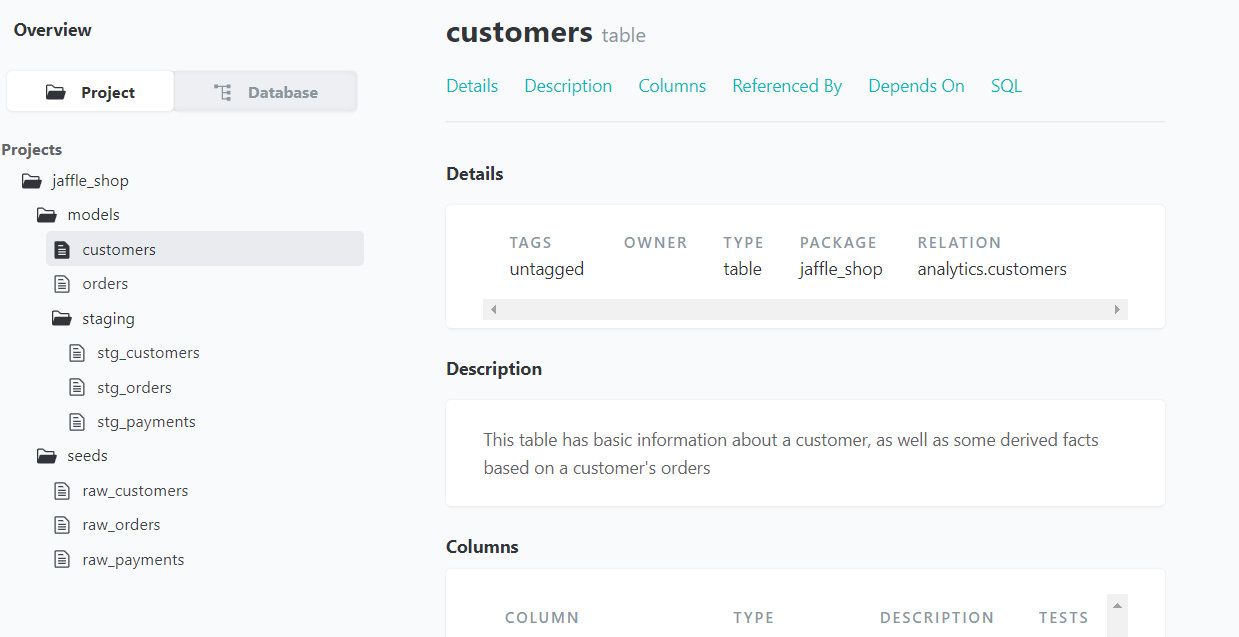
可以通过浏览器查看文档,其中包含 jaffle_shop 项目的整体结构以及所有表和视图的描述说明。
总结
TiDB 在 dbt 中的使用主要有以下几步:
- 安装 dbt 和 dbt-tidb
- 配置项目
- 编写 SQL 和 YML 文件
- 运行项目
目前,TiDB 支持 dbt 的版本在 4.0 以上,但根据 dbt-tidb 项目文档描述,低版本的 TiDB 在和 dbt 结合使用中还存在一些问题,例如:不支持临时表和临时视图、不支持 WITH 语法等。想要痛快的使用 dbt ,建议使用 TiDB 5.3 以上版本,此版本支持 dbt 的全部功能。