【TiDB 使用环境】生产环境 /测试环境
【TiDB 版本】7.5.0
【部署方式】虚拟机部署
业务查询某张表报错:PD server timeout
检查日志发现都是 autoanalyze 报错:
[autoanalyze.go:435] [“auto analyze failed”] [category=stats] [sql=“analyze table xxxxx.xxxxx partition xxxxx”] [cost_time=11.243548842s] [error="[tikv:9001]PD server timeout: "]
集群状态都是正常的,只有某几张表无法查询。
1 个赞
克里克里克
(Ti D Ber H052ej9m)
6
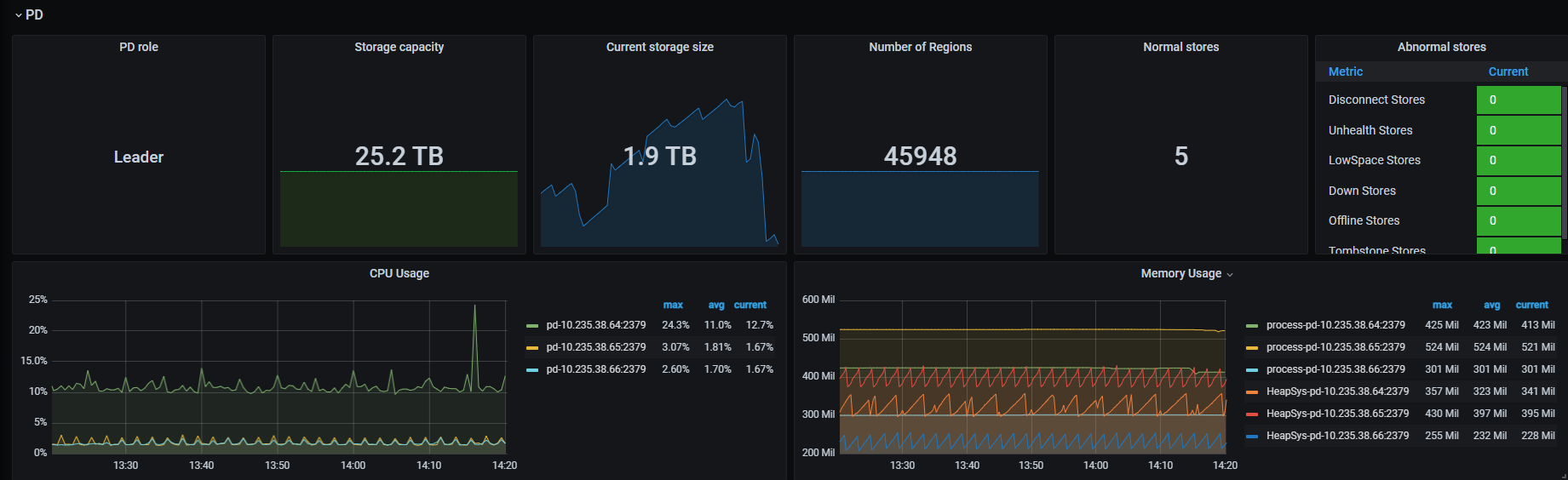
看截图好像没什么太大的异常,不能查询的表是analyze的表么? 将统计信息的任务暂时停掉,能否正常执行的。
1 个赞
临时停 autoanalyze(set global tidb_auto_analyze_enable=0),手动调优 PD 参数,长期建议清理冗余 Region 或升级版本。
1 个赞
[2026/01/21 09:07:17.782 +07:00] [ERROR] [apiutil.go:419] [“request failed”] [error=“[PD:http:ErrSendRequest]Get "http://10.235.38.64:2379/pd/api/v1/ping\”: context canceled: Get "http://10.235.38.64:2379/pd/api/v1/ping\“: context canceled”]
[2026/01/21 09:07:29.443 +07:00] [ERROR] [grpclog.go:75] [“transport: loopyWriter.run returning. Err: write tcp 10.235.38.66:2379->10.235.38.64:59866: write: broken pipe”]
[2026/01/21 09:07:29.334 +07:00] [ERROR] [etcdutil.go:422] [“failed to list members”] [error=“context deadline exceeded”]
[2026/01/21 09:36:56.958 +07:00] [ERROR] [client.go:150] [“region sync with leader meet error”] [error=“[PD:grpc:ErrGRPCRecv]rpc error: code = Canceled desc = context canceled: rpc error: code = Canceled desc = context canceled”]
[2026/01/21 13:26:52.073 +07:00] [ERROR] [etcdutil.go:152] [“load from etcd meet error”] [key=/pd/7355341457185982298/member/8314904980276262071/leader_priority] [error=“[PD:etcd:ErrEtcdKVGet]context deadline exceeded: context deadline exceeded”]
[2026/01/21 13:26:52.073 +07:00] [ERROR] [member.go:274] [“failed to load leader priority”] [error=“[PD:etcd:ErrEtcdKVGet]context deadline exceeded: context deadline exceeded”]
[2026/01/21 13:26:54.567 +07:00] [ERROR] [etcdutil.go:152] [“load from etcd meet error”] [key=/pd/7355341457185982298/config] [error=“[PD:etcd:ErrEtcdKVGet]context deadline exceeded: context deadline exceeded”]
[2026/01/21 13:26:55.393 +07:00] [ERROR] [client.go:150] [“region sync with leader meet error”] [error=“[PD:grpc:ErrGRPCRecv]rpc error: code = Canceled desc = context canceled: rpc error: code = Canceled desc = context canceled”]
[2026/01/21 13:28:17.251 +07:00] [ERROR] [etcdutil.go:422] [“failed to list members”] [error=“context deadline exceeded”]
[2026/01/21 13:28:17.305 +07:00] [ERROR] [apiutil.go:419] [“request failed”] [error=“[PD:http:ErrSendRequest]Get "http://10.235.38.64:2379/pd/api/v1/ping\”: context canceled: Get "http://10.235.38.64:2379/pd/api/v1/ping\“: context canceled”]
[2026/01/21 13:28:17.315 +07:00] [ERROR] [etcdutil.go:422] [“failed to list members”] [error=“context deadline exceeded”]
[2026/01/21 13:28:17.317 +07:00] [ERROR] [etcdutil.go:152] [“load from etcd meet error”] [key=/pd/7355341457185982298/member/8314904980276262071/leader_priority] [error=“[PD:etcd:ErrEtcdKVGet]context deadline exceeded: context deadline exceeded”]
[2026/01/21 13:28:17.318 +07:00] [ERROR] [member.go:274] [“failed to load leader priority”] [error=“[PD:etcd:ErrEtcdKVGet]context deadline exceeded: context deadline exceeded”]
[2026/01/21 13:28:17.592 +07:00] [ERROR] [client.go:150] [“region sync with leader meet error”] [error=“[PD:grpc:ErrGRPCRecv]rpc error: code = Canceled desc = context canceled: rpc error: code = Canceled desc = context canceled”]
随缘天空
(Ti D Ber Ivw R7o Pj)
15
表数据量是不是太大或者分区数是不是很多?执行如下命令试试是否报错:ANALYZE TABLE your_table PARTITION p1;
此外,可以重启下有问题的pd节点(10.235.38.64)试试
对,手动analyze是否报错? 实在不行改下tikv-client:
pd-server-timeout: 30s # 默认可能是 10s 或 15s,适当调大
analyze 也是报错的,重启pd节点也无法解决
1 个赞