

听了张昌宇的PCTP 闭门精讲课,再结合自己看303,、304的课程,记录自己PCTP的学习过程,以实践为引导学习,
PCTP主要考察的是对TIDB运维的全量知识涵盖知识点广,贴合生产实际,课程中老师以分享涵盖 TiDB 集群部署、使用管理、备份恢复、数据同步、高可用架构及高级特性模块,我将围绕这几部分展开学习。
TiDB 集群部署
本地测试集群的搭建方式主要有三种:
| 方式 | 适用场景 | 优缺点 |
|---|---|---|
| TiUP Playground | 快速体验、开发测试 | 一键启动,但非持久化 |
| Docker Compose | 单机模拟集群 | 部署简单,适合学习 |
| TiUP 生产部署 | 生产环境 | 接近真实,配置复杂 |
考虑到我要验证的是生产级功能(扩缩容、故障恢复、备份恢复等),我选择了TiUP部署方式,在三台虚拟机上部署完整的TiDB集群。集群部署的环境准备、配置文件编写等操作可直接参考官方文档的最佳实践,在线环境通过 curl 命令下载工具,离线环境使用对应安装包完成部署
| 主机IP | 主机配置 | 磁盘 | 组件 |
|---|---|---|---|
| 192.168.151.101 | 8c16g | 100g | TiDB,TiKV,PD prometheus,grafana |
| 192.168.151.103 | 8c16g | 100g | TiDB,TiKV,PD |
| 192.168.151.104 | 8c16g | 100g | TiDB,TiKV,PD |
整个部署过程主要分为以下几步:
1. 环境准备与检查
在开始安装前,需要对所有服务器进行基础环境配置:
-
创建用户 :TiDB 官方建议使用普通用户
tidb进行部署,不要直接使用root用户。useradd tidb passwd tidb -
配置 SSH 互信:以
tidb用户登录中控机,生成 SSH 密钥并将公钥分发到所有目标机器上。# 以 tidb 用户执行 ssh-keygen -t rsa ssh-copy-id tidb@<目标机器IP> -
关闭防火墙和 SELinux(或开放所需端口):
systemctl stop firewalld
systemctl disable firewalld
setenforce 0
# 并修改 /etc/selinux/config 文件,将 SELINUX=enforcing 改为 SELINUX=disabled
2. 离线安装 TiUP
-
上传并解压:将手上的部署包上传到中控机的
tidb用户目录下(/home/tidb/),然后解压:# 以 tidb 用户执行 tar -xzvf tidb-ee-server-v7.1.8-5.2-20250630-linux-amd64.tar.gz -
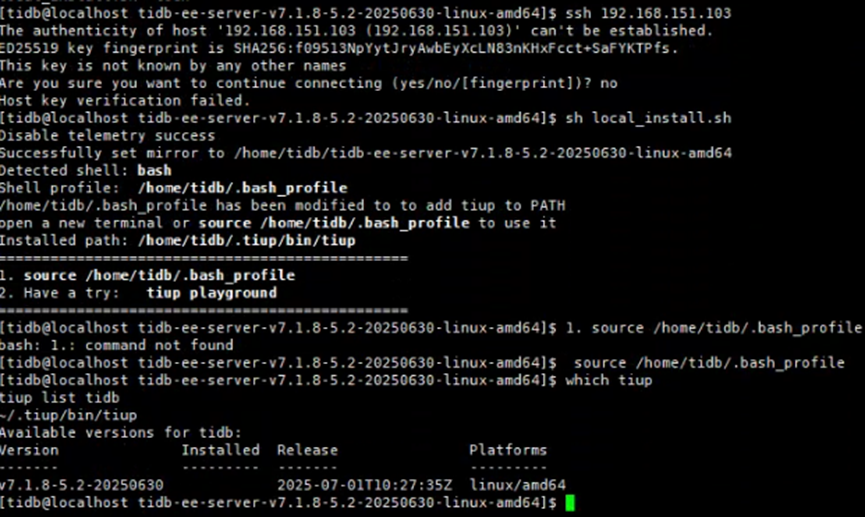
安装 TiUP:进入解压后的目录,执行安装脚本:
cd tidb-ee-server-v7.1.8-5.2-20250630-linux-amd64
sh local_install.sh
source /home/tidb/.bash_profile
- 安装 tiup 工具。
先复制镜像密钥到 tiup 目录
cp -rp /home/tidb/tidb-ee-server-v7.1.8-5.2-20250630-linux-amd64/keys ~/.tiup/
执行镜像合并,将 toolkit 组件合并到主 server 镜像
cd /home/tidb/tidb-ee-server-v7.1.8-5.2-20250630-linux-amd64
tiup mirror merge /home/tidb/tidb-ee-toolkit-v7.1.8-5.2-20250630-linux-amd64
验证安装:
bash
which tiup
tiup list tidb
如果能正常显示 TiDB 组件列表,说明离线环境已准备就绪。
3.编辑集群拓扑文件
-
生成拓扑模板:
tiup cluster template > topology.yaml -
编辑拓扑文件:根据服务器规划,修改
topology.yaml文件。一个典型的三节点集群配置如下:
# topology.yaml
# TiDB 集群拓扑配置文件
# 版本: v7.1.8
# 服务器规划:
#   192.168.151.101  TiDB, TiKV, PD, Prometheus, Grafana
#   192.168.151.103  TiDB, TiKV, PD
#   192.168.151.104  TiDB, TiKV, PD

global:
  user: "tidb"
  ssh_port: 22
  ssh_type: "builtin"
  deploy_dir: "/tidb/tidb-deploy-v7"
  data_dir: "/tidb/tidb-data-v7"

monitored:
  node_exporter_port: 9899
  blackbox_exporter_port: 9816
  deploy_dir: "/tidb/tidb-deploy-v7/monitor-9899"
  data_dir: "/tidb/tidb-data-v7/monitor-9899"
  log_dir: "/tidb/tidb-deploy-v7/monitor-9899/log"

server_configs:
  tidb:
    log.file.max-backups: 50
    log.file.max-days: 7
    token-limit: 20
  tikv:
    log.file.max-backups: 50
    log.file.max-days: 7
    raftstore.apply-pool-size: 2
    raftstore.capacity: 20G
    raftstore.store-io-pool-size: 2
    raftstore.store-pool-size: 2
    readpool.unified.max-thread-count: 2
    storage.block-cache.capacity: 160M
  pd:
    log.file.max-backups: 50
    log.file.max-days: 7
    replication.max-replicas: 3

pd_servers:
  - host: 192.168.151.101
    ssh_port: 22
    name: "pd-151-101"
    client_port: 2379
    peer_port: 2380
    deploy_dir: "/tidb/tidb-deploy-v7/pd-2379"
    data_dir: "/tidb/tidb-data-v7/pd-2379"
    log_dir: "/tidb/tidb-deploy-v7/pd-2379/log"
  - host: 192.168.151.103
    ssh_port: 22
    name: "pd-151-103"
    client_port: 2379
    peer_port: 2380
    deploy_dir: "/tidb/tidb-deploy-v7/pd-2379"
    data_dir: "/tidb/tidb-data-v7/pd-2379"
    log_dir: "/tidb/tidb-deploy-v7/pd-2379/log"
  - host: 192.168.151.104
    ssh_port: 22
    name: "pd-151-104"
    client_port: 2379
    peer_port: 2380
    deploy_dir: "/tidb/tidb-deploy-v7/pd-2379"
    data_dir: "/tidb/tidb-data-v7/pd-2379"
    log_dir: "/tidb/tidb-deploy-v7/pd-2379/log"

tidb_servers:
  - host: 192.168.151.101
    ssh_port: 22
    port: 4000
    status_port: 10080
    deploy_dir: "/tidb/tidb-deploy-v7/tidb-4000"
    log_dir: "/tidb/tidb-deploy-v7/tidb-4000/log"
  - host: 192.168.151.103
    ssh_port: 22
    port: 4000
    status_port: 10080
    deploy_dir: "/tidb/tidb-deploy-v7/tidb-4000"
    log_dir: "/tidb/tidb-deploy-v7/tidb-4000/log"
  - host: 192.168.151.104
    ssh_port: 22
    port: 4000
    status_port: 10080
    deploy_dir: "/tidb/tidb-deploy-v7/tidb-4000"
    log_dir: "/tidb/tidb-deploy-v7/tidb-4000/log"

tikv_servers:
  - host: 192.168.151.101
    ssh_port: 22
    port: 20160
    status_port: 20180
    deploy_dir: "/tidb/tidb-deploy-v7/tikv-20160"
    data_dir: "/tidb/tidb-data-v7/tikv-20160"
    log_dir: "/tidb/tidb-deploy-v7/tikv-20160/log"
  - host: 192.168.151.103
    ssh_port: 22
    port: 20160
    status_port: 20180
    deploy_dir: "/tidb/tidb-deploy-v7/tikv-20160"
    data_dir: "/tidb/tidb-data-v7/tikv-20160"
    log_dir: "/tidb/tidb-deploy-v7/tikv-20160/log"
  - host: 192.168.151.104
    ssh_port: 22
    port: 20160
    status_port: 20180
    deploy_dir: "/tidb/tidb-deploy-v7/tikv-20160"
    data_dir: "/tidb/tidb-data-v7/tikv-20160"
    log_dir: "/tidb/tidb-deploy-v7/tikv-20160/log"

monitoring_servers:
  - host: 192.168.151.101
    ssh_port: 22
    port: 9090
    deploy_dir: "/tidb/tidb-deploy-v7/prometheus-9090"
    data_dir: "/tidb/tidb-data-v7/prometheus-9090"
    log_dir: "/tidb/tidb-deploy-v7/prometheus-9090/log"

grafana_servers:
  - host: 192.168.151.101
    ssh_port: 22
    port: 3000
    deploy_dir: "/tidb/tidb-deploy-v7/grafana-3000"

alertmanager_servers:
  - host: 192.168.151.101
    ssh_port: 22
    web_port: 9093
    cluster_port: 9094
    deploy_dir: "/tidb/tidb-deploy-v7/alertmanager-9093"
    data_dir: "/tidb/tidb-data-v7/alertmanager-9093"
    log_dir: "/tidb/tidb-deploy-v7/alertmanager-9093/log"
#执行主机环境检查
tiup cluster check topology.yaml --user tidb -p
Verbose debug logs has been written to /home/tidb/.tiup/logs/tiup-cluster-debug-2026-08-11-11-14-09.log.
[tidb@localhost ~]$ tiup cluster check topology.yaml --user tidb -p
Input SSH password:


+ Detect CPU Arch Name
  - Detecting node 192.168.151.101 Arch info ... Done
  - Detecting node 192.168.151.103 Arch info ... Done
  - Detecting node 192.168.151.104 Arch info ... Done


+ Detect CPU OS Name
  - Detecting node 192.168.151.101 OS info ... Done
  - Detecting node 192.168.151.103 OS info ... Done
  - Detecting node 192.168.151.104 OS info ... Done
+ Download necessary tools
  - Downloading check tools for linux/amd64 ... Done
+ Collect basic system information
+ Collect basic system information
+ Collect basic system information
+ Collect basic system information
  - Getting system info of 192.168.151.101:22 ... Done
  - Getting system info of 192.168.151.103:22 ... Done
  - Getting system info of 192.168.151.104:22 ... Done
+ Check time zone
  - Checking node 192.168.151.101 ... Done
  - Checking node 192.168.151.103 ... Done
  - Checking node 192.168.151.104 ... Done
+ Check system requirements
+ Check system requirements
+ Check system requirements
+ Check system requirements
+ Check system requirements
+ Check system requirements
+ Check system requirements
+ Check system requirements
+ Check system requirements
+ Check system requirements
  - Checking node 192.168.151.101 ... Done
  - Checking node 192.168.151.103 ... Done
  - Checking node 192.168.151.104 ... Done
  - Checking node 192.168.151.101 ... Done
  - Checking node 192.168.151.103 ... Done
  - Checking node 192.168.151.104 ... Done
  - Checking node 192.168.151.101 ... Done
  - Checking node 192.168.151.103 ... Done
  - Checking node 192.168.151.104 ... Done
  - Checking node 192.168.151.101 ... Done
  - Checking node 192.168.151.101 ... Done
  - Checking node 192.168.151.101 ... Done
  - Checking node 192.168.151.101 ... Done
  - Checking node 192.168.151.103 ... Done
  - Checking node 192.168.151.104 ... Done
+ Cleanup check files
  - Cleanup check files on 192.168.151.101:22 ... Done
  - Cleanup check files on 192.168.151.103:22 ... Done
  - Cleanup check files on 192.168.151.104:22 ... Done
Node             Check         Result  Message
----             -----         ------  -------
192.168.151.103  network       Pass    network speed of ens160 is 10000MB
192.168.151.103  disk          Warn    mount point / does not have 'noatime' option set
192.168.151.103  selinux       Pass    SELinux is disabled
192.168.151.103  os-version    Fail    Red Hat Enterprise Linux 9.2 (Plow) 9.2 not supported, use version 8.4 or a later 8.x version please
192.168.151.103  thp           Fail    THP is enabled, please disable it for best performance
192.168.151.103  command       Fail    numactl not usable, bash: line 1: numactl: command not found
192.168.151.103  timezone      Fail    time zone is America/New_York, but the firt PD is Asia/Hong_Kong
192.168.151.103  cpu-cores     Pass    number of CPU cores / threads: 8
192.168.151.103  cpu-governor  Warn    Unable to determine current CPU frequency governor policy
192.168.151.103  swap          Warn    swap is enabled, please disable it for best performance
192.168.151.103  memory        Pass    memory size is 16384MB
192.168.151.104  memory        Pass    memory size is 16384MB
192.168.151.104  selinux       Pass    SELinux is disabled
192.168.151.104  thp           Fail    THP is enabled, please disable it for best performance
192.168.151.104  timezone      Fail    time zone is America/New_York, but the firt PD is Asia/Hong_Kong
192.168.151.104  cpu-governor  Warn    Unable to determine current CPU frequency governor policy
192.168.151.104  network       Pass    network speed of ens160 is 10000MB
192.168.151.104  disk          Warn    mount point / does not have 'noatime' option set
192.168.151.104  command       Fail    numactl not usable, bash: line 1: numactl: command not found
192.168.151.104  os-version    Fail    Red Hat Enterprise Linux 9.2 (Plow) 9.2 not supported, use version 8.4 or a later 8.x version please
192.168.151.104  cpu-cores     Pass    number of CPU cores / threads: 8
192.168.151.104  swap          Warn    swap is enabled, please disable it for best performance
192.168.151.101  os-version    Fail    Red Hat Enterprise Linux 9.2 (Plow) 9.2 not supported, use version 8.4 or a later 8.x version please
192.168.151.101  swap          Warn    swap is enabled, please disable it for best performance
192.168.151.101  memory        Pass    memory size is 16384MB
192.168.151.101  disk          Warn    mount point / does not have 'noatime' option set
192.168.151.101  selinux       Pass    SELinux is disabled
192.168.151.101  cpu-cores     Pass    number of CPU cores / threads: 8
192.168.151.101  cpu-governor  Warn    Unable to determine current CPU frequency governor policy
192.168.151.101  network       Pass    network speed of ens160 is 10000MB
192.168.151.101  thp           Fail    THP is enabled, please disable it for best performance
192.168.151.101  command       Fail    numactl not usable, bash: line 1: numactl: command not found
检查发现了一些问题和警告。
| 检查项 | 问题 | 节点 | 严重程度 |
|---|---|---|---|
| OS Version | RHEL 9.2 不在支持列表中 | 全部节点 | ❌ Fail(必须解决) |
| THP | 透明大页已启用 | 全部节点 | ❌ Fail(必须解决) |
| Timezone | 时区不一致 | 103, 104 | ❌ Fail(必须解决) |
| numactl | 未安装 | 全部节点 | ❌ Fail(必须解决) |
| Swap | 已启用 | 全部节点 | ⚠️ Warn(建议解决) |
| noatime | 未设置 | 全部节点 | ⚠️ Warn(建议解决) |
| cpu-governor | 无法确定CPU调度策略 | 全部节点 | ⚠️ Warn(可忽略) |
| 磁盘挂载 | 根目录无 noatime | 全部节点 | ⚠️ Warn(建议解决) |
4.集群部署
将报错的问题修复,修复完成后进行集群部署,
[tidb@localhost ~]$ tiup cluster deploy tidb-test v7.1.8-5.2-20250630 topology.yaml --user tidb -p
Input SSH password:


+ Detect CPU Arch Name
  - Detecting node 192.168.151.101 Arch info ... Done
  - Detecting node 192.168.151.103 Arch info ... Done
  - Detecting node 192.168.151.104 Arch info ... Done


+ Detect CPU OS Name
  - Detecting node 192.168.151.101 OS info ... Done
  - Detecting node 192.168.151.103 OS info ... Done
  - Detecting node 192.168.151.104 OS info ... Done
Please confirm your topology:
Cluster type:    tidb
Cluster kind:    standard
Cluster name:    tidb-test
Cluster version: v7.1.8-5.2-20250630
Role          Host             Ports        OS/Arch       Directories
----          ----             -----        -------       -----------
pd            192.168.151.101  2379/2380    linux/x86_64  /tidb/tidb-deploy-v7/pd-2379,/tidb/tidb-data-v7/pd-2379
pd            192.168.151.103  2379/2380    linux/x86_64  /tidb/tidb-deploy-v7/pd-2379,/tidb/tidb-data-v7/pd-2379
pd            192.168.151.104  2379/2380    linux/x86_64  /tidb/tidb-deploy-v7/pd-2379,/tidb/tidb-data-v7/pd-2379
tikv          192.168.151.101  20160/20180  linux/x86_64  /tidb/tidb-deploy-v7/tikv-20160,/tidb/tidb-data-v7/tikv-20160
tikv          192.168.151.103  20160/20180  linux/x86_64  /tidb/tidb-deploy-v7/tikv-20160,/tidb/tidb-data-v7/tikv-20160
tikv          192.168.151.104  20160/20180  linux/x86_64  /tidb/tidb-deploy-v7/tikv-20160,/tidb/tidb-data-v7/tikv-20160
tidb          192.168.151.101  4000/10080   linux/x86_64  /tidb/tidb-deploy-v7/tidb-4000
tidb          192.168.151.103  4000/10080   linux/x86_64  /tidb/tidb-deploy-v7/tidb-4000
tidb          192.168.151.104  4000/10080   linux/x86_64  /tidb/tidb-deploy-v7/tidb-4000
prometheus    192.168.151.101  9090/12020   linux/x86_64  /tidb/tidb-deploy-v7/prometheus-9090,/tidb/tidb-data-v7/prometheus-9090
grafana       192.168.151.101  3000         linux/x86_64  /tidb/tidb-deploy-v7/grafana-3000
alertmanager  192.168.151.101  9093/9094    linux/x86_64  /tidb/tidb-deploy-v7/alertmanager-9093,/tidb/tidb-data-v7/alertmanager-9093
Attention:
    1. If the topology is not what you expected, check your yaml file.
    2. Please confirm there is no port/directory conflicts in same host.
Do you want to continue? [y/N]: (default=N) y
+ Generate SSH keys ... Done
+ Download TiDB components
  - Download pd:v7.1.8-5.2-20250630 (linux/amd64) ... Done
  - Download tikv:v7.1.8-5.2-20250630 (linux/amd64) ... Done
  - Download tidb:v7.1.8-5.2-20250630 (linux/amd64) ... Done
  - Download prometheus:v7.1.8-5.2-20250630 (linux/amd64) ... Done
  - Download grafana:v7.1.8-5.2-20250630 (linux/amd64) ... Done
  - Download alertmanager: (linux/amd64) ... Done
  - Download node_exporter: (linux/amd64) ... Done
  - Download blackbox_exporter: (linux/amd64) ... Done
+ Initialize target host environments
  - Prepare Keys 192.168.151.101:22 ... Done
  - Prepare Keys 192.168.151.103:22 ... Done
  - Prepare Keys 192.168.151.104:22 ... Done
+ Deploy TiDB instance
  - Prepare Assets pd -> 192.168.151.101 ... Done
  - Prepare Assets pd -> 192.168.151.103 ... Done
  - Prepare Assets pd -> 192.168.151.104 ... Done
  - Prepare Assets tikv -> 192.168.151.101 ... Done
  - Prepare Assets tikv -> 192.168.151.103 ... Done
  - Prepare Assets tikv -> 192.168.151.104 ... Done
  - Prepare Assets tidb -> 192.168.151.101 ... Done
  - Prepare Assets tidb -> 192.168.151.103 ... Done
  - Prepare Assets tidb -> 192.168.151.104 ... Done
  - Prepare Assets prometheus -> 192.168.151.101 ... Done
  - Prepare Assets grafana -> 192.168.151.101 ... Done
  - Prepare Assets alertmanager -> 192.168.151.101 ... Done
  - Deploy node_exporter -> 192.168.151.101 ... Done
  - Deploy node_exporter -> 192.168.151.103 ... Done
  - Deploy node_exporter -> 192.168.151.104 ... Done
  - Deploy blackbox_exporter -> 192.168.151.101 ... Done
  - Deploy blackbox_exporter -> 192.168.151.103 ... Done
  - Deploy blackbox_exporter -> 192.168.151.104 ... Done
+ Copy certificate to remote host


+ Init instance configs
  - Generate config pd -> 192.168.151.101:2379 ... ⠋ InitConfig: cluster=tidb-test, user=tidb, host=192.168.151.101, path=/home/tidb/.tiup/storage/cluster/clusters/tidb-test/config-cache/p...
+ Init instance configs
  - Generate config pd -> 192.168.151.101:2379 ... ⠙ InitConfig: cluster=tidb-test, user=tidb, host=192.168.151.101, path=/home/tidb/.tiup/storage/cluster/clusters/tidb-test/config-cache/p...
+ Init instance configs
  - Generate config pd -> 192.168.151.101:2379 ... ⠴ InitConfig: cluster=tidb-test, user=tidb, host=192.168.151.101, path=/home/tidb/.tiup/storage/cluster/clusters/tidb-test/config-cache/p...
+ Init instance configs
  - Generate config pd -> 192.168.151.101:2379 ... ⠧ InitConfig: cluster=tidb-test, user=tidb, host=192.168.151.101, path=/home/tidb/.tiup/storage/cluster/clusters/tidb-test/config-cache/p...
+ Init instance configs
  - Generate config pd -> 192.168.151.101:2379 ... Done
+ Init instance configs
  - Generate config pd -> 192.168.151.101:2379 ... Done
+ Init instance configs
  - Generate config pd -> 192.168.151.101:2379 ... Done
+ Init instance configs
  - Generate config pd -> 192.168.151.101:2379 ... Done
  - Generate config pd -> 192.168.151.103:2379 ... Done
  - Generate config pd -> 192.168.151.104:2379 ... Done
  - Generate config tikv -> 192.168.151.101:20160 ... Done
  - Generate config tikv -> 192.168.151.103:20160 ... Done
  - Generate config tikv -> 192.168.151.104:20160 ... Done
  - Generate config tidb -> 192.168.151.101:4000 ... Done
  - Generate config tidb -> 192.168.151.103:4000 ... Done
  - Generate config tidb -> 192.168.151.104:4000 ... Done
  - Generate config prometheus -> 192.168.151.101:9090 ... Done
  - Generate config grafana -> 192.168.151.101:3000 ... Done
  - Generate config alertmanager -> 192.168.151.101:9093 ... Done
+ Init monitor configs
  - Generate config node_exporter -> 192.168.151.101 ... Done
  - Generate config node_exporter -> 192.168.151.103 ... Done
  - Generate config node_exporter -> 192.168.151.104 ... Done
  - Generate config blackbox_exporter -> 192.168.151.101 ... Done
  - Generate config blackbox_exporter -> 192.168.151.103 ... Done
  - Generate config blackbox_exporter -> 192.168.151.104 ... Done
Enabling component pd
	Enabling instance 192.168.151.104:2379
	Enabling instance 192.168.151.103:2379
	Enabling instance 192.168.151.101:2379
	Enable instance 192.168.151.103:2379 success
	Enable instance 192.168.151.104:2379 success
	Enable instance 192.168.151.101:2379 success
Enabling component tikv
	Enabling instance 192.168.151.104:20160
	Enabling instance 192.168.151.101:20160
	Enabling instance 192.168.151.103:20160
	Enable instance 192.168.151.101:20160 success
	Enable instance 192.168.151.103:20160 success
	Enable instance 192.168.151.104:20160 success
Enabling component tidb
	Enabling instance 192.168.151.104:4000
	Enabling instance 192.168.151.103:4000
	Enabling instance 192.168.151.101:4000
	Enable instance 192.168.151.103:4000 success
	Enable instance 192.168.151.101:4000 success
	Enable instance 192.168.151.104:4000 success
Enabling component prometheus
	Enabling instance 192.168.151.101:9090
	Enable instance 192.168.151.101:9090 success
Enabling component grafana
	Enabling instance 192.168.151.101:3000
	Enable instance 192.168.151.101:3000 success
Enabling component alertmanager
	Enabling instance 192.168.151.101:9093
	Enable instance 192.168.151.101:9093 success
Enabling component node_exporter
	Enabling instance 192.168.151.101
	Enabling instance 192.168.151.104
	Enabling instance 192.168.151.103
	Enable 192.168.151.101 success
	Enable 192.168.151.103 success
	Enable 192.168.151.104 success
Enabling component blackbox_exporter
	Enabling instance 192.168.151.104
	Enabling instance 192.168.151.103
	Enabling instance 192.168.151.101
	Enable 192.168.151.103 success
	Enable 192.168.151.101 success
	Enable 192.168.151.104 success
Cluster `tidb-test` deployed successfully, you can start it with command: `tiup cluster start tidb-test --init`
下面进行集群初始化,命令上面已经带出
[tidb@localhost tidb-ee-server-v7.1.8-5.2-20250630-linux-amd64]$ tiup cluster start tidb-test --init
Starting cluster tidb-test...
+ [ Serial ] - SSHKeySet: privateKey=/home/tidb/.tiup/storage/cluster/clusters/tidb-test/ssh/id_rsa, publicKey=/home/tidb/.tiup/storage/cluster/clusters/tidb-test/ssh/id_rsa.pub
+ [Parallel] - UserSSH: user=tidb, host=192.168.151.103
+ [Parallel] - UserSSH: user=tidb, host=192.168.151.104
+ [Parallel] - UserSSH: user=tidb, host=192.168.151.103
+ [Parallel] - UserSSH: user=tidb, host=192.168.151.101
+ [Parallel] - UserSSH: user=tidb, host=192.168.151.104
+ [Parallel] - UserSSH: user=tidb, host=192.168.151.101
+ [Parallel] - UserSSH: user=tidb, host=192.168.151.101
+ [Parallel] - UserSSH: user=tidb, host=192.168.151.104
+ [Parallel] - UserSSH: user=tidb, host=192.168.151.101
+ [Parallel] - UserSSH: user=tidb, host=192.168.151.101
+ [Parallel] - UserSSH: user=tidb, host=192.168.151.103
+ [Parallel] - UserSSH: user=tidb, host=192.168.151.101
+ [ Serial ] - StartCluster
Starting component pd
	Starting instance pd
	Starting instance pd
	Starting instance pd
	Starting instance 192.168.151.104:2379
	Starting instance 192.168.151.103:2379
	Starting instance 192.168.151.101:2379
	Start instance 192.168.151.101:2379 success
	Start instance 192.168.151.103:2379 success
	Start instance 192.168.151.104:2379 success
Starting component tikv
	Starting instance tikv
	Starting instance tikv
	Starting instance tikv
	Starting instance 192.168.151.104:20160
	Starting instance 192.168.151.103:20160
	Starting instance 192.168.151.101:20160
	Start instance 192.168.151.101:20160 success
	Start instance 192.168.151.103:20160 success
	Start instance 192.168.151.104:20160 success
Starting component tidb
	Starting instance tidb
	Starting instance tidb
	Starting instance tidb
	Starting instance 192.168.151.104:4000
	Starting instance 192.168.151.101:4000
	Starting instance 192.168.151.103:4000
	Start instance 192.168.151.103:4000 success
	Start instance 192.168.151.104:4000 success
	Start instance 192.168.151.101:4000 success
Starting component prometheus
	Starting instance prometheus
	Starting instance 192.168.151.101:9090
	Start instance 192.168.151.101:9090 success
Starting component grafana
	Starting instance grafana
	Starting instance 192.168.151.101:3000
	Start instance 192.168.151.101:3000 success
Starting component alertmanager
	Starting instance alertmanager
	Starting instance 192.168.151.101:9093
	Start instance 192.168.151.101:9093 success
Starting component node_exporter
	Starting instance 192.168.151.104
	Starting instance 192.168.151.101
	Starting instance 192.168.151.103
	Start 192.168.151.101 success
	Start 192.168.151.103 success
	Start 192.168.151.104 success
Starting component blackbox_exporter
	Starting instance 192.168.151.104
	Starting instance 192.168.151.101
	Starting instance 192.168.151.103
	Start 192.168.151.101 success
	Start 192.168.151.104 success
	Start 192.168.151.103 success
+ [ Serial ] - UpdateTopology: cluster=tidb-test
Started cluster `tidb-test` successfully
The root password of TiDB database has been changed.
查看集群情况:tiup cluster display tidb-test
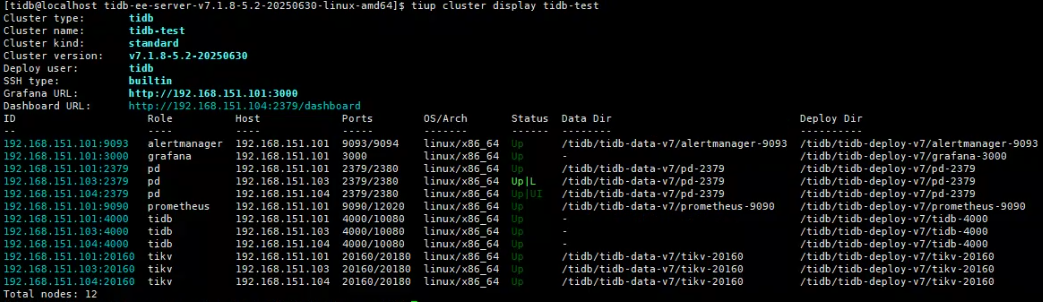
目前,整个集群已搭建完毕

运维要点
运维可视化工具
TiDB 集群自带 Dashboard 和 Grafana 两个可视化工具,可用于后续的集群管理、运维及问题排查工作
监控TiDB Grafana Grafana
URL: http://192.168.151.101:3000 默认口令 admin/admin
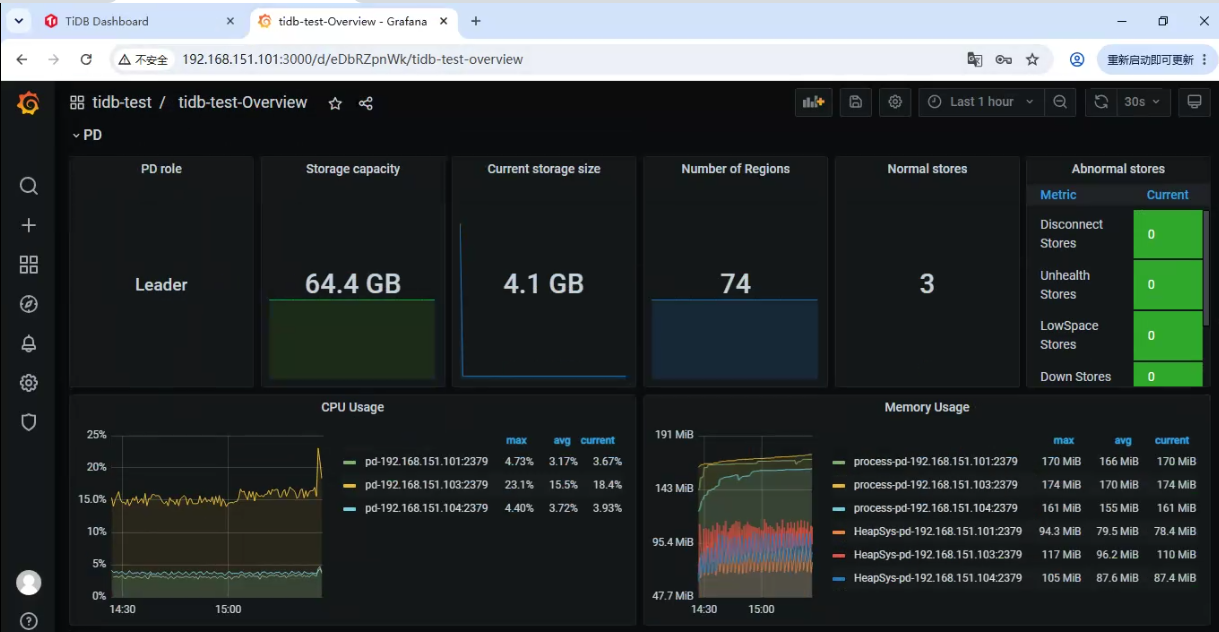
Dashboard Dashboard URL: http://192.168.151.104:2379/dashboard 登录用户: root
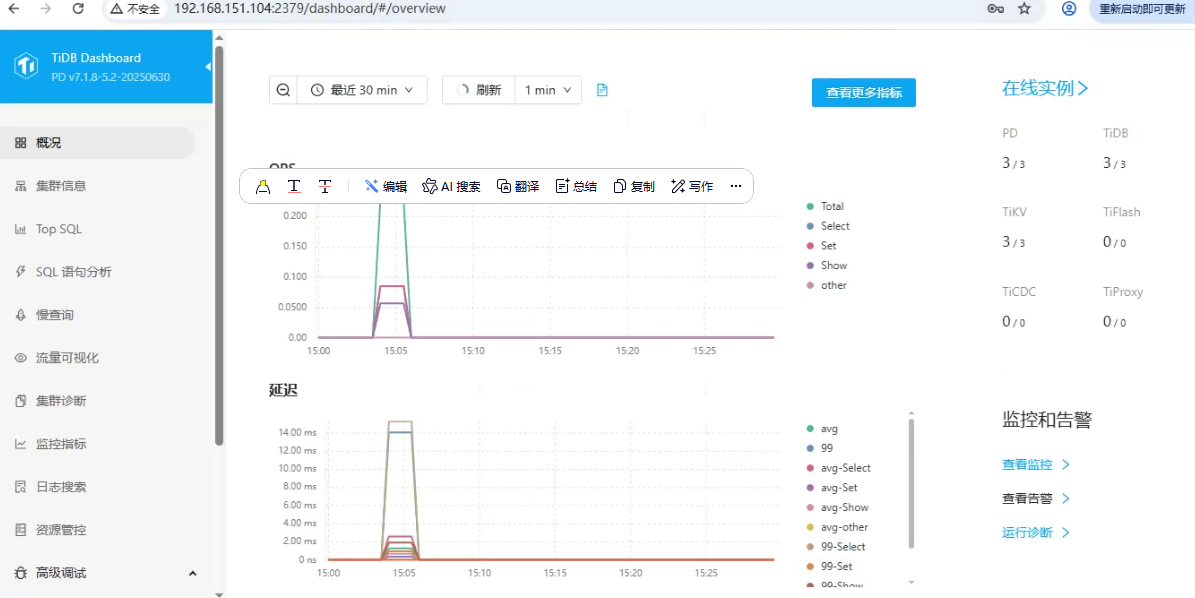
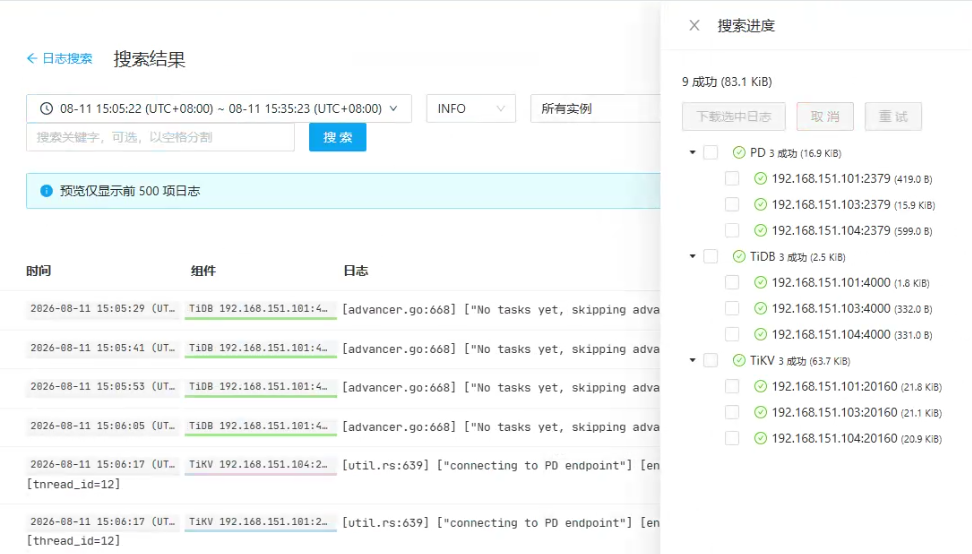
运维日志查询功能: Dashboard 支持直接选定组件 IP 进行日志搜索,无需逐台登录主机,Grafana 也提供相关运维功能
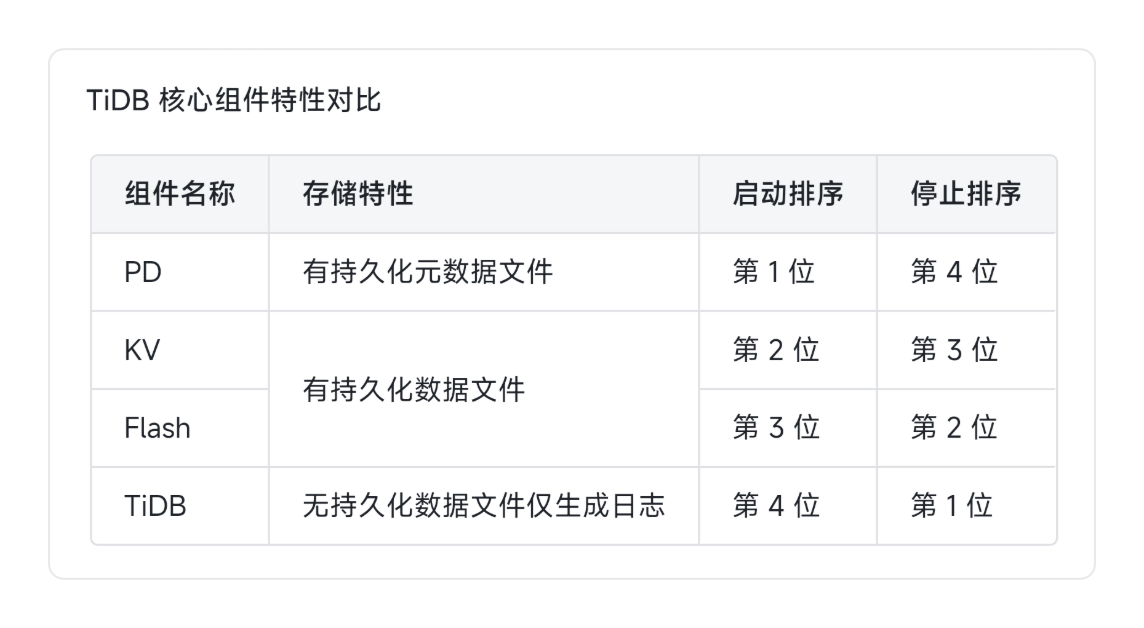
集群启停顺序考点: TiDB 集群启动顺序为 PD → KV → Flash → TiDB,停止顺序与启动顺序相反,该内容为 PCTP 考试的重点考点
组件数据存储差异: TiDB 为无状态组件仅产生日志无数据文件,PD、KV、Flash 组件存在对应的数据文件路径
运维日志查询功能: Dashboard 支持直接选定组件 IP 进行日志搜索,无需逐台登录主机,Grafana 也提供相关运维功能
TiDB 连接与协议兼容规则
连接兼容性: TiDB 完全兼容 MySQL 5.7 协议,所有支持连接 MySQL 的客户端(如 Navicat、DBeaver、服务器原生 MySQL 客户端)均可直接连接 TiDB 集群
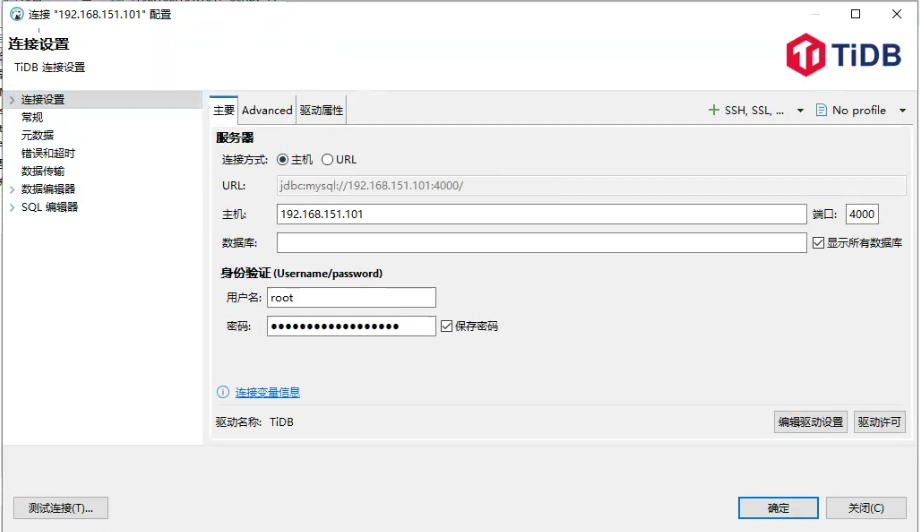
协议兼容边界: TiDB 支持 MySQL 5.7 绝大多数常用功能与语法,但不支持存储过程、函数、触发器和外键,该内容为考试重点考点
TiDB 集群参数配置管理规则
参数分类与持久化特性: TiDB 参数分为系统配置参数与集群配置参数两类,除 session 级别参数外,其余参数修改后均会持久化,集群重启不会失效
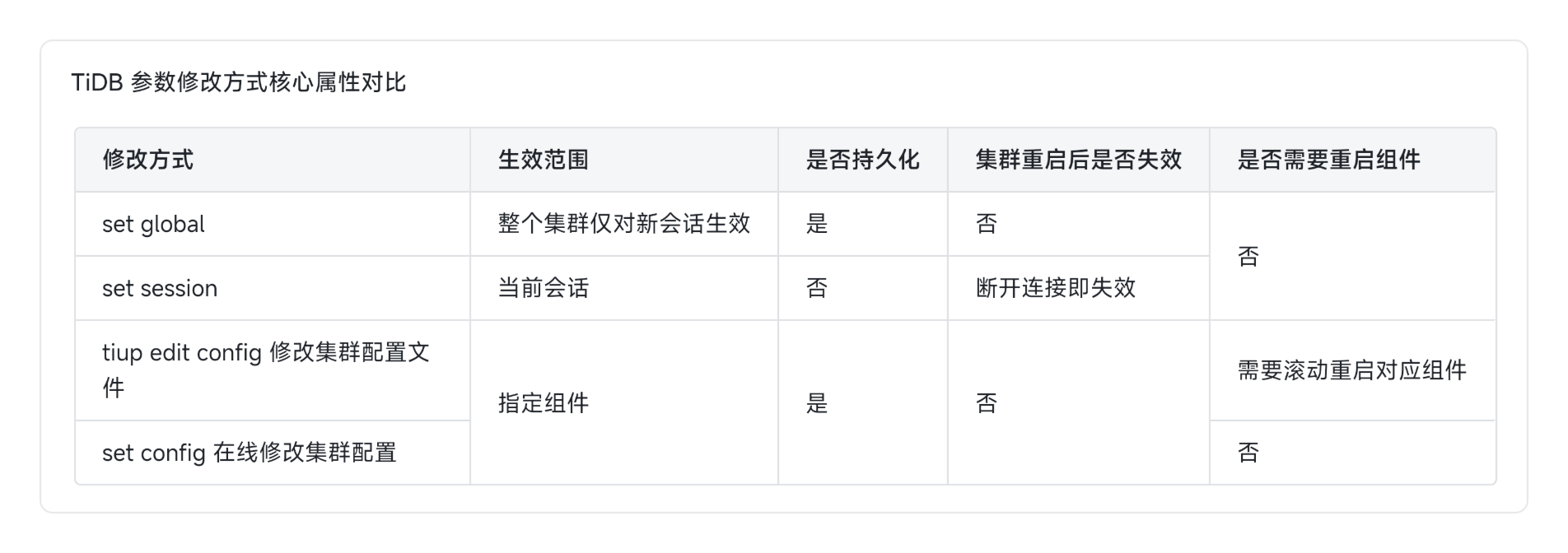
系统参数作用域: 系统参数支持 global(对新会话生效、需重连)、session(仅对当前会话生效)、instance(对单个实例生效,不常用)三个作用域,参数作用域可在官方文档对应参数说明中查询
集群参数修改方式: 集群参数可通过修改配置文件后对对应组件滚动重启,或通过在线命令修改,可在线修改的参数列表可查询官方文档
---参数修改实操---
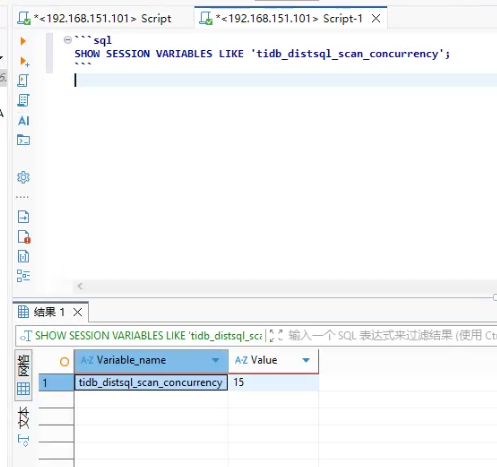
--SESSION 作用域验证
SESSION 级别参数的修改只影响当前会话。
-- 1. 查看当前会话的 tidb_distsql_scan_concurrency 值
SHOW SESSION VARIABLES LIKE 'tidb_distsql_scan_concurrency';
SHOW GLOBAL VARIABLES LIKE 'tidb_distsql_scan_concurrency';

-- 2. 在当前会话中修改 SESSION 变量
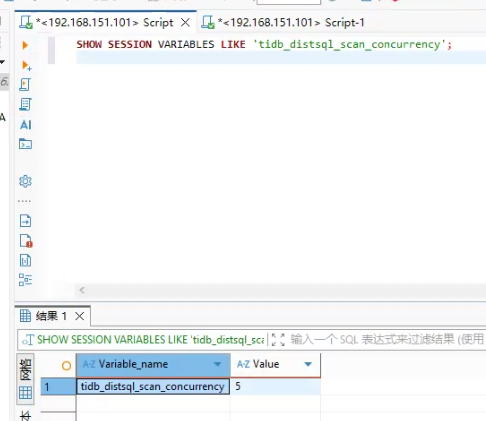
SET SESSION tidb_distsql_scan_concurrency = 5;


-- 3. 验证当前会话已生效
SHOW SESSION VARIABLES LIKE 'tidb_distsql_scan_concurrency';
-- 应返回 5

-- 4. 打开新终端建立新连接,查看该变量的值
-- 新会话中执行:
SHOW SESSION VARIABLES LIKE 'tidb_distsql_scan_concurrency';
-- 应返回默认值(非 5),证明 SESSION 修改不影响其他会话
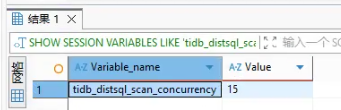
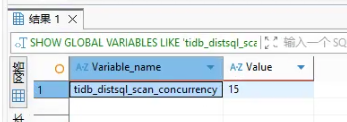
进行修改
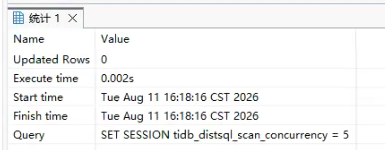
当前会话已修改
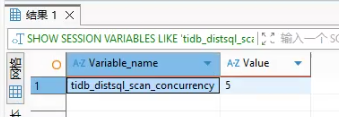
新建窗口查询
--GLOBAL 作用域验证
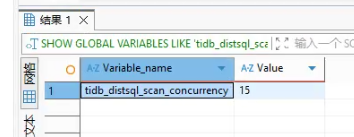
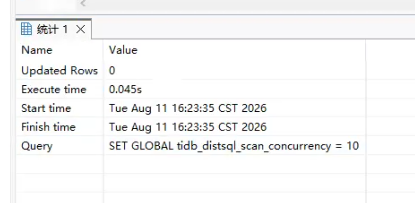
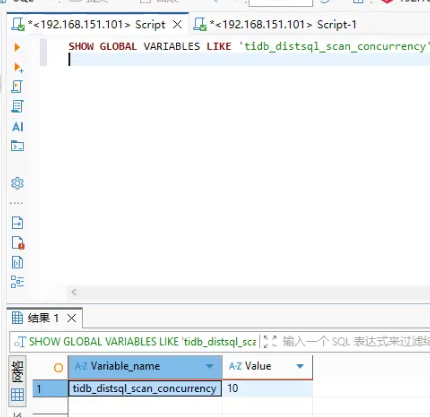
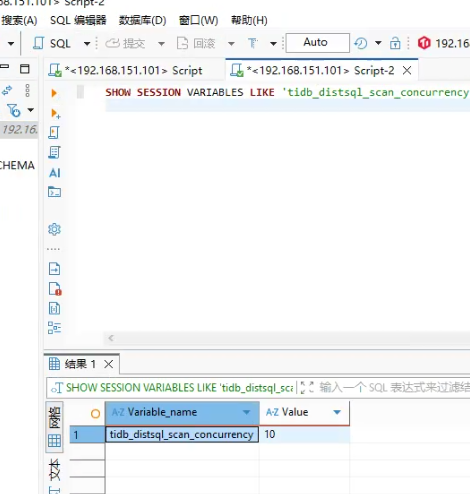
GLOBAL 级别参数的修改对当前会话无效,仅对新建立的会话生效。
-- 1. 查看当前 GLOBAL 值
SHOW GLOBAL VARIABLES LIKE 'tidb_distsql_scan_concurrency';

-- 2. 修改 GLOBAL 变量
SET GLOBAL tidb_distsql_scan_concurrency = 10;
-- 或
SET @@global.tidb_distsql_scan_concurrency = 10;  -- 两种写法等价[reference:25]

-- 3. 验证:当前会话的 SESSION 值不变
SHOW SESSION VARIABLES LIKE 'tidb_distsql_scan_concurrency';
-- 仍为之前的值(如 5)

-- 4. 验证 GLOBAL 值已修改
SHOW GLOBAL VARIABLES LIKE 'tidb_distsql_scan_concurrency';
-- 应返回 10

-- 5. 打开新终端建立新连接,查看 SESSION 值
-- 新会话中执行:
SHOW SESSION VARIABLES LIKE 'tidb_distsql_scan_concurrency';
-- 应返回 10,证明 GLOBAL 修改对新会话生效
--持久化验证
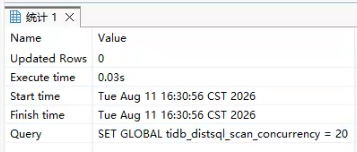
部分 GLOBAL 变量会持久化到 TiKV 中,集群重启后仍保留。
-- 1. 确认变量是否支持持久化(查阅官方文档[reference:27])
-- 以 tidb_distsql_scan_concurrency 为例

-- 2. 修改 GLOBAL 变量
SET GLOBAL tidb_distsql_scan_concurrency = 20;

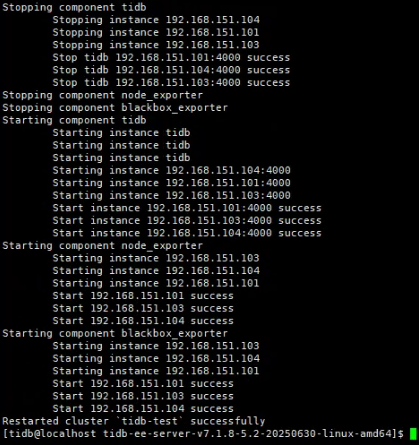
-- 3. 重启 TiDB 集群(或单个 TiDB 节点)
tiup cluster restart tidb-test -R tidb

-- 4. 重启后重新连接,查看该变量
SHOW GLOBAL VARIABLES LIKE 'tidb_distsql_scan_concurrency';
-- 应仍为 20,证明已持久化
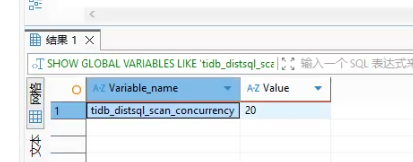
注意:并非所有 GLOBAL 变量都会持久化,需查阅官方文档中“是否持久化到集群”的说明。
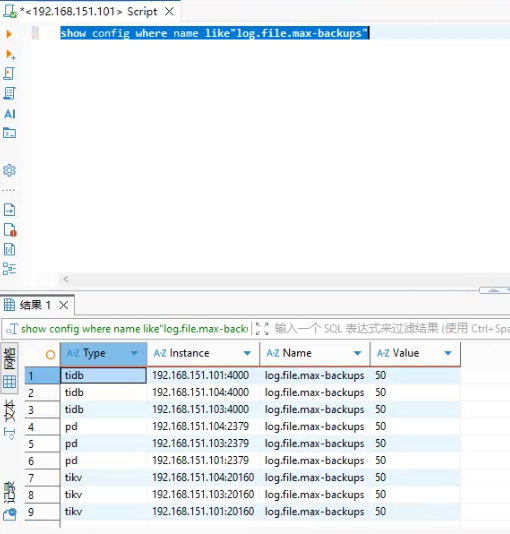
--集群配置参数调整
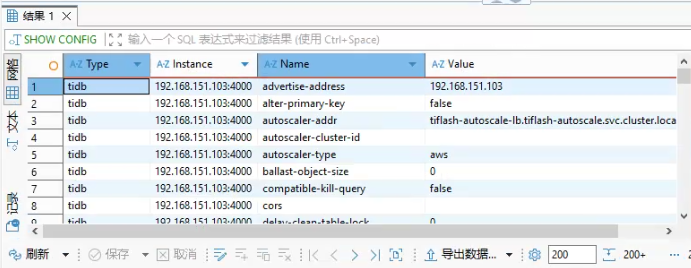
show config where name like"log.file.max-backups"
--集群配置参数管理
集群配置参数存储在各节点的配置文件中,需要通过 TiUP 工具集中管理。
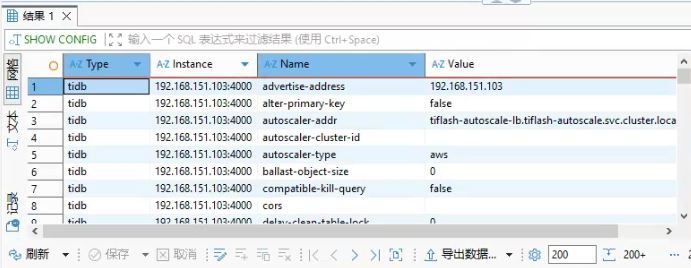
查看当前集群配置
-- 查看所有实例的配置[reference:31]
SHOW CONFIG;

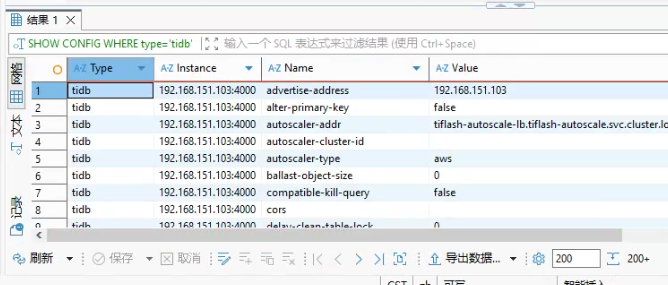
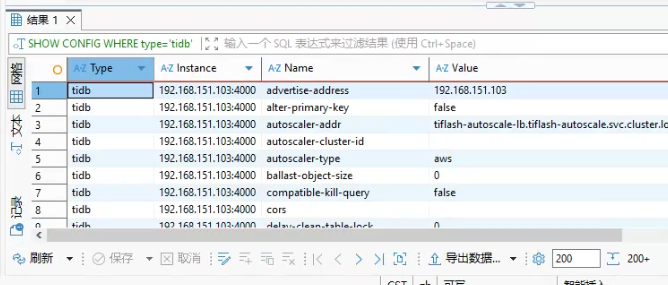
-- 查看 TiDB 组件的配置
SHOW CONFIG WHERE type='tidb';

-- 查看 TiKV 组件的特定配置
SHOW CONFIG WHERE type='tikv' AND name LIKE '%raftstore%';

-- 查看 TiKV 的日志级别
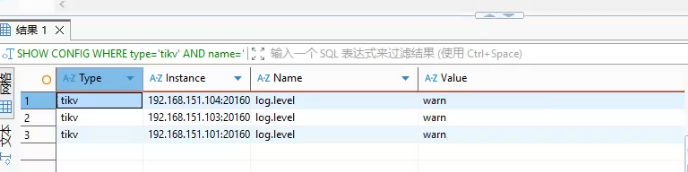
SHOW CONFIG WHERE type='tikv' AND name='log.level';


--通过 TiUP 修改集群配置(需重启生效)
# 1. 以编辑模式打开集群配置文件[reference:32]
tiup cluster edit-config tidb-test

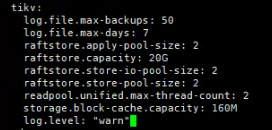
# 2. 在编辑器中修改或添加参数
# 例如修改 TiKV 的日志级别:
# server_configs:
#   tikv:
#     log.level: "warn"

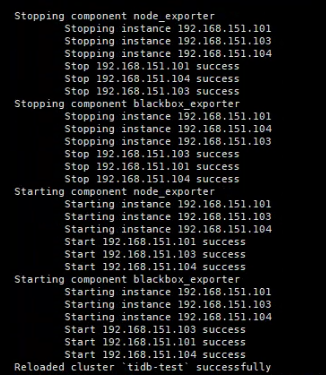
# 3. 保存退出后,执行 reload 滚动分发配置并重启组件[reference:33][reference:34]
tiup cluster reload tidb-test -R tikv

# 4. 验证配置是否生效
tiup cluster display tidb-test
SHOW CONFIG WHERE type='tikv' AND name='log.level';


--在线动态修改集群配置(无需重启)
TiDB 支持通过 SQL 对 TiDB、TiKV、PD 进行在线配置变更,无需重启集群组件。
-- 1. 修改所有 TiKV 实例的配置[reference:38]
SET CONFIG tikv `split.qps-threshold` = 1000;

-- 2. 修改单个 TiKV 实例的配置[reference:39]
SET CONFIG "192.168.151.101:20180" `split.qps-threshold` = 800;

-- 3. 修改 TiDB 实例配置
SET CONFIG tidb `log.level` = 'warn';

-- 4. 修改 PD 配置
SET CONFIG pd `log.level` = 'info';

-- 5. 查看修改结果
SHOW CONFIG WHERE type='tikv' AND name='split.qps-threshold';
重要提醒:
- 在线修改后,配置文件不会自动更新。
- 如果后续执行
tiup cluster reload或升级操作,在线修改的配置会被配置文件覆盖。- 在线修改后,应同步执行
tiup cluster edit-config更新配置文件
TiDB 用户与角色管理规则
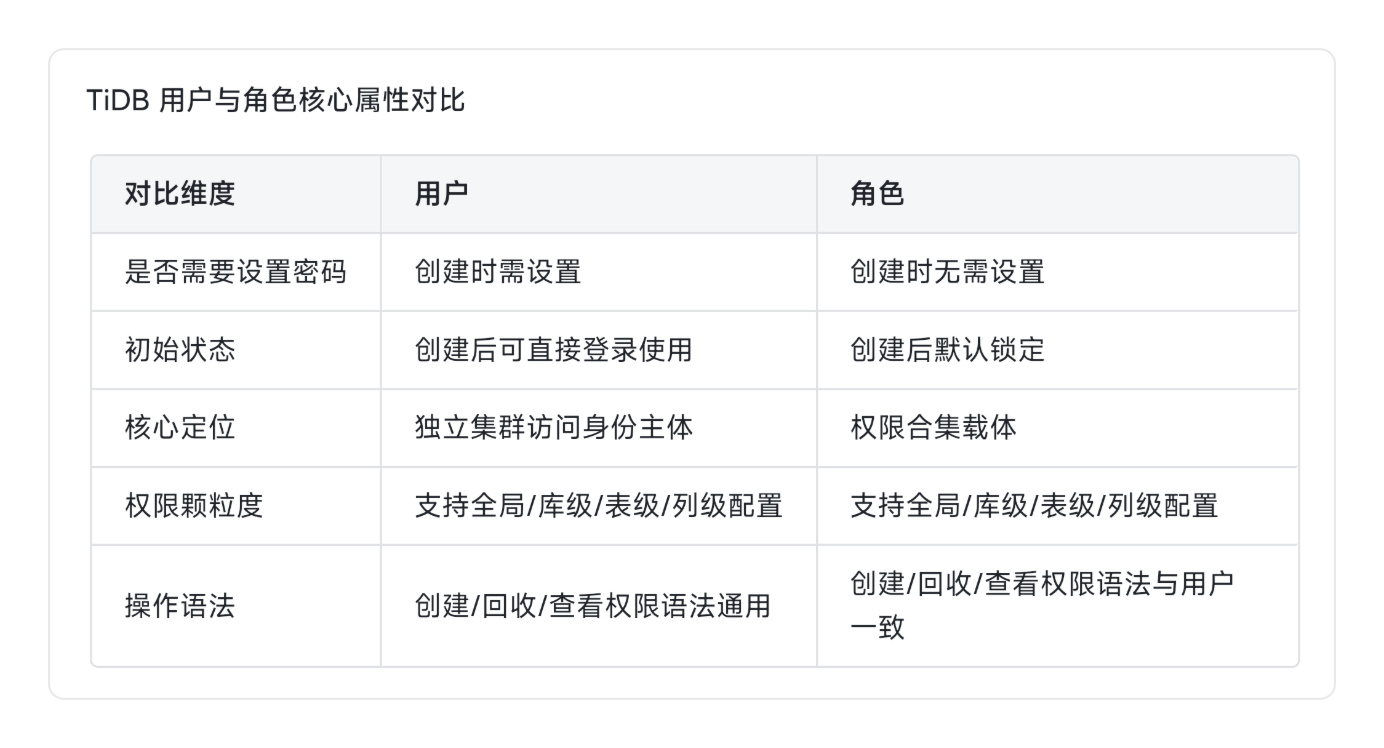
用户管理核心规则: TiDB 用户管理逻辑与 MySQL 基本一致,涉及认证与授权,支持用户名大小写敏感、通配符,用户信息统一存储于 mysql.user 系统表
root 密码丢失解决方案: 若 root 密码丢失,可在 TiDB Server 配置文件添加 skip ground table 参数并重启进程,跳过密码校验后直接登录集群重置密码
角色特性与使用规则: 角色为权限合集,创建无需设置密码且默认锁定,其创建、赋权、查看语法与用户完全一致,权限颗粒度覆盖全局、库级、表级、列级
---用户与角色实操---
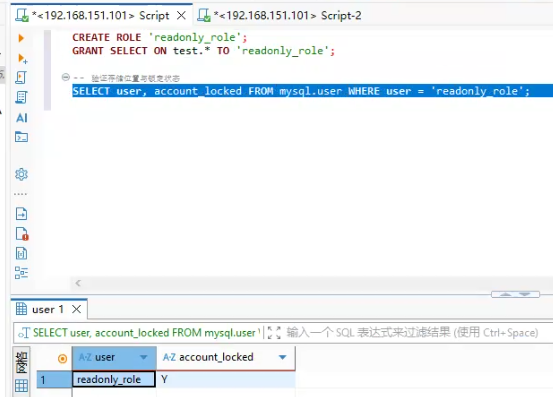
- 创建角色并查看存储位置
CREATE ROLE 'readonly_role';
GRANT SELECT ON test.* TO 'readonly_role';

-- 验证存储位置与锁定状态
SELECT user, account_locked FROM mysql.user WHERE user = 'readonly_role';
角色存在 mysql.user 表,默认锁定。
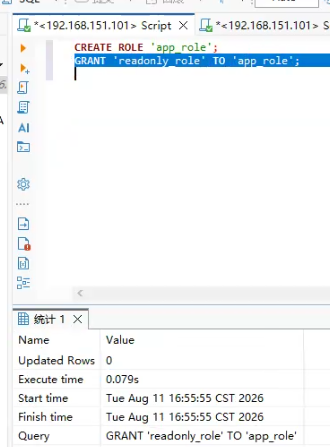
- 角色嵌套验证
CREATE ROLE 'app_role';
GRANT 'readonly_role' TO 'app_role';
给角色赋予角色,支持权限嵌套。
- 新开客户端连接,给用户绑定角色
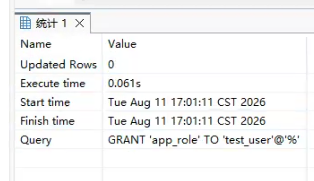
GRANT 'app_role' TO 'test_user'@'%';
TiDB 集群日常运维操作规范
- 集群扩缩容特性: TiDB 所有组件均支持在线水平扩缩容,操作全程不影响业务正常读写,通过 tiup cluster scale out/scale in 命令完成操作
- TiFlash 缩容特殊要求: 缩容 TiFlash 节点前必须先将对应 TiFlash 副本数设为 0,否则缩容操作会长期处于 pending 状态无法完成
- 运维操作注意事项: 生产集群日志由系统按预设规则自动清理,禁止手动清理;集群销毁操作会清除全部数据、日志及服务文件,仅保留 TiUP 工具
- 部署基础校验要求: 集群默认使用主机本地 system 时区,部署阶段需提前检查 NTP 服务配置及时钟同步状态是否正常
升级操作规范
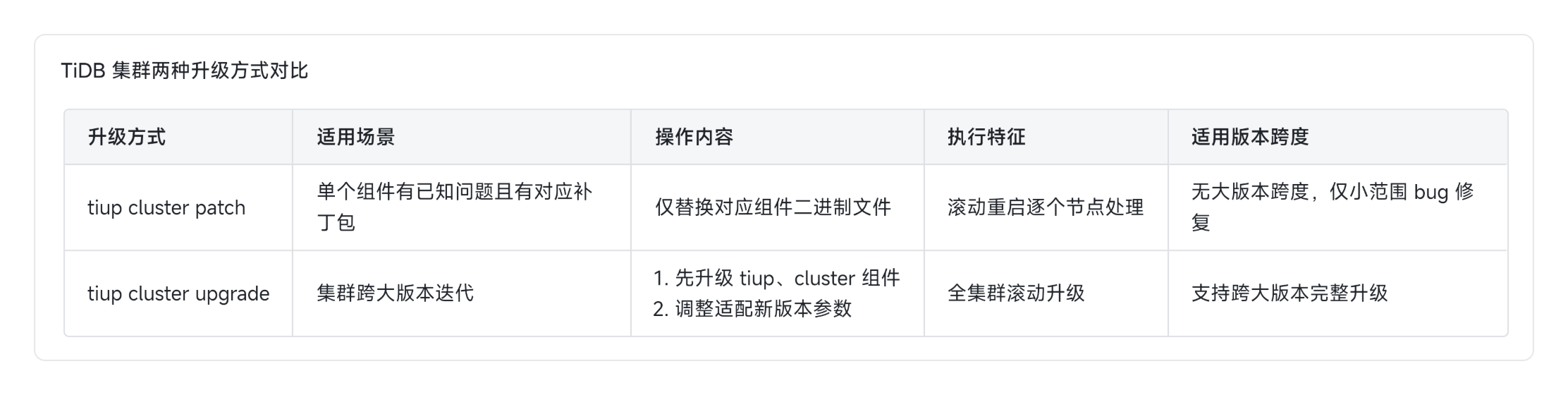
- 两类升级方式差异: TiDB 升级分为 type class patch(仅替换对应 TiDB 节点二进制文件,滚动重启,用于临时问题修复)和 type up class upgrade(用于大版本跨级升级,需先升级 TiUP 及 cluster 组件)两种类型
- 升级前置操作要求: 升级前需修改集群配置文件适配版本参数差异,同时检查集群 region 健康状态,解决 pending、miss 等异常 region 后再执行升级
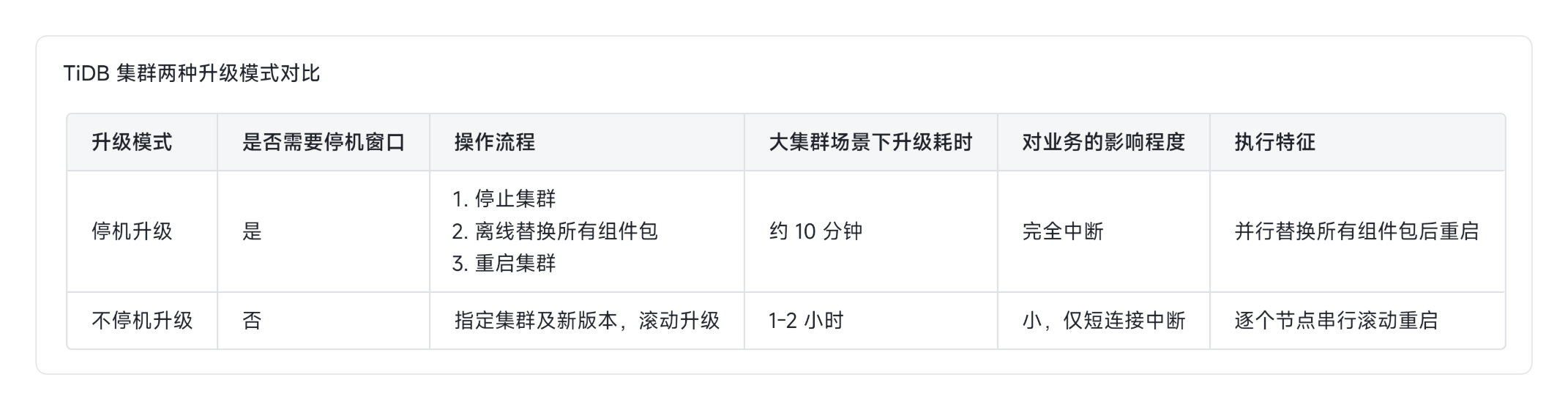
- 两种升级方案对比: 不停机升级采用滚动重启方式,集群全程可用但大集群耗时可达1-2小时,适合无长时间停机窗口的场景;停机升级采用并行替换组件包,大集群仅需约10分钟即可完成,需预留停机窗口
升级异常处理规则: 升级中断后需先排查中断原因,再通过 tiup cluster replay 命令基于已完成进度继续升级,无需重复执行已完成步骤
Leader 驱逐相关规则: 在线升级 KV 节点默认需先驱逐节点上的 leader 到其他存活节点,数据量越大驱逐耗时越久;可通过 force 命令跳过驱逐,但会引发应用性能抖动
升级后配套要求: 集群升级完成后,需将配套的 CTR 工具升级至与集群一致的版本
TiDB 集群高可用架构与特性
- 基础高可用机制: KV 基于 Multi-Raft 三副本机制,单副本异常不影响服务;PD 节点支持 leader 自动切换,集群滚动重启、升级均不中断业务
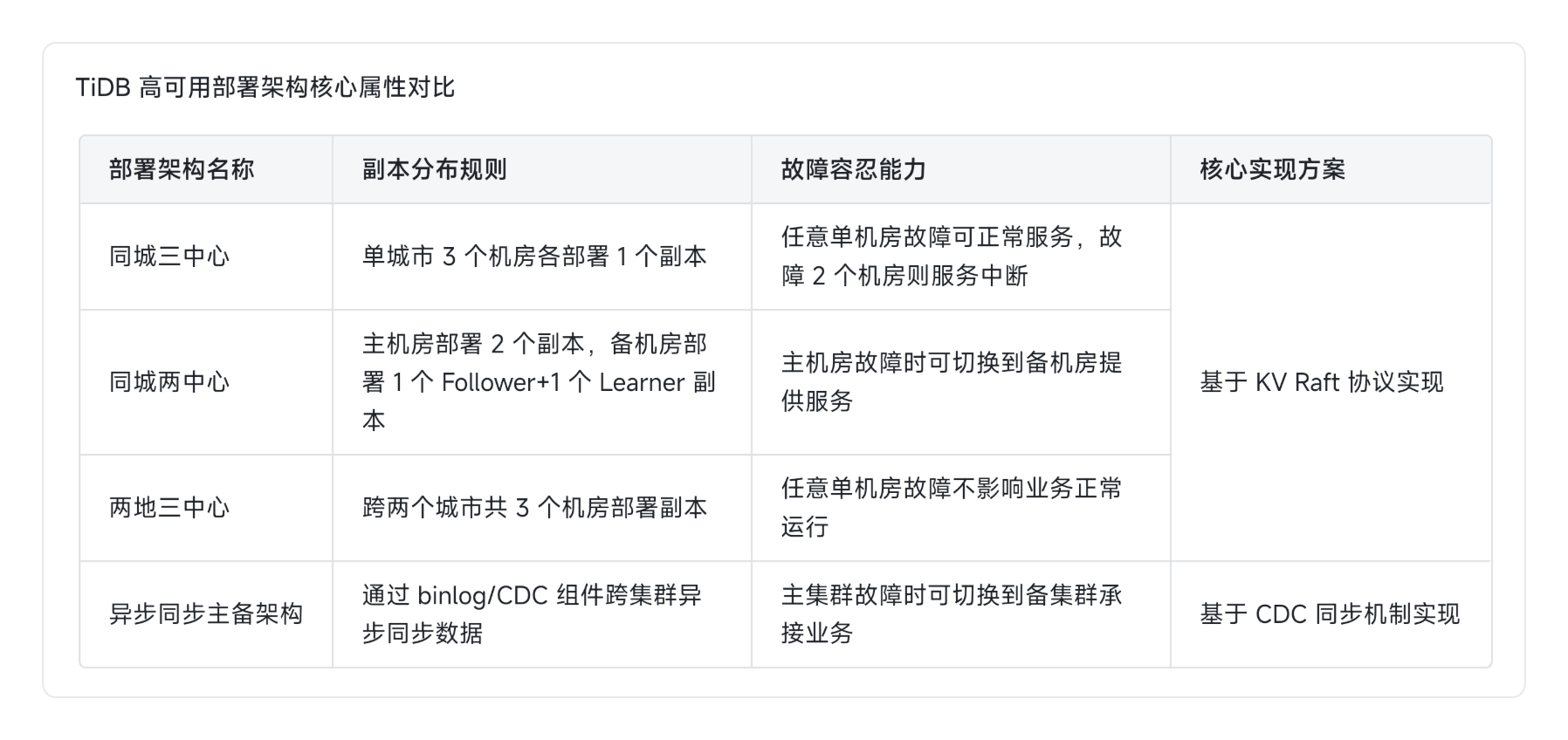
- 主流高可用架构: 包含同城三中心、同城两中心、两地三中心及异步主备架构,其中同城三中心可容忍单机房故障,其余架构各有对应的故障容忍与数据丢失风险边界
- TiProxy 组件特性: 可替代传统 HA 负载均衡方案,通过 VIP 转发请求,解决集群升级、缩容过程中的连接中断问题,仅会产生极小的响应时间波动
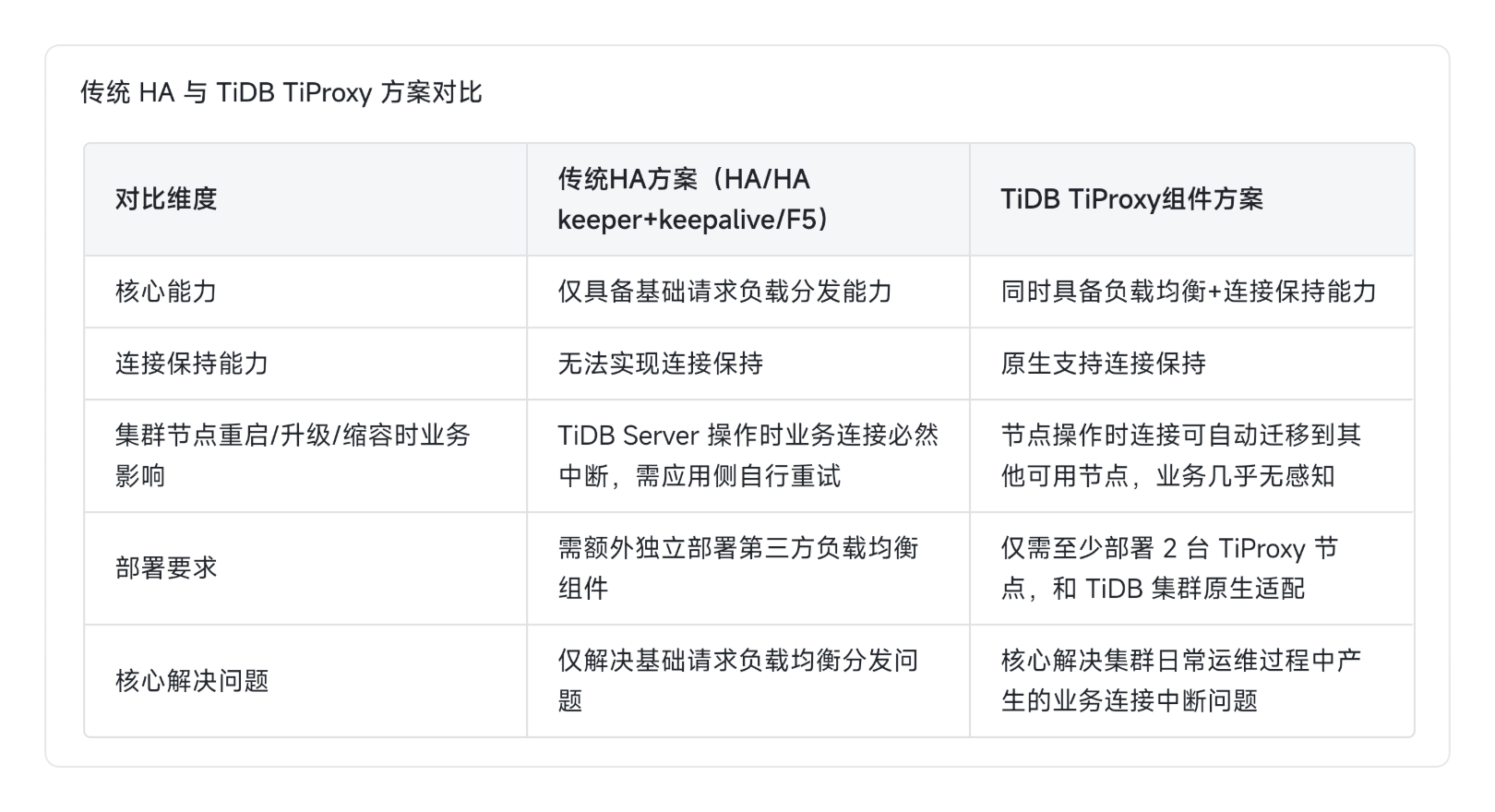
---集群部署tiproxy实操---
--TiProxy 简介
TiProxy 是 TiDB 官方提供的负载均衡组件,主要用于:
将客户端 SQL 请求均匀分发到多个 TiDB 实例。
支持会话亲和性(保持同一连接始终路由到同一 TiDB 实例,可选)。
支持健康检查,自动剔除故障节点。
支持动态配置,无需重启。
 TiUP 安装 TiProxy 组件

# 安装 tiproxy 组件
tiup install tiproxy

# 验证安装
tiup list tiproxy

--部署 TiProxy
TiProxy 可以部署在任意节点(建议与 TiDB 或中控机同机)。我们将它部署在 192.168.151.101(中控机),监听端口 6000。
编写 TiProxy 拓扑文件
创建 tiproxy-topology.yaml:
tiproxy_servers:
  - host: 192.168.151.101
    ssh_port: 22
    port: 6000
    deploy_dir: /tidb/tidb-deploy-v7/tiproxy-6000
    data_dir: /tidb/tidb-data-v7/tiproxy-6000
    log_dir: /tidb/tidb-deploy-v7/tiproxy-6000/log
    config:
      # 配置后端 TiDB 节点地址
      proxy.backend-addrs: "192.168.151.101:4000,192.168.151.103:4000,192.168.151.104:4000,192.168.151.104:4001"
      # 健康检查间隔(秒)
      proxy.health-check-interval: 10
      # 会话亲和性(可选:session / none)
      proxy.session-affinity: "none"
说明:
backend-addrs填写所有 TiDB 节点的地址和端口,用逗号分隔。后续新扩容的节点10.2.106.194:4001已包含在内。
--部署 TiProxy
[tidb@localhost ~]$ tiup cluster scale-out tidb-test ./tiproxy-topology.yaml --user tidb -p
Input SSH password:
+ Detect CPU Arch Name
- Detecting node 192.168.151.101 Arch info ... Done
+ Detect CPU OS Name
- Detecting node 192.168.151.101 OS info ... Done
Please confirm your topology:
Cluster type: tidb
Cluster kind: standard
Cluster name: tidb-test
Cluster version: v7.1.8-5.2-20250630
Role Host Ports OS/Arch Directories
---- ---- ----- ------- -----------
tiproxy 192.168.151.101 6000/3080 linux/x86_64 /tidb/tidb-deploy-v7/tiproxy-6000
Attention:
1. If the topology is not what you expected, check your yaml file.
2. Please confirm there is no port/directory conflicts in same host.
Do you want to continue? [y/N]: (default=N) y
yy+ [ Serial ] - SSHKeySet: privateKey=/home/tidb/.tiup/storage/cluster/clusters/tidb-test/ssh/id_rsa, publicKey=/home/tidb/.tiup/storage/cluster/clusters/tidb-test/ssh/id_rsa.pub
+ [Parallel] - UserSSH: user=tidb, host=192.168.151.103
+ [Parallel] - UserSSH: user=tidb, host=192.168.151.104
+ [Parallel] - UserSSH: user=tidb, host=192.168.151.103
+ [Parallel] - UserSSH: user=tidb, host=192.168.151.101
+ [Parallel] - UserSSH: user=tidb, host=192.168.151.103
+ [Parallel] - UserSSH: user=tidb, host=192.168.151.104
+ [Parallel] - UserSSH: user=tidb, host=192.168.151.101
+ [Parallel] - UserSSH: user=tidb, host=192.168.151.101
+ [Parallel] - UserSSH: user=tidb, host=192.168.151.101
+ [Parallel] - UserSSH: user=tidb, host=192.168.151.101
+ [Parallel] - UserSSH: user=tidb, host=192.168.151.101
+ [Parallel] - UserSSH: user=tidb, host=192.168.151.104
+ Download TiDB components
- Download tiproxy: (linux/amd64) ... Done
+ Initialize target host environments
+ Deploy TiDB instance
- Deploy instance tiproxy -> 192.168.151.101:6000 ... Done
+ Copy certificate to remote host
- Copy session certificate tidb -> 192.168.151.101:4000 ... Done
- Copy session certificate tidb -> 192.168.151.103:4000 ... Done
- Copy session certificate tidb -> 192.168.151.104:4000 ... Done
+ Generate scale-out config
- Generate scale-out config tiproxy -> 192.168.151.101:6000 ... Done
+ Init monitor config
Enabling component tiproxy
Enabling instance 192.168.151.101:6000
Enable instance 192.168.151.101:6000 success
Enabling component node_exporter
Enabling instance 192.168.151.101
Enable 192.168.151.101 success
Enabling component blackbox_exporter
Enabling instance 192.168.151.101
Enable 192.168.151.101 success
+ [ Serial ] - Save meta
+ [ Serial ] - Start new instances
Starting component tiproxy
Starting instance tiproxy
Starting instance 192.168.151.101:6000
Start instance 192.168.151.101:6000 success
Starting component node_exporter
Starting instance 192.168.151.101
Start 192.168.151.101 success
Starting component blackbox_exporter
Starting instance 192.168.151.101
Start 192.168.151.101 success
Copying configuration files tikv to 192.168.151.101:20160...
+ Refresh components conifgs..- Generate config tikv -> 192.168.151.103:20160 ... â
+ Refresh components conifgs..- Generate config tiproxy -> 192.168.151.101:6000 ... Done
+ Refresh components conifgs..- Generate config tiproxy -> 192.168.151.101:6000 ... Done
- Generate config tikv -> 192.168.151.101:20160 ... Done..- Generate config tidb -> 192.168.151.101:4000 ... â ¼
+ Refresh components conifgs..- Generate config pd -> 192.168.151.103:2379 ... Done
+ Refresh components conifgs
+ Refresh components conifgs
- Generate config pd -> 192.168.151.101:2379 ... Done
- Generate config pd -> 192.168.151.103:2379 ... Done
- Generate config pd -> 192.168.151.104:2379 ... Done
- Generate config tiproxy -> 192.168.151.101:6000 ... Done
- Generate config tikv -> 192.168.151.101:20160 ... Done
- Generate config tikv -> 192.168.151.103:20160 ... Done
- Generate config tikv -> 192.168.151.104:20160 ... Done
- Generate config tidb -> 192.168.151.101:4000 ... Done
- Generate config tidb -> 192.168.151.103:4000 ... Done
- Generate config tidb -> 192.168.151.104:4000 ... Done
- Generate config prometheus -> 192.168.151.101:9090 ... Done
- Generate config grafana -> 192.168.151.101:3000 ... Done
- Generate config alertmanager -> 192.168.151.101:9093 ... Done
+ Reload prometheus and grafana
- Reload prometheus -> 192.168.151.101:9090 ... Done
- Reload grafana -> 192.168.151.101:3000 ... Done
+ [ Serial ] - UpdateTopology: cluster=tidb-test
Scaled cluster `tidb-test` out successfully
--启动 TiProxy
[tidb@localhost ~]$ tiup cluster start tidb-test -R tiproxy
Starting cluster tidb-test...
+ [ Serial ] - SSHKeySet: privateKey=/home/tidb/.tiup/storage/cluster/clusters/tidb-test/ssh/id_rsa, publicKey=/home/tidb/.tiup/storage/cluster/clusters/tidb-test/ssh/id_rsa.pub
+ [Parallel] - UserSSH: user=tidb, host=192.168.151.101
+ [Parallel] - UserSSH: user=tidb, host=192.168.151.101
+ [Parallel] - UserSSH: user=tidb, host=192.168.151.104
+ [Parallel] - UserSSH: user=tidb, host=192.168.151.101
+ [Parallel] - UserSSH: user=tidb, host=192.168.151.103
+ [Parallel] - UserSSH: user=tidb, host=192.168.151.104
+ [Parallel] - UserSSH: user=tidb, host=192.168.151.101
+ [Parallel] - UserSSH: user=tidb, host=192.168.151.101
+ [Parallel] - UserSSH: user=tidb, host=192.168.151.101
+ [Parallel] - UserSSH: user=tidb, host=192.168.151.103
+ [Parallel] - UserSSH: user=tidb, host=192.168.151.104
+ [Parallel] - UserSSH: user=tidb, host=192.168.151.101
+ [Parallel] - UserSSH: user=tidb, host=192.168.151.103
+ [ Serial ] - StartCluster
Starting component tiproxy
	Starting instance tiproxy
	Starting instance 192.168.151.101:6000
	Start instance 192.168.151.101:6000 success
Starting component node_exporter
	Starting instance 192.168.151.101
	Start 192.168.151.101 success
Starting component blackbox_exporter
	Starting instance 192.168.151.101
	Start 192.168.151.101 success
+ [ Serial ] - UpdateTopology: cluster=tid
--验证 TiProxy 状态
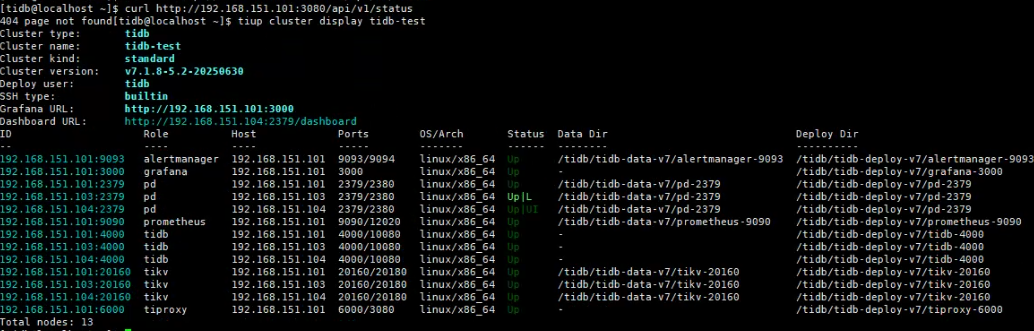
[tidb@localhost ~]$ tiup cluster display tidb-test | grep tiproxy
192.168.151.101:6000   tiproxy       192.168.151.101  6000/3080    linux/x86_64  Up      -                                     /tidb/tidb-deploy-v7/tiproxy-6000
--配置负载均衡与连接测试
通过 TiProxy 连接 TiDB
使用 MySQL 客户端连接 TiProxy(端口 6000):
mysql -h 192.168.151.101 -P 6000 -u root -p

查看 TiProxy 状态
查看 Ti‑Proxy 日志排查异常
部署目录:/tidb/tidb-deploy-v7/tiproxy-6000
#查看运行日志
tail -f /tidb/tidb-deploy-v7/tiproxy-6000/log/tiproxy.log
重点检查日志有没有 PD 连接报错、无法获取 TiDB 节点等报错。

---集群扩容实操---
--本次扩容目标
新增 1 台 TiDB Server 计算节点,分担业务连接压力与 SQL 计算负载。
- 新增节点 IP:192.168.151.104
- 服务端口:4001
- 状态端口:18081
- 部署目录:
/tidb/tidb-deploy-v7/tidb-4001
--编写扩容拓扑文件
创建扩容配置文件 scale-out-tidb.yaml:
tidb_servers:
- host: 192.168.151.104
  ssh_port: 22
  port: 4001
  status_port: 18081
  deploy_dir: /tidb/tidb-deploy-v7/tidb-4001
  log_dir: /tidb/tidb-deploy-v7/tidb-4001/log
关键参数说明:
port:TiDB 业务服务端口,同机多实例部署时需避免端口冲突status_port:状态指标端口,供 Prometheus 采集监控数据deploy_dir/log_dir:需与现有集群目录规范保持一致,便于统一运维
--在部署机执行 TiUP 扩容指令:
tiup cluster scale-out tidb-test ./scale-out-tidb.yaml
[tidb@localhost ~]$ tiup cluster scale-out tidb-test ./scale-out-tidb.yaml -p Input SSH password:
Detect CPU Arch Name
- Detecting node 192.168.151.104 Arch info ... Done
Detect CPU OS Name
- Detecting node 192.168.151.104 OS info ... Done Please confirm your topology: Cluster type: tidb Cluster kind: standard Cluster name: tidb-test Cluster version: v7.1.8-5.2-20250630 Role Host Ports OS/Arch Directories
tidb 192.168.151.104 4001/18081 linux/x86_64 /tidb/tidb-deploy-v7/tidb-4001 Attention: 1. If the topology is not what you expected, check your yaml file. 2. Please confirm there is no port/directory conflicts in same host. Do you want to continue? [y/N]: (default=N) y
[ Serial ] - SSHKeySet: privateKey=/home/tidb/.tiup/storage/cluster/clusters/tidb-test/ssh/id_rsa, publicKey=/home/tidb/.tiup/storage/cluster/clusters/tidb-test/ssh/id_rsa.pub
[Parallel] - UserSSH: user=tidb, host=192.168.151.101
[Parallel] - UserSSH: user=tidb, host=192.168.151.103
[Parallel] - UserSSH: user=tidb, host=192.168.151.101
[Parallel] - UserSSH: user=tidb, host=192.168.151.103
[Parallel] - UserSSH: user=tidb, host=192.168.151.104
[Parallel] - UserSSH: user=tidb, host=192.168.151.101
[Parallel] - UserSSH: user=tidb, host=192.168.151.104
[Parallel] - UserSSH: user=tidb, host=192.168.151.101
[Parallel] - UserSSH: user=tidb, host=192.168.151.104
[Parallel] - UserSSH: user=tidb, host=192.168.151.101
[Parallel] - UserSSH: user=tidb, host=192.168.151.101
[Parallel] - UserSSH: user=tidb, host=192.168.151.103
[Parallel] - UserSSH: user=tidb, host=192.168.151.101
Download TiDB components
- Download tidb:v7.1.8-5.2-20250630 (linux/amd64) ... Done
Initialize target host environments
Deploy TiDB instance
- Deploy instance tidb -> 192.168.151.104:4001 ... Done
Copy certificate to remote host
- Copy session certificate tidb -> 192.168.151.104:4001 ... Done
Generate scale-out config
- Generate scale-out config tidb -> 192.168.151.104:4001 ... Done
Init monitor config Enabling component tidb Enabling instance 192.168.151.104:4001 Enable instance 192.168.151.104:4001 success Enabling component node_exporter Enabling instance 192.168.151.104 Enable 192.168.151.104 success Enabling component blackbox_exporter Enabling instance 192.168.151.104 Enable 192.168.151.104 success
[ Serial ] - Save meta
[ Serial ] - Start new instances Starting component tidb Starting instance tidb Starting instance 192.168.151.104:4001 Start instance 192.168.151.104:4001 success Starting component node_exporter Starting instance 192.168.151.104 Start 192.168.151.104 success Starting component blackbox_exporter Starting instance 192.168.151.104 Start 192.168.151.104 success
Refresh components conifgs
- Generate config pd -> 192.168.151.101:2379 ... ⠙ InitConfig: cluster=tidb-test, user=tidb, host=192.168.151.101, path=/home/tidb/.tiup/storage/cluster/clusters/tidb-test/config-cache/p...
Refresh components conifgs
- Generate config pd -> 192.168.151.101:2379 ... ⠴ InitConfig: cluster=tidb-test, user=tidb, host=192.168.151.101, path=/home/tidb/.tiup/storage/cluster/clusters/tidb-test/config-cache/p...
Refresh components conifgs
- Generate config pd -> 192.168.151.101:2379 ... ⠸ InitConfig: cluster=tidb-test, user=tidb, host=192.168.151.101, path=/home/tidb/.tiup/storage/cluster/clusters/tidb-test/config-cache/p...
Refresh components conifgs
- Generate config pd -> 192.168.151.101:2379 ... ⠼ InitConfig: cluster=tidb-test, user=tidb, host=192.168.151.101, path=/home/tidb/.tiup/storage/cluster/clusters/tidb-test/config-cache/p...
Refresh components conifgs
- Generate config pd -> 192.168.151.101:2379 ... ⠇ InitConfig: cluster=tidb-test, user=tidb, host=192.168.151.101, path=/home/tidb/.tiup/storage/cluster/clusters/tidb-test/config-cache/p...
Refresh components conifgs
- Generate config pd -> 192.168.151.101:2379 ... Done
Refresh components conifgs
- Generate config pd -> 192.168.151.101:2379 ... Done
Refresh components conifgs
- Generate config pd -> 192.168.151.101:2379 ... Done
Refresh components conifgs
- Generate config pd -> 192.168.151.101:2379 ... Done
Refresh components conifgs
- Generate config pd -> 192.168.151.101:2379 ... Done
- Generate config pd -> 192.168.151.103:2379 ... Done
- Generate config pd -> 192.168.151.104:2379 ... Done
- Generate config tiproxy -> 192.168.151.101:6000 ... Done
- Generate config tikv -> 192.168.151.101:20160 ... Done
- Generate config tikv -> 192.168.151.103:20160 ... Done
- Generate config tikv -> 192.168.151.104:20160 ... Done
- Generate config tidb -> 192.168.151.101:4000 ... Done
- Generate config tidb -> 192.168.151.103:4000 ... Done
- Generate config tidb -> 192.168.151.104:4000 ... Done
- Generate config tidb -> 192.168.151.104:4001 ... Done
- Generate config prometheus -> 192.168.151.101:9090 ... Done
- Generate config grafana -> 192.168.151.101:3000 ... Done
- Generate config alertmanager -> 192.168.151.101:9093 ... Done
Reload prometheus and grafana
- Reload prometheus -> 192.168.151.101:9090 ... Done
- Reload grafana -> 192.168.151.101:3000 ... Done
[ Serial ] - UpdateTopology: cluster=tidb-test Scaled cluster
tidb-testout successfully
扩容过程原理
TiDB Server 是无状态计算节点,扩容全程不中断业务:
- TiUP 自动完成环境校验、二进制分发、配置文件生成
- 启动新增 TiDB 实例,自动向 PD 注册节点信息
- 原有 TiDB 节点上的业务连接不受任何影响,SQL 执行不中断
- 扩容完成后,可通过负载均衡将新增流量分发到新节点
--验证扩容结果
扩容完成后执行命令确认状态:
tiup cluster display tidb-test
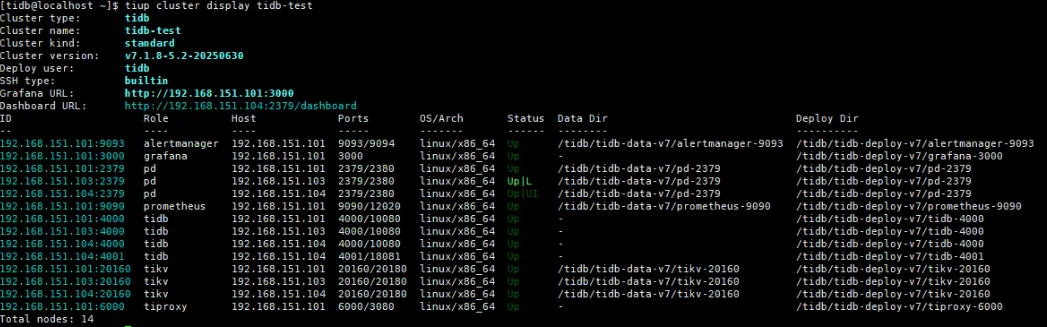
验证要点:
- 新增 TiDB 节点出现在拓扑列表中,状态为
Up - PD、TiKV、监控组件状态全部正常
- 新增节点版本与集群版本一致
--业务压测验证(TPC-C)
使用 go-tpc 工具模拟在线交易业务,分扩容前基线、扩容中连续性、扩容后性能三个阶段验证。
测试数据初始化
./go-tpc tpcc \
    --host=192.168.151.101 \
    --port=6000 \
    --user=root \
    --password='M8-CFR2@1w7*6WgV^9' \
    --db=tpcc \
    --warehouses=10 \
    prepare
- 测试仓库数:5 个,数据量约 5GB
- 压测并发:16 线程
- 单轮压测时长:60 秒
--扩容前基线压测
执行命令
./go-tpc tpcc \
    --host=192.168.151.101 \
    --port=6000 \
    --user=root \
    --password='***' \
    --db=tpcc \
    --warehouses=5 \
    --threads=16 \
    --time=300s \
    --interval=10s \
    run
核心指标汇总
[Summary] DELIVERY - Takes(s): 299.6, Count: 4348, TPM: 870.7, Sum(ms): 809266.4, Avg(ms): 186.1, 50th(ms): 167.8, 90th(ms): 285.2, 95th(ms): 318.8, 99th(ms): 436.2, 99.9th(ms): 637.5, Max(ms): 738.2 [Summary] NEW_ORDER - Takes(s): 299.9, Count: 48860, TPM: 9776.8, Sum(ms): 2762253.0, Avg(ms): 56.5, 50th(ms): 54.5, 90th(ms): 79.7, 95th(ms): 92.3, 99th(ms): 125.8, 99.9th(ms): 167.8, Max(ms): 285.2 [Summary] NEW_ORDER_ERR - Takes(s): 299.9, Count: 9, TPM: 1.8, Sum(ms): 234.3, Avg(ms): 25.9, 50th(ms): 24.1, 90th(ms): 52.4, 95th(ms): 62.9, 99th(ms): 62.9, 99.9th(ms): 62.9, Max(ms): 62.9 [Summary] ORDER_STATUS - Takes(s): 299.8, Count: 4273, TPM: 855.1, Sum(ms): 95934.0, Avg(ms): 22.5, 50th(ms): 19.9, 90th(ms): 37.7, 95th(ms): 44.0, 99th(ms): 54.5, 99.9th(ms): 75.5, Max(ms): 109.1 [Summary] PAYMENT - Takes(s): 299.9, Count: 46594, TPM: 9322.6, Sum(ms): 2029786.8, Avg(ms): 43.6, 50th(ms): 35.7, 90th(ms): 75.5, 95th(ms): 88.1, 99th(ms): 121.6, 99.9th(ms): 176.2, Max(ms): 260.0 [Summary] PAYMENT_ERR - Takes(s): 299.9, Count: 5, TPM: 1.0, Sum(ms): 109.7, Avg(ms): 22.0, 50th(ms): 21.0, 90th(ms): 35.7, 95th(ms): 35.7, 99th(ms): 35.7, 99.9th(ms): 35.7, Max(ms): 35.7 [Summary] STOCK_LEVEL - Takes(s): 299.8, Count: 4299, TPM: 860.4, Sum(ms): 206234.0, Avg(ms): 48.0, 50th(ms): 44.0, 90th(ms): 71.3, 95th(ms): 83.9, 99th(ms): 121.6, 99.9th(ms): 159.4, Max(ms): 201.3 [Summary] STOCK_LEVEL_ERR - Takes(s): 299.8, Count: 1, TPM: 0.2, Sum(ms): 2.6, Avg(ms): 2.9, 50th(ms): 3.1, 90th(ms): 3.1, 95th(ms): 3.1, 99th(ms): 3.1, 99.9th(ms): 3.1, Max(ms): 3.1 tpmC: 9776.7, tpmTotal: 21685.5, efficiency: 7602.4%
整体核心指标:
- tpmC:9776.7
- tpmTotal:21685.5
- 错误率低,业务运行稳定
--扩容中业务连续性验证
操作方法:
- 启动持续 TPC-C 压测
- 并行执行
tiup cluster scale-out扩容操作 - 全程观察压测实时输出与错误数
[Summary] DELIVERY - Takes(s): 150.6, Count: 1940, TPM: 772.8, Sum(ms): 379189.0, Avg(ms): 195.5, 50th(ms): 167.8, 90th(ms): 268.4, 95th(ms): 318.8, 99th(ms): 453.0, 99.9th(ms): 906.0, Max(ms): 9126.8 [Summary] DELIVERY_ERR - Takes(s): 150.6, Count: 2, TPM: 0.8, Sum(ms): 179.8, Avg(ms): 90.7, 50th(ms): 58.7, 90th(ms): 125.8, 95th(ms): 125.8, 99th(ms): 125.8, 99.9th(ms): 125.8, Max(ms): 125.8 [Summary] NEW_ORDER - Takes(s): 150.8, Count: 22301, TPM: 8875.4, Sum(ms): 1413041.8, Avg(ms): 63.4, 50th(ms): 54.5, 90th(ms): 83.9, 95th(ms): 96.5, 99th(ms): 134.2, 99.9th(ms): 243.3, Max(ms): 8321.5 [Summary] NEW_ORDER_ERR - Takes(s): 150.8, Count: 9, TPM: 3.6, Sum(ms): 246.1, Avg(ms): 27.3, 50th(ms): 30.4, 90th(ms): 44.0, 95th(ms): 71.3, 99th(ms): 71.3, 99.9th(ms): 71.3, Max(ms): 71.3 [Summary] ORDER_STATUS - Takes(s): 150.8, Count: 1923, TPM: 765.3, Sum(ms): 39005.3, Avg(ms): 20.3, 50th(ms): 18.9, 90th(ms): 30.4, 95th(ms): 35.7, 99th(ms): 48.2, 99.9th(ms): 60.8, Max(ms): 234.9 [Summary] PAYMENT - Takes(s): 150.8, Count: 21538, TPM: 8570.5, Sum(ms): 1069054.0, Avg(ms): 49.6, 50th(ms): 37.7, 90th(ms): 83.9, 95th(ms): 100.7, 99th(ms): 142.6, 99.9th(ms): 218.1, Max(ms): 8053.1 [Summary] PAYMENT_ERR - Takes(s): 150.8, Count: 6, TPM: 2.4, Sum(ms): 85.9, Avg(ms): 14.3, 50th(ms): 8.9, 90th(ms): 10.5, 95th(ms): 41.9, 99th(ms): 41.9, 99.9th(ms): 41.9, Max(ms): 41.9 [Summary] STOCK_LEVEL - Takes(s): 150.8, Count: 1918, TPM: 763.4, Sum(ms): 70850.9, Avg(ms): 36.9, 50th(ms): 35.7, 90th(ms): 52.4, 95th(ms): 60.8, 99th(ms): 79.7, 99.9th(ms): 100.7, Max(ms): 201.3 [Summary] STOCK_LEVEL_ERR - Takes(s): 150.8, Count: 1, TPM: 0.4, Sum(ms): 32.9, Avg(ms): 33.0, 50th(ms): 33.6, 90th(ms): 33.6, 95th(ms): 33.6, 99th(ms): 33.6, 99.9th(ms): 33.6, Max(ms): 33.6 tpmC: 8875.3, tpmTotal: 19747.3, efficiency: 6901.5%
验证结论:
1、核心吞吐量变化
扩容之前稳定 tpm‑C≈9776.7;扩容过程中下降至 8875.3,吞吐量下滑约 9.2 % 吞吐量小幅回落属于正常现象:scale‑out 部署新组件、Ti‑Proxy 后端节点列表刷新、后端健康检测刷新,短暂引发连接路由抖动。
2、延迟特征(最关键观测点)
- 出现极端峰值延迟
- DELIVERY 最大耗时 9126.8ms
- NEW_ORDER 最大耗时 8321.5ms
- PAYMENT 最大耗时 8053.1ms
原因拆解: 扩容刷新 TiProxy 的后端地址列表,短时发生连接重置、会话重路由;部分旧连接断开、事务被阻塞等待悲观锁,产生数秒级别的极端长尾延迟。
但是 99.9% 分位延迟数值依旧正常:delivery‑906ms、new_order‑243.3ms 仅有极少数事务撞上路由抖动,绝大多数事务不受扩容操作干扰。
- 常规平均延迟十分平稳
- NEW‑ORDER 平均 63.4ms
- DELIVERY 平均 195.5ms
- PAYMENT 平均 49.6ms 日常运行时延指标没有恶化。
3、事务失败指标
- DELIVERY_ERR=2、NEW_ORDER_ERR=9、PAYMENT_ERR=6、STOCK_LEVEL_ERR=1 整体事务失败率极低;报错来源为扩容瞬间连接断开触发悲观锁超时,属于扩容阶段正常瞬时现象。
4、本次扩容连续性综合判定
- 业务没有中断,满足平滑扩容 压测全程没有中断,只是短暂出现少量慢事务、吞吐量小幅下跌;
- 99.9% 延迟处在可控区间,极端高延迟仅为个别事务峰值;
- 扩容完成之后重新 reload TiProxy 配置,集群即可回归之前 9700+ tpm‑C 的性能水准。
---扩容后性能验证
扩容完成后,通过负载均衡将流量分发到全部 4 台 TiDB 节点,保持相同并发再次压测。
[Summary] DELIVERY - Takes(s): 299.7, Count: 4387, TPM: 878.2, Sum(ms): 748827.4, Avg(ms): 170.8, 50th(ms): 159.4, 90th(ms): 251.7, 95th(ms): 285.2, 99th(ms): 385.9, 99.9th(ms): 570.4, Max(ms): 704.6 [Summary] DELIVERY_ERR - Takes(s): 299.7, Count: 3, TPM: 0.6, Sum(ms): 223.8, Avg(ms): 73.7, 50th(ms): 79.7, 90th(ms): 100.7, 95th(ms): 100.7, 99th(ms): 100.7, 99.9th(ms): 100.7, Max(ms): 100.7 [Summary] NEW_ORDER - Takes(s): 299.8, Count: 48949, TPM: 9795.2, Sum(ms): 2772244.2, Avg(ms): 56.6, 50th(ms): 54.5, 90th(ms): 75.5, 95th(ms): 92.3, 99th(ms): 125.8, 99.9th(ms): 192.9, Max(ms): 419.4 [Summary] NEW_ORDER_ERR - Takes(s): 299.8, Count: 7, TPM: 1.4, Sum(ms): 260.1, Avg(ms): 37.1, 50th(ms): 33.6, 90th(ms): 50.3, 95th(ms): 65.0, 99th(ms): 65.0, 99.9th(ms): 65.0, Max(ms): 65.0 [Summary] ORDER_STATUS - Takes(s): 299.9, Count: 4368, TPM: 874.0, Sum(ms): 86334.1, Avg(ms): 19.8, 50th(ms): 19.9, 90th(ms): 27.3, 95th(ms): 31.5, 99th(ms): 44.0, 99.9th(ms): 56.6, Max(ms): 151.0 [Summary] PAYMENT - Takes(s): 299.9, Count: 47074, TPM: 9419.0, Sum(ms): 2123004.1, Avg(ms): 45.1, 50th(ms): 35.7, 90th(ms): 79.7, 95th(ms): 92.3, 99th(ms): 125.8, 99.9th(ms): 184.5, Max(ms): 385.9 [Summary] PAYMENT_ERR - Takes(s): 299.9, Count: 7, TPM: 1.4, Sum(ms): 89.2, Avg(ms): 13.0, 50th(ms): 7.9, 90th(ms): 22.0, 95th(ms): 46.1, 99th(ms): 46.1, 99.9th(ms): 46.1, Max(ms): 46.1 [Summary] STOCK_LEVEL - Takes(s): 299.8, Count: 4258, TPM: 852.3, Sum(ms): 172959.1, Avg(ms): 40.6, 50th(ms): 37.7, 90th(ms): 58.7, 95th(ms): 67.1, 99th(ms): 92.3, 99.9th(ms): 134.2, Max(ms): 192.9 tpmC: 9795.2, tpmTotal: 21818.7, efficiency: 7616.8%
指标综合评估
1、吞吐量对比
- 扩容前稳定 tpm‑C:9776.7
- 扩容抖动阶段:8875.3
- 扩容完成稳定之后:9795.2
吞吐量已经完全恢复至扩容之前水准,甚至小幅高出,新后端 TiDB 实例已经成功接入 Ti‑Proxy、参与流量负载分担。
2、延迟指标全面回归健康状态
- DELIVERY(瓶颈事务) 平均延迟 170.8ms,99.9% 延迟 570.4ms,峰值 704.6ms; 扩容期间出现的 9s 级别极端长尾延迟彻底消失。
- NEW_ORDER 核心下单事务 平均 56.6ms、99.9%‑192.9ms,最大耗时 419.4ms,时延十分平稳。
- PAYMENT、ORDER_STATUS、STOCK‑LEVEL 各项分位延迟全部回到扩容之前的正常区间,查询事务响应迅速。
3、事务报错
NEW_ORDER_ERR=7、DELIVERY_ERR=3、PAYMENT_ERR=7、STOCK_LEVEL 无报错。 整体失败率低,少量报错均为常规悲观锁等待超时,扩容带来的瞬时连接抖动已经彻底结束。
4、本次 TiProxy 在线扩容‑业务连续性结论
- 扩容进行时仅短暂吞吐下跌、零星超长时延,TP‑CC 压测全程没有中断,满足平滑在线扩容;
- 配置重载完毕之后集群性能完全复原,新增后端 TiDB 节点正常承接业务流量;
- Ti‑Proxy 后端健康检查、负载分发功能运行正常。
本次《我的PCTP学习之路(上)》涵盖 TiDB 集群环境准备、离线 TiUP 部署、拓扑配置、集群搭建、可视化运维、参数调优、权限管理、高可用架构、TiProxy 部署与集群扩容等大量理论与实操内容。受平台字数篇幅限制,本篇仅整理核心知识点、关键流程与运维规范,部分超长内容和完整实操细节,将统一收录于《我的PCTP学习之路(下)》中详细展开。