DM工具在同步过程中遇到panic error: table checkpoint position问题

【 TiDB 使用环境】生产环境
【 TiDB 版本】 V7.5.1
tiup dmctl --version
tiup is checking updates for component dmctl …
A new version of dmctl is available:
The latest version: v8.5.1
Local installed version: v8.0.0
Update current component: tiup update dmctl
Update all components: tiup update --all

【复现路径】
【遇到的问题】
DM同步数据,上游mysql5.7.25 , 未开启GTID,传统binlog pos方式同步 。在同步时出现如下错误:
“errors”: [
{
“ErrCode”: 36001,
“ErrClass”: “sync-unit”,
“ErrScope”: “internal”,
“ErrLevel”: “high”,
“Message”: “panic error: table checkpoint position: (mysql57-bin.002108, 20212127), gtid-set: 00000000-0000-0000-0000-000000000000:0 less than global checkpoint location(position: (mysql57-bin.002108, 31354389), gtid-set: 00000000-0000-0000-0000-000000000000:0) (flushed location(position: (mysql57-bin.002108, 31354389), gtid-set: 00000000-0000-0000-0000-000000000000:0))”,
“RawCause”: “”,
“Workaround”: “”
}
]
做的处置:
在论坛查询该错误先关内容,参考 DM报错 "ErrCode": 36001如何解决? - #3,来自 Hacker_7b2KWuuo 文章。进行了binlog文件核对,发现的确binlog文件超过了4G。 但是 现在的问题是 这个问题该如何解决,如何让同步进行下去。
【资源配置】
【复制黏贴 ERROR 报错的日志】
dm-worker.log (2.4 MB)

【其他附件:截图/日志/监控】

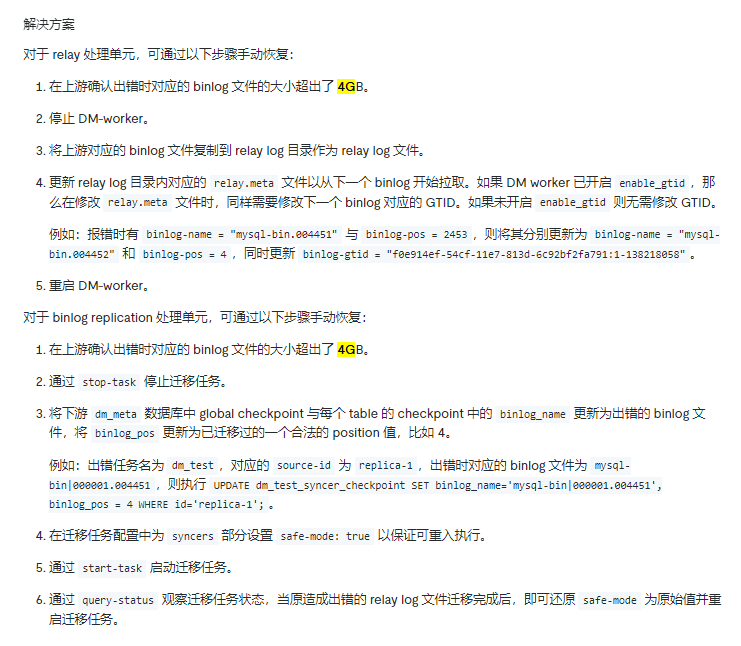
1.停止 DM-worker
这里要注意,不是stop-task,而是停止对应的dm-worker进程

2.将上游对应的 binlog 文件复制到 relay log 目录作为 relay log 文件。
3.修改relay.meta 文件
更新 relay log 目录内对应的 relay.meta 文件以从下一个 binlog (这个binlog是指relay-log目录中没有的,且在二进制show master logs;能看到的)开始拉取。如果 DM worker 已开启 enable_gtid,那么在修改 relay.meta 文件时,同样需要修改下一个 binlog 对应的 GTID。如果未开启 enable_gtid 则无需修改 GTID。

例如:报错时有 binlog-name = “mysql-bin.004451” 与 binlog-pos = 2453,则将其分别更新为 binlog-name = “mysql-bin.004452” 和 binlog-pos = 4,同时更新 binlog-gtid = “f0e914ef-54cf-11e7-813d-6c92bf2fa791:1-138218058”

这是我之前记录的,你试下

2 个赞

同步的这个库或者同步的这个对象大吗?重新起一个同步任务,跳过这个大binlog

先使用 stop-relay -s 把 relay-log 落盘关闭,然后看下任务能不能做过去。如果能做过去,可以后续再把 relay 开启从最新开始拉取 binlog。

:joy:已读乱回么?

:joy:有点不知所云

是的,往回跳了

已经测试,还是有问题

这个是生产环境,不能跳过文件,否则数据有丢失

不是跳过文件,你仔细看我的步骤,比如你的大文件是mysql-bin.000002,你把这个mysql-bin.000002手动拉取过来,然后dm的拉取你指定mysql-bin.000003,他就会mysql-bin.000003开始拉取,应用会先应用你的mysql-bin.000002,也不会丢数据,一个是拉取,一个是应用,步骤应该已经很详细了

1 个赞

找了半天,没有找到relay log ,好像我没有开启

上一次同样问题,刚经过了3天时间重做了,现在又出现了 。做不起了。

mysql主从也有这个问题。感觉问题的核心在于

就是当binlog文件大于4G的时候,因为发送的位点是一个uint32类型的,这里大于4G会出现截断

position在mysql里面是个uint32存放的,大于4g就溢出了。

这成了个mysql的硬伤,只能从分拆大事务的方向去解决了。到了dba这里,没什么特别好的办法了。

1 个赞

https://docs.pingcap.com/zh/tidb/stable/dm-error-handling#原因 你看下官方文档给的解决方案

2 个赞

relay开启的方法官网上就有,可以开启下

按照这个方案做了 现在还是有错误 ,具体如下
“result”: true,
“msg”: “”,
“sources”: [
{
“result”: true,
“msg”: “”,
“sourceStatus”: {
“source”: “mysql50133_3306”,
“worker”: “dm-192.168.55.25-8264”,
“result”: null,
“relayStatus”: {
“masterBinlog”: “(mysql57-bin.002172, 243054667)”,
“masterBinlogGtid”: “”,
“relaySubDir”: “75f42d7f-d854-11ed-bda4-286ed4897b05.000001”,
“relayBinlog”: “(mysql57-bin.002130, 188808650)”,
“relayBinlogGtid”: “”,
“relayCatchUpMaster”: false,
“stage”: “Running”,
“result”: null
}
},
“subTaskStatus”: [
{
“name”: “jz33062025”,
“stage”: “Paused”,
“unit”: “Sync”,
“result”: {
“isCanceled”: false,
“errors”: [
{
“ErrCode”: 36001,
“ErrClass”: “sync-unit”,
“ErrScope”: “internal”,
“ErrLevel”: “high”,
“Message”: “panic error: table checkpoint position: (mysql57-bin|000001.002108, 20212127), gtid-set: 00000000-0000-0000-0000-000000000000:0 less than global checkpoint location(position: (mysql57-bin|000001.002108, 31354389), gtid-set: 00000000-0000-0000-0000-000000000000:0) (flushed location(position: (mysql57-bin|000001.002108, 31354389), gtid-set: 00000000-0000-0000-0000-000000000000:0))”,
“RawCause”: “”,
“Workaround”: “”
}
],
“detail”: null
},
“unresolvedDDLLockID”: “”,
“sync”: {
“totalEvents”: “37707”,
“totalTps”: “179”,
“recentTps”: “0”,
“masterBinlog”: “(mysql57-bin.002172, 243054667)”,
“masterBinlogGtid”: “”,
“syncerBinlog”: “(mysql57-bin|000001.002108, 31354389)”,
“syncerBinlogGtid”: “00000000-0000-0000-0000-000000000000:0”,
“blockingDDLs”: [
],
“unresolvedGroups”: [
],
“synced”: false,
“binlogType”: “local”,
“secondsBehindMaster”: “412050”,
“blockDDLOwner”: “”,
“conflictMsg”: “”,
“totalRows”: “37707”,
“totalRps”: “179”,
“recentRps”: “0”
},
“validation”: null
}
]
}
]
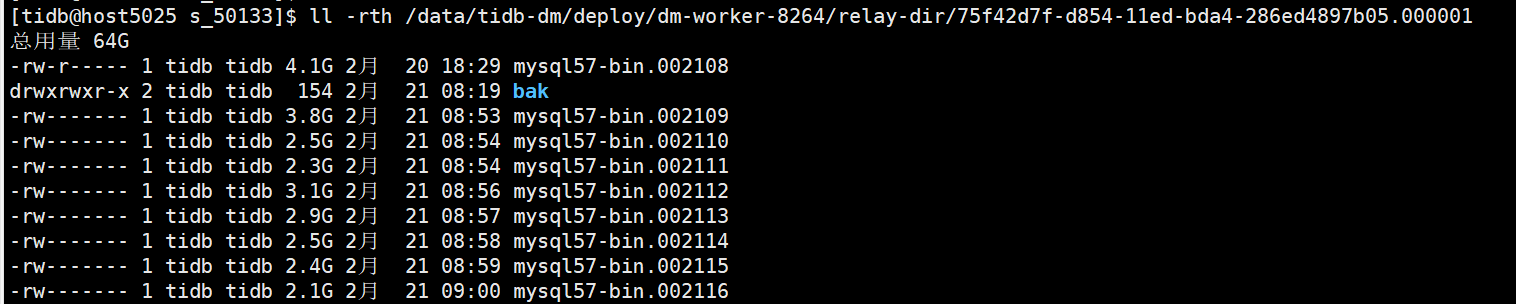
下面是 relay log 目录


下面是更新 数据库 位置信息

有一个疑问的是 我更新的值为 mysql57-bin.002108 ,启动任务后 变为 mysql57-bin|000001.002108

后来理解明白了,先开启了relay log ,然后 关闭了 DM Work ,然后一步步做,还是报错

新的报错是什么,发下看下

{
“result”: true,
“msg”: “”,
“sources”: [
{
“result”: true,
“msg”: “”,
“sourceStatus”: {
“source”: “mysql50133_3306”,
“worker”: “dm-192.168.55.25-8264”,
“result”: null,
“relayStatus”: {
“masterBinlog”: “(mysql57-bin.002172, 351878096)”,
“masterBinlogGtid”: “”,
“relaySubDir”: “75f42d7f-d854-11ed-bda4-286ed4897b05.000001”,
“relayBinlog”: “(mysql57-bin.002172, 351899013)”,
“relayBinlogGtid”: “”,
“relayCatchUpMaster”: false,
“stage”: “Running”,
“result”: null
}
},
“subTaskStatus”: [
{
“name”: “jz33062025”,
“stage”: “Paused”,
“unit”: “Sync”,
“result”: {
“isCanceled”: false,
“errors”: [
{
“ErrCode”: 36001,
“ErrClass”: “sync-unit”,
“ErrScope”: “internal”,
“ErrLevel”: “high”,
“Message”: “panic error: table checkpoint position: (mysql57-bin|000001.002108, 20212127), gtid-set: 00000000-0000-0000-0000-000000000000:0 less than global checkpoint location(position: (mysql57-bin|000001.002108, 31354389), gtid-set: 00000000-0000-0000-0000-000000000000:0) (flushed location(position: (mysql57-bin|000001.002108, 31354389), gtid-set: 00000000-0000-0000-0000-000000000000:0))”,
“RawCause”: “”,
“Workaround”: “”
}
],
“detail”: null
},
“unresolvedDDLLockID”: “”,
“sync”: {
“totalEvents”: “37678”,
“totalTps”: “12558”,
“recentTps”: “1”,
“masterBinlog”: “(mysql57-bin.002172, 351878096)”,
“masterBinlogGtid”: “”,
“syncerBinlog”: “(mysql57-bin|000001.002108, 31354389)”,
“syncerBinlogGtid”: “00000000-0000-0000-0000-000000000000:0”,
“blockingDDLs”: [
],
“unresolvedGroups”: [
],
“synced”: false,
“binlogType”: “local”,
“secondsBehindMaster”: “414006”,
“blockDDLOwner”: “”,
“conflictMsg”: “”,
“totalRows”: “37678”,
“totalRps”: “12558”,
“recentRps”: “1”
},
“validation”: null
}
]
}
]
}

这个是relay log 目录

你往上看,大佬截图里的内容已经回复你了,就是下面的这个操作,大于4G这个报错官网有总结的
1.通过 stop-task 停止迁移任务。
2.更改元信息表
将下游 dm_meta 数据库中 global checkpoint 与每个 table 的 checkpoint 中的 binlog_name 更新为出错的 binlog 文件,将 binlog_pos 更新为已迁移过的一个合法的 position 值,比如 4。

例如:出错任务名为 dm_test,对应的 source-id 为 replica-1,出错时对应的 binlog 文件为 mysql-bin|000001.004451,则执行 UPDATE dm_test_syncer_checkpoint SET binlog_name=‘mysql-bin|000001.004451’, binlog_pos = 4 WHERE id=‘replica-1’;。

3.更改复制模式为安全模式
在迁移任务配置中为 syncers 部分设置 safe-mode: true 以保证可重入执行。

4.通过 start-task 启动迁移任务。
5.恢复复制模式
通过 query-status 观察迁移任务状态,当原造成出错的 relay log 文件迁移完成后,即可还原 safe-mode 为原始值并重启迁移任务。