【TiDB 使用环境】生产环境
【TiDB 版本】5.3.1
【操作系统】
【部署方式】云上部署(什么云)/机器部署(什么机器配置、什么硬盘)
【集群数据量】100T
【集群节点数】20+
【问题复现路径】做过哪些操作出现的问题
【遇到的问题:问题现象及影响】
【资源配置】进入到 TiDB Dashboard -集群信息 (Cluster Info) -主机(Hosts) 截图此页面
【复制黏贴 ERROR 报错的日志】
[2025/09/17 16:23:48.950 +08:00] [INFO] [range_task.go:310] [“canceling range task because of error”] [name=resolve-locks-runner] [startKey=7480000000000431df5f69800000000000000204000000007781737703e8000000c67d5727] [endKey=7480000000000431df5f69800000000000000204000000007826607f03800000005a9a85c8] [error="unexpected resolve err: commit_ts_expired:<start_ts:450046591374983318 attempted_commit_ts:450046591977652390 key:"t\200\000\000\000\000\0041\337_i\200\000\000\000\000\000\000\002\004\000\000\000\000w\260+\263\003\370\000\000\001*\333\255\365" min_commit_ts:450046592187367871 > "]
【其他附件:截图/日志/监控】
gc 的配置都没问题,tidb 和 pd 自己的 gc time 也正常,tikv 的 gc_auto_safepoint 有问题
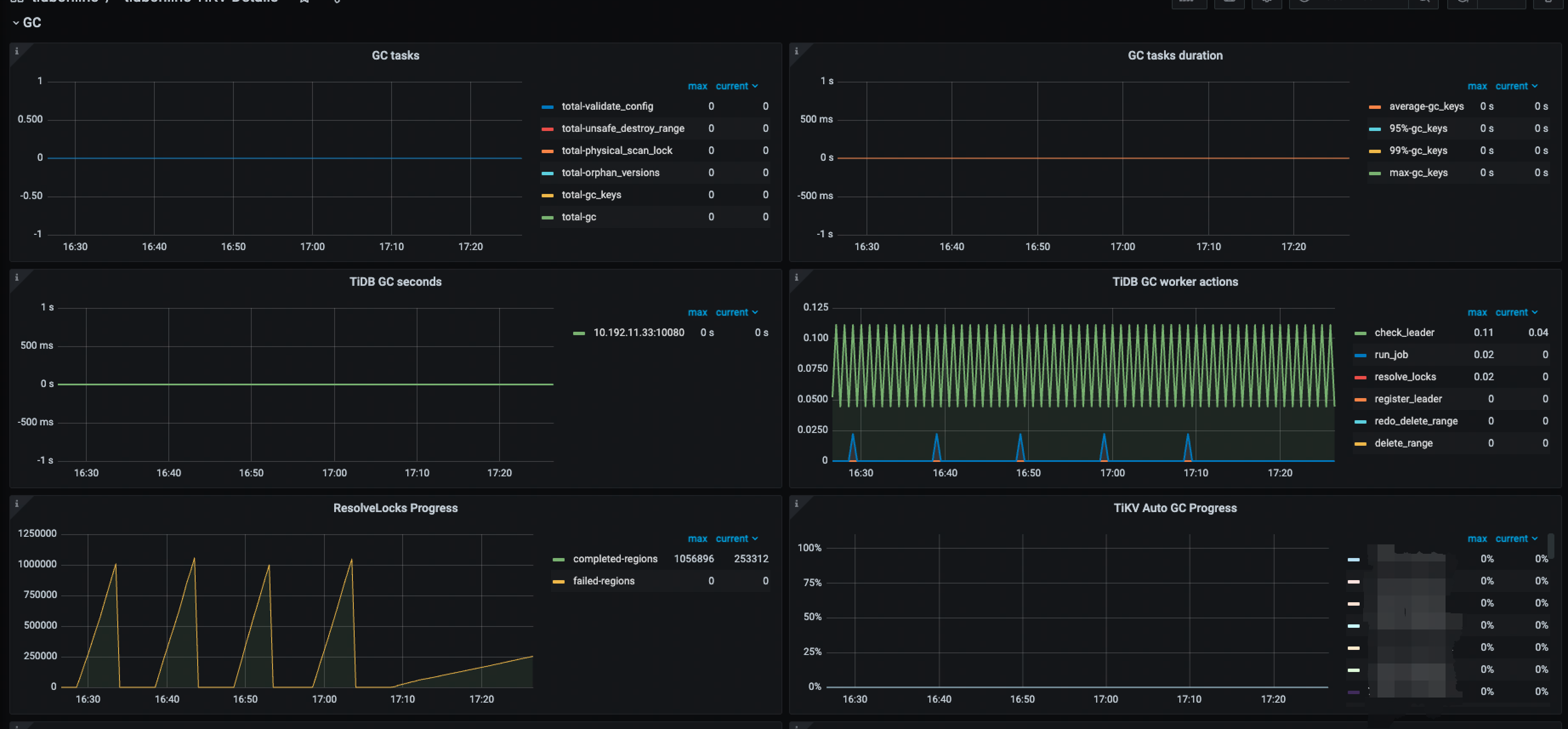

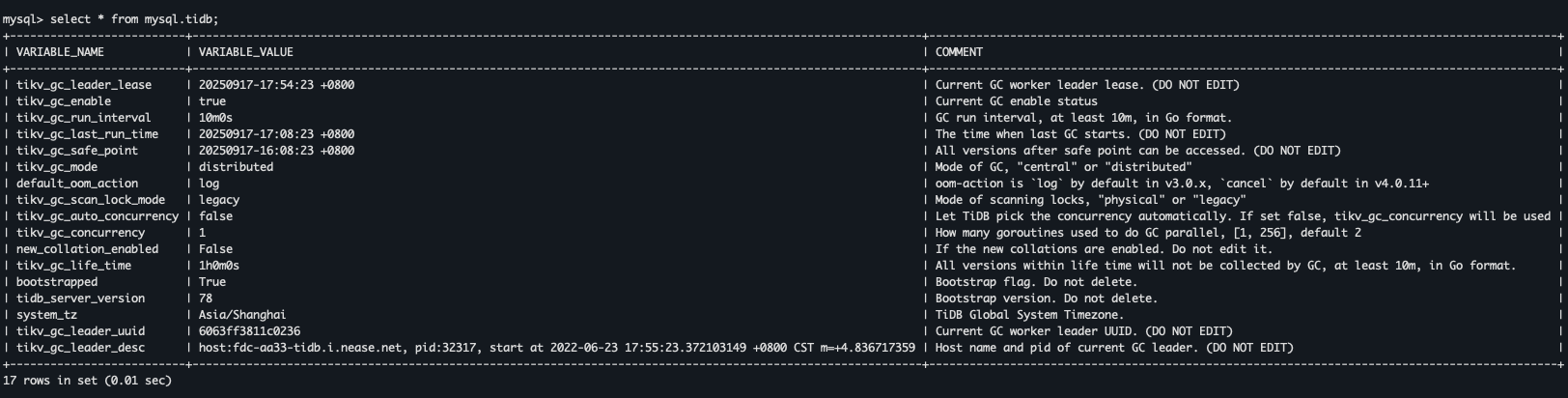
有参考过:博客 - GC异常导致空间不释放,如何通过 tikv-ctl recover-mvcc 修复 | TiDB 社区 进行操作,但是在实际的操作过程中,相关的 key 上并没有发现有 lock ,也没有 mvcc info
tiup ctl:v5.3.1 tikv --data-dir=/ssd1/tidb/tikv/deploy1/data mvcc -k “zt\200\000\000\000\000\0041\337_i\200\000\000\000\000\000\000\002\004\000\000\000\000w\272\301\322\003\230\000\000\000B\325’C” --show-cf=lock,write,default
Starting component ctl: /home/fdc/.tiup/components/ctl/v5.3.1/ctl tikv --data-dir=/ssd1/tidb/tikv/deploy1/data mvcc -k zt\200\000\000\000\000\0041\337_i\200\000\000\000\000\000\000\002\004\000\000\000\000w\272\301\322\003\230\000\000\000B\325’C --show-cf=lock,write,default
[2025/09/16 18:56:42.769 +08:00] [INFO] [mod.rs:118] [“encryption: none of key dictionary and file dictionary are found.”]
[2025/09/16 18:56:42.769 +08:00] [INFO] [mod.rs:479] [“encryption is disabled.”]
[2025/09/16 18:56:42.773 +08:00] [WARN] [config.rs:587] [“compaction guard is disabled due to region info provider not available”]
[2025/09/16 18:56:42.773 +08:00] [WARN] [config.rs:682] [“compaction guard is disabled due to region info provider not available”]
no mvcc infos for zt\200\000\000\000\000\0041\337_i\200\000\000\000\000\000\000\002\004\000\000\000\000w\272\301\322\003\230\000\000\000B\325’C
no mvcc infos
Error: exit status 255
tiup ctl:v5.3.1 tikv --data-dir=/ssd1/tidb/tikv/deploy1/data recover-mvcc --read-only -r 9131865 -p
Starting component ctl: /home/fdc/.tiup/components/ctl/v5.3.1/ctl tikv --data-dir=/ssd1/tidb/tikv/deploy1/data recover-mvcc --read-only -r 9131865 -p ******
[2025/09/16 18:57:34.081 +08:00] [INFO] [mod.rs:118] [“encryption: none of key dictionary and file dictionary are found.”]
[2025/09/16 18:57:34.081 +08:00] [INFO] [mod.rs:479] [“encryption is disabled.”]
[2025/09/16 18:57:34.084 +08:00] [WARN] [config.rs:587] [“compaction guard is disabled due to region info provider not available”]
[2025/09/16 18:57:34.085 +08:00] [WARN] [config.rs:682] [“compaction guard is disabled due to region info provider not available”]
Recover regions: [9131865], pd: [“10.XX.XX.XX:2379”], read_only: true
[2025/09/16 18:57:37.244 +08:00] [INFO] [util.rs:544] [“connecting to PD endpoint”] [endpoints=10.90.230.8:2379]
[2025/09/16 18:57:37.244 +08:00] [INFO] [] [“TCP_USER_TIMEOUT is available. TCP_USER_TIMEOUT will be used thereafter”]
[2025/09/16 18:57:37.247 +08:00] [INFO] [] [“New connected subchannel at 0x7fb7d8004680 for subchannel 0x7fb815411f00”]
[2025/09/16 18:57:37.249 +08:00] [INFO] [util.rs:544] [“connecting to PD endpoint”] [endpoints=http://10.191.128.76:2379]
[2025/09/16 18:57:37.250 +08:00] [INFO] [] [“New connected subchannel at 0x7fb7d8004800 for subchannel 0x7fb8154120c0”]
[2025/09/16 18:57:37.251 +08:00] [INFO] [util.rs:544] [“connecting to PD endpoint”] [endpoints=http://10.90.230.8:2379]
[2025/09/16 18:57:37.254 +08:00] [INFO] [] [“New connected subchannel at 0x7fb7d8004980 for subchannel 0x7fb815411f00”]
[2025/09/16 18:57:37.256 +08:00] [INFO] [util.rs:668] [“connected to PD member”] [endpoints=http://10.90.230.8:2379]
[2025/09/16 18:57:37.256 +08:00] [INFO] [util.rs:536] [“all PD endpoints are consistent”] [endpoints=“["10.90.230.8:2379"]”]
[2025/09/16 18:57:37.305 +08:00] [success!
INFO] [debug.rs:956] [“thread 0: skip write 0 rows”]
[2025/09/16 18:57:37.305 +08:00] [INFO] [debug.rs:959] [“thread 0: total fix default: 0, lock: 0, write: 0”]
[2025/09/16 18:57:37.305 +08:00] [INFO] [debug.rs:968] [“thread 0 has finished working.”]