一个好的问题描述有利于社区小伙伴更快帮你定位到问题,高效解决你的问题
【TiDB 使用环境】生产环境 /测试环境 测试环境
【TiDB 版本】v8.5.4
【部署方式】云上部署(什么云)/机器部署 云上部署/紫光云
【操作系统/CPU 架构/芯片详情】 ubuntu
【机器部署详情】CPU大小/内存大小/磁盘大小
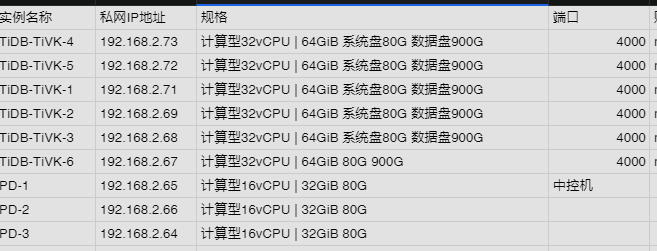
【集群数据量】
【集群节点数】
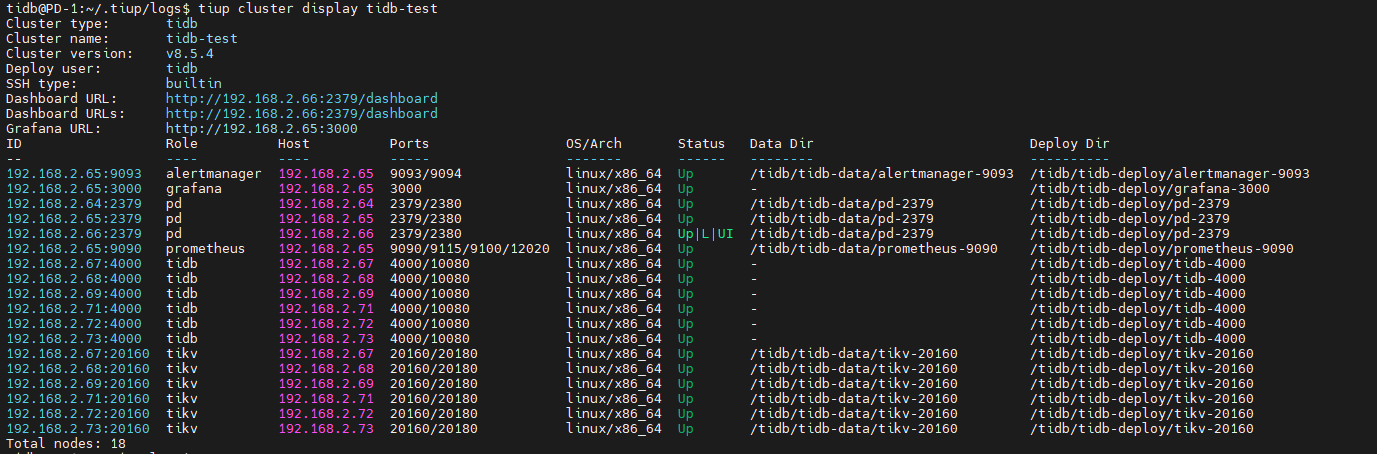
【问题复现路径】做过哪些操作出现的问题
搭建集群有时候会出现Error: failed to stop tidb: failed to stop: 192.168.2.68 tidb-4000.service, please check the instance’s log(/tidb/tidb-deploy/tidb-4000/log) for more detail.: executor.ssh.execute_failed: Failed to execute command over SSH for ‘tidb@192.168.2.68:22’ {ssh_stderr: , ssh_stdout: , ssh_command: export LANG=C; PATH=$PATH:/bin:/sbin:/usr/bin:/usr/sbin; /usr/bin/sudo -H bash -c “systemctl daemon-reload && systemctl stop tidb-4000.service”}, cause: dial tcp 192.168.2.68:22: i/o timeout
【遇到的问题:问题现象及影响】
ssh很容易超时,一会down一会up
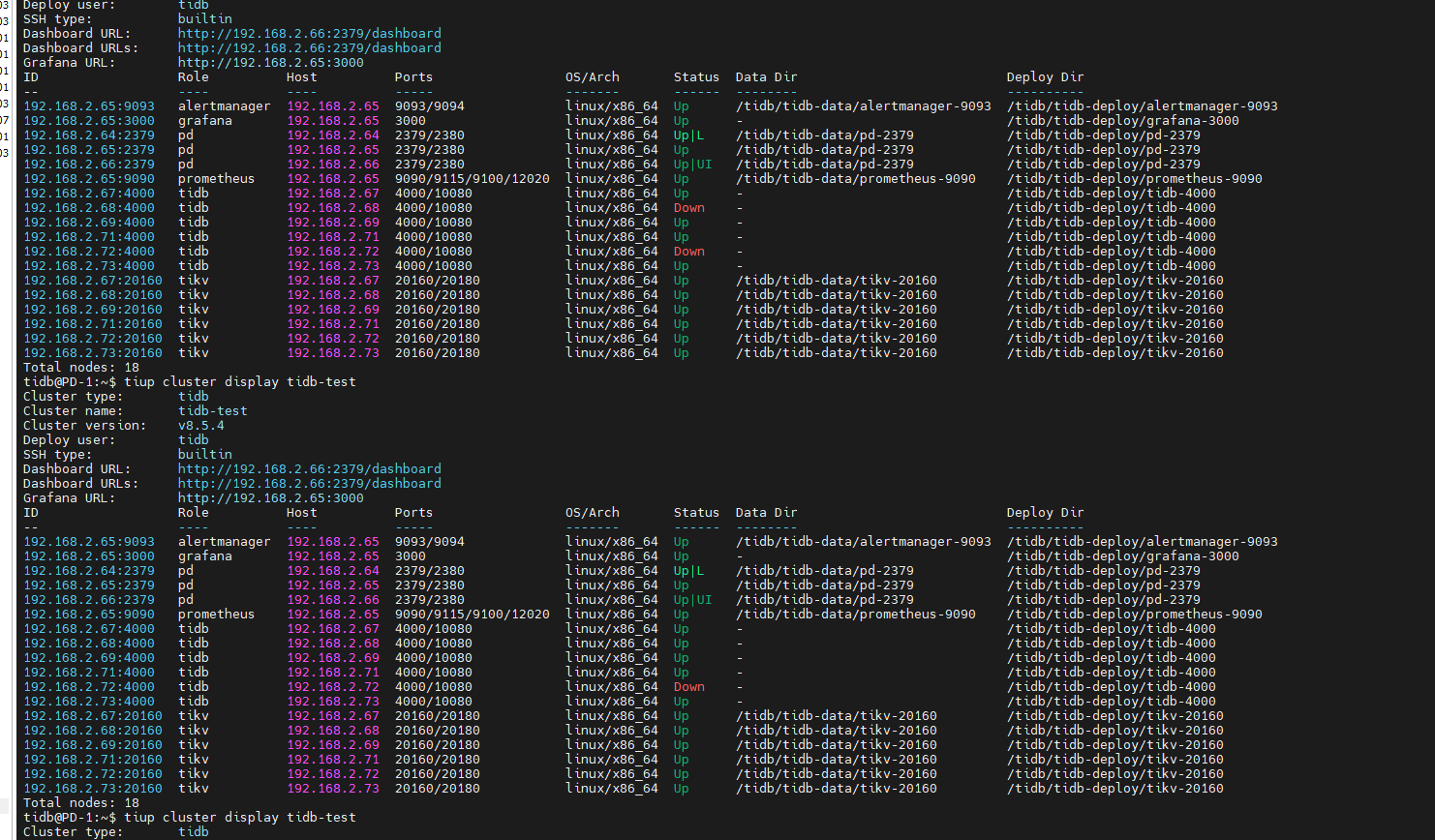
【资源配置】进入到 TiDB Dashboard -集群信息 (Cluster Info) -主机(Hosts) 截图此页面
【复制黏贴 ERROR 报错的日志】
2026-03-05T17:19:28.783+0800 INFO Execute command finished {“code”: 1, “error”: “failed to stop tidb: failed to stop: 192.168.2.68 tidb-4000.service, please check the instance’s log(/tidb/tidb-depl oy/tidb-4000/log) for more detail.: executor.ssh.execute_failed: Failed to execute command over SSH for ‘tidb@192.168.2.68:22’ {ssh_stderr: , ssh_stdout: , ssh_command: export LANG=C; PATH=$PATH:/bin:/sbin:/usr /bin:/usr/sbin; /usr/bin/sudo -H bash -c "systemctl daemon-reload && systemctl stop tidb-4000.service"}, cause: dial tcp 192.168.2.68:22: i/o timeout”, “errorVerbose”: “executor.ssh.execute_failed: Failed to execute command over SSH for ‘tidb@192.168.2.68:22’ {ssh_stderr: , ssh_stdout: , ssh_command: export LANG=C; PATH=$PATH:/bin:/sbin:/usr/bin:/usr/sbin; /usr/bin/sudo -H bash -c "systemctl daemon-reload && syste mctl stop tidb-4000.service"}, cause: dial tcp 192.168.2.68:22: i/o timeout\n at github.com/pingcap/tiup/pkg/cluster/executor.(*EasySSHExecutor).Execute()\n\tgithub.com/pingcap/tiup/pkg/cluster/executor/ssh.go :174\n at github.com/pingcap/tiup/pkg/cluster/executor.(*CheckPointExecutor).Execute()\n\tgithub.com/pingcap/tiup/pkg/cluster/executor/checkpoint.go:86\n at github.com/pingcap/tiup/pkg/cluster/module.(*SystemdM odule).Execute()\n\tgithub.com/pingcap/tiup/pkg/cluster/module/systemd.go:106\n at github.com/pingcap/tiup/pkg/cluster/operation.systemctl()\n\tgithub.com/pingcap/tiup/pkg/cluster/operation/action.go:423\n at g ithub.com/pingcap/tiup/pkg/cluster/operation.stopInstance()\n\tgithub.com/pingcap/tiup/pkg/cluster/operation/action.go:555\n at github.com/pingcap/tiup/pkg/cluster/operation.StopComponent.func1()\n\tgithub.com/ pingcap/tiup/pkg/cluster/operation/action.go:627\n at The Go Programming Language\n\tgolang.org/x/sync@v0.12.0/errgroup/errgroup.go:78\n at runtime.goexit()\n\truntime/asm_amd64.s:1700\nfaile d to stop: 192.168.2.68 tidb-4000.service, please check the instance’s log(/tidb/tidb-deploy/tidb-4000/log) for more detail.\ngithub.com/pingcap/tiup/pkg/cluster/operation.toFailedActionError\n\tgithub.com/ping cap/tiup/pkg/cluster/operation/action.go:640\ngithub.com/pingcap/tiup/pkg/cluster/operation.stopInstance\n\tgithub.com/pingcap/tiup/pkg/cluster/operation/action.go:556\ngithub.com/pingcap/tiup/pkg/cluster/opera tion.StopComponent.func1\n\tgithub.com/pingcap/tiup/pkg/cluster/operation/action.go:627\ngolang.org/x/sync/errgroup.(*Group).Go.func1\n\tgolang.org/x/sync@v0.12.0/errgroup/errgroup.go:78\nruntime.goexit\n\trunt ime/asm_amd64.s:1700\nfailed to stop tidb”}
【其他附件:截图/日志/监控】
