
黄东旭解析 TiDB 的核心优势
1610
2019-08-08

内容来源:http://mp.weixin.qq.com/s?__biz=MzI3NDIxNTQyOQ==&mid=2247489381&idx=2&sn=b5583d105f29b15c5de9919fe74985ad&chksm=eb16300fdc61b9198b658065c2ea08326b49ae5c409640c65dcf7beb7c5881a2167e8dd701b5#rd
本文转自公众号 TCTP。
我行在 2018 年开始了基于 ARM 服务器平台的尝试,当前 *** 的冷备数据全部保存在基于 ARM 服务器搭建的 CEPH 存储集群上,运行稳定。在今年贸易战的大背景下,我们数据库团队也尝试将各个数据库产品放到 ARM 平台上去编译并运行起来,为我行在基础架构层面的进一步国产化打下基础。
我们这次首先针对我行引入的 NewSQL 数据库 TiDB,在我行实验室的 ARM 平台上进行了编译和测试,预计会将整个测试流程和相关测试结论,整理为三篇技术文章分享出来,分别是:
(一)《TiDB 集群 在 arm 平台编译、安装与部署》
(二)《sysbench 测试下 arm 平台 cpu /内存/磁盘的能力》
(三)《 TiDB 在 arm 与 x86 平台的性能测试对比》
此次是系列文章的第一篇。
一、环境准备
pingcap 提供了 TiDB-Ansible 部署方案,可以使用 Ansible 快速方便地部署一个完整的 TiDB 集群,而 TiDB-Ansible release-3.0 版本依赖 Ansible 2.4.2 及以上版本(Ansible>=2.4.2,最好是 2.7.11 版本),另外依赖 Python 模块:jinja2 >= 2.9.6 和 jmespath >= 0.9.0,而且内部的数据库服务器与外网一般是隔离的,所以只能选择离线安装:
[root@ip-localhost ansible]# cd ansible_pkg/[root@ip-localhost ansible_pkg]# rpm -Uvh *.rpm --nodeps --forcewarning: libyaml-0.1.4-11.el7_0.aarch64.rpm: Header V3 RSA/SHA256 Signature, key ID fd431d51: NOKEYwarning: python2-babel-2.7.0-1.fc31.noarch.rpm: Header V3 RSA/SHA256 Signature, key ID 3c3359c4: NOKEYwarning: python2-markupsafe-1.0-1.fc29.aarch64.rpm: Header V3 RSA/SHA256 Signature, key ID 429476b4: NOKEYPreparing... ################################# [100%]Updating / installing...1:python2-pyasn1-0.1.9-7.el7 ################################# [ 5%]2:sshpass-1.06-1.el7 ################################# [ 10%]3:python-ply-3.4-11.el7 ################################# [ 14%]4:python-pycparser-2.14-1.el7 ################################# [ 19%]5:python-cffi-1.6.0-5.el7 ################################# [ 24%]6:python-idna-2.4-1.el7 ################################# [ 29%]7:python-httplib2-0.9.2-0.2.el7 ################################# [ 33%]8:python-enum34-1.0.4-1.el7 ################################# [ 38%]9:python2-cryptography-1.7.2-2.el7 ################################# [ 43%]10:python-paramiko-2.1.1-9.el7 ################################# [ 48%]11:python2-pytz-2018.9-1.fc31 ################################# [ 52%]12:python2-babel-2.7.0-1.fc31 ################################# [ 57%]13:python2-markupsafe-1.0-1.fc29 ################################# [ 62%]14:python2-jinja2-2.10-2.el7 ################################# [ 67%]15:python2-jmespath-0.9.0-1.el7 ################################# [ 71%]16:libyaml-0.1.4-11.el7_0 ################################# [ 76%]17:PyYAML-3.10-11.el7 ################################# [ 81%]18:ansible-2.8.2-1.el7 ################################# [ 86%]19:python2-pip-8.1.2-8.el7 ################################# [ 90%]20:mariadb-1:5.5.60-1.el7_5 ################################# [ 95%]21:epel-release-7-11 ################################# [100%]
[root@ip-localhost ansible]# ansible --versionansible 2.8.2config file = /etc/ansible/ansible.cfgconfigured module search path = [u'/root/.ansible/plugins/modules', u'/usr/share/ansible/plugins/modules']ansible python module location = /usr/lib/python2.7/site-packages/ansibleexecutable location = /bin/ansiblepython version = 2.7.5 (default, Oct 31 2018, 18:48:32) [GCC 4.8.5 20150623 (Red Hat 4.8.5-36)]
ansible]# pip show jinja2: 1.1Name: Jinja2Version: 2.10Summary: A small but fast and easy to use stand-alone template engine written in pure python.: http://jinja.pocoo.org/Author: Armin Ronacher: armin.ronacher@active-4.comLicense: BSDLocation: /usr/lib/python2.7/site-packagesRequires: MarkupSafeClassifiers:Development Status :: 5 - Production/StableEnvironment :: Web EnvironmentIntended Audience :: DevelopersLicense :: OSI Approved :: BSD LicenseOperating System :: OS IndependentProgramming Language :: PythonProgramming Language :: Python :: 2Programming Language :: Python :: 2.6Programming Language :: Python :: 2.7Programming Language :: Python :: 3Programming Language :: Python :: 3.3Programming Language :: Python :: 3.4Programming Language :: Python :: 3.5Programming Language :: Python :: 3.6Topic :: Internet :: WWW/HTTP :: Dynamic ContentTopic :: Software Development :: Libraries :: Python ModulesTopic :: Text Processing :: Markup :: HTML:[babel.extractors]= jinja2.ext:babel_extract[i18n]
ansible]# pip show jmespath: 1.1Name: jmespathVersion: 0.9.0Summary: JSON Matching Expressions: https://github.com/jmespath/jmespath.pyAuthor: James Saryerwinnie: js@jamesls.comLicense: UNKNOWNLocation: /usr/lib/python2.7/site-packagesRequires:Classifiers:Development Status :: 5 - Production/StableIntended Audience :: DevelopersNatural Language :: EnglishLicense :: OSI Approved :: MIT LicenseProgramming Language :: PythonProgramming Language :: Python :: 2.6Programming Language :: Python :: 2.7Programming Language :: Python :: 3Programming Language :: Python :: 3.3:: Python :: 3.4
二、编译 TiDB arm 版本
# Soft Version# TiDN Coretidb_version=release-3.0# TiDB Toolstispark_version=masterdm_version=master# Monitorprometheus_version=v2.8.1alertmanager_version=v0.17.0node_exporter_version=v0.17.0# blackbox_exporter_version=v0.12.0#v0.12.0 meets some wrongblackbox_exporter_version=masterpushgateway_version=v0.7.0grafana_version=6.1.6# Soft Dirdeclare -A soft_srcssoft_srcs=(# ["tidb"]="$tidb_version https://github.com/pingcap/tidb.git"# ["pd"]="$tidb_version https://github.com/pingcap/pd.git"# ["tikv"]="$tidb_version https://github.com/tikv/tikv.git"# ["tispark"]="$tidb_version https://github.com/pingcap/tispark"["tidb-binlog"]="$tidb_version https://github.com/pingcap/tidb-binlog"["dm"]="$dm_version https://github.com/pingcap/dm"["prometheus"]="$prometheus_version https://github.com/prometheus/prometheus.git"["alertmanager"]="$alertmanager_version https://github.com/prometheus/alertmanager.git"["node_exporter"]="$node_exporter_version https://github.com/prometheus/node_exporter.git"["blackbox_version"]="$blackbox_exporter_version https://github.com/prometheus/blackbox_exporter.git"["pushgateway"]="$pushgateway_version https://github.com/prometheus/pushgateway.git"# ["grafana"]="$grafana_version https://github.com/grafana/grafana.git")# DirROOT=$PWD/buildtarget=$ROOT/binrm -rf $ROOTmkdir -p $targetsudo yum install -y gcc gcc-c++ wget git zlib-develcd $ROOT# Goif which go >/dev/null; thenecho "go installed, skip"elsewget https://dl.google.com/go/go1.12.6.linux-arm64.tar.gzsudo tar -C /usr/local -xzf go1.12.6.linux-arm64.tar.gzecho "export GOPATH=$ROOT/go" >> ~/.bashrcecho 'export PATH=$PATH:/usr/local/go/bin:$GOPATH/bin' >> ~/.bashrcsource ~/.bashrcfi# Rustif which rustc >/dev/null; thenecho "rust installed, skip"elsecurl https://sh.rustup.rs -sSf | sh -s -- -ysource $HOME/.cargo/envfi# Install cmake3if which cmake3 >/dev/null; thenecho "cmake3 installed, skip"elsewget http://dl.fedoraproject.org/pub/epel/epel-release-latest-7.noarch.rpmsudo rpm -ivh epel-release-latest-7.noarch.rpmsudo yum install -y epel-releasesudo yum install -y cmake3sudo ln -s /usr/bin/cmake3 /usr/bin/cmakefi# Install Javaif which java >/dev/null;thenecho "java installed, skip"elsece $ROOTwget --no-cookies --no-check-certificate --header "Cookie: gpw_e24=http%3A%2F%2Fwww.***.com%2F; ***license=accept-securebackup-cookie" "http://download.***.com/otn-pub/java/jdk/8u141-b15/336fa29ff2bb4ef291e347e091f7f4a7/jdk-8u141-linux-arm64-vfp-hflt.tar.gz"sudo tar -C /usr/local -xzf jdk-8u141-linux-arm64-vfp-hflt.tar.gzecho 'export JAVA_HOME=/usr/local/jdk1.8.0_141' >> ~/.bashrcecho 'export JRE_HOME=/user/local/jdk1.8.0_141/jre' >> ~/.bashrcecho 'export PATH=$PATH:$JAVA_HOME/bin:$JRE_HOME/bin' >> ~/.bashrcfi# Install mavenif which mvn >/dev/null;thenecho "maven installed, skip"elsewget https://mirrors.tuna.tsinghua.edu.cn/apache/maven/maven-3/3.6.1/binaries/apache-maven-3.6.1-bin.tar.gzsudo tar -C /usr/local -xzf apache-maven-3.6.1-bin.tar.gzecho 'export PATH=$PATH:/usr/local/apache-maven-3.6.1/bin' >> ~/.bashrcsource ~/.bashrcfi# # RocksDB gflags# git clone https://github.com/gflags/gflags.git# cd gflags# git checkout v2.0# ./configure --build=aarch64-unknown-linux-gnu && make && sudo make install# cd $ROOT# Build Monitorfor soft in $(echo ${!soft_srcs[*]})dosoft_src=${soft_srcs[$soft]}cd $ROOTgit clone -b $soft_srccd $softmake buildif [ -d bin ];thencp bin/* $targetelsecp $soft $targetficd $ROOTecho "`date +'%F %T'`: Build Soft $soft done ."done# Download Grafanacd $ROOTwget https://dl.grafana.com/oss/release/grafana-${grafana_version}.linux-arm64.tar.gztar -zxvf grafana-${grafana_version}.linux-arm64.tar.gzcp grafana-${grafana_version}/bin/* bin/# Build TiDBcd $ROOTgit clone -b $tidb_version https://github.com/pingcap/tidbcd tidbmakecp bin/* $target# Build PDcd $ROOTgit clone -b $tidb_version https://github.com/pingcap/pdcd pdmakecp bin/* $target# Build TiKVcd $ROOTgit clone -b $tidb_version https://github.com/tikv/tikv.gitcd tikvROCKSDB_SYS_SSE=0 make releasecp target/release/tikv-* $target# Build tisparkcd $ROOTgit clone -b $tispark_version https://github.com/pingcap/tisparkcd tisparkmvn clean install -Dmaven.test.skip=true -P spark-2.3
[root@ip-localhost bin]# lltotal 1492252-rwxr-xr-x 1 tidb tidb 25880636 Jul 25 16:21 alertmanager-rwxr-xr-x 1 tidb tidb 41476026 Jul 25 16:21 arbiter-rwxr-xr-x 1 tidb tidb 23086365 Jul 25 16:21 binlogctl-rwxr-xr-x 1 root root 16725668 Jul 25 16:48 blackbox_exporter-rwxr-xr-x 1 tidb tidb 42190443 Jul 25 16:21 dmctl-rwxr-xr-x 1 tidb tidb 42643818 Jul 25 16:21 dm-master-rwxr-xr-x 1 tidb tidb 41231475 Jul 25 16:21 dm-tracer-rwxr-xr-x 1 tidb tidb 45855210 Jul 25 16:21 dm-worker-rwxr-xr-x 1 tidb tidb 45378703 Jul 25 16:21 drainer-rwxr-xr-x 1 tidb tidb 20578913 Jul 25 16:21 grafana-cli-rw-r--r-- 1 tidb tidb 33 Jul 25 16:21 grafana-cli.md5-rwxr-xr-x 1 tidb tidb 41749049 Jul 25 16:21 grafana-server-rw-r--r-- 1 tidb tidb 33 Jul 25 16:21 grafana-server.md5-rwxr-xr-x 1 tidb tidb 15884939 Jul 25 16:21 node_exporter-rwxr-xr-x 1 tidb tidb 27341094 Jul 25 16:21 pd-ctl-rwxr-xr-x 1 tidb tidb 16345055 Jul 25 16:21 pd-recover-rwxr-xr-x 1 tidb tidb 36866195 Jul 25 16:21 pd-server-rwxr-xr-x 1 tidb tidb 16394398 Jul 25 16:21 pd-tso-bench-rwxr-xr-x 1 tidb tidb 68935640 Jul 25 16:21 prometheus-rwxr-xr-x 1 tidb tidb 32089280 Jul 25 16:21 pump-rwxr-xr-x 1 tidb tidb 14439632 Jul 25 16:21 pushgateway-rwxr-xr-x 1 tidb tidb 39814928 Jul 25 16:21 reparo-rwxr-xr-x 1 tidb tidb 8280869 Jul 25 16:21 shadow-rwxr-xr-x 1 tidb tidb 67211621 Jul 25 16:21 tidb-server-rwxr-xr-x 1 tidb tidb 197494880 Jul 25 16:21 tikv-ctl-rw-r--r-- 1 tidb tidb 20985 Jul 25 16:21 tikv-ctl.d-rwxr-xr-x 1 tidb tidb 207880328 Jul 25 16:21 tikv-importer-rw-r--r-- 1 tidb tidb 20995 Jul 25 16:21 tikv-importer.d-rwxr-xr-x 1 tidb tidb 355234696 Jul 25 16:21 tikv-server-rw-r--r-- 1 tidb tidb 20991 Jul 25 16:21 tikv-server.d-rw-r--r-- 1 tidb tidb 32650300 Jul 25 16:59 tispark-SNAPSHOT-jar-with-dependencies.jar
三、安装 TiDB
根据 PingCAP 官网的离线 TiDB-Ansible 部署方案(https://pingcap.com/docs-cn/v3.0/how-to/deploy/orchestrated/offline-ansible/),完成以下初始化工作:
在中控机上创建 tidb 用户,并生成 ssh key
在下载机上下载 TiDB-Ansible 及 TiDB 安装包,但下载机不需要安装 ansible,具体操作如下:
把在下载机下载好的 tidb-ansible 传到部署中控机
在 tidb-ansible 目录下创建 resources/bin/ 目录,并且把编译的 ARM 版二进制文件全部放到 resources/bin/ 目录里(还包括 fio 文件)
编辑 inventory.ini
## TiDB Cluster Part[tidb_servers]TiDB-1 ansible_host=127.0.0.1 deploy_dir=/tidb/deploy_tidb/tidb tidb_port=5000 tidb_status_port=10089 labels="host=ip-1"TiDB-2 ansible_host=127.0.0.2 deploy_dir=/tidb/deploy_tidb/tidb tidb_port=5000 tidb_status_port=10089 labels="host=ip-2"TiDB-3 ansible_host=127.0.0.3 deploy_dir=/tidb/deploy_tidb/tidb tidb_port=5000 tidb_status_port=10089 labels="host=ip-3"[tikv_servers]TiKV1-1 ansible_host=127.0.0.1 deploy_dir=/tidb/deploy_tidb/tikv1 tikv_port=20891 tikv_status_port=20181 labels="host=TiKV1-1"TiKV2-1 ansible_host=127.0.0.2 deploy_dir=/tidb/deploy_tidb/tikv1 tikv_port=20891 tikv_status_port=20181 labels="host=TiKV2-1"TiKV3-1 ansible_host=127.0.0.3 deploy_dir=/tidb/deploy_tidb/tikv1 tikv_port=20891 tikv_status_port=20181 labels="host=TiKV3-1"[pd_servers]PD01 ansible_host=127.0.0.1 deploy_dir=/tidb/deploy_tidb/pd pd_client_port=2589 pd_peer_port=2590 labels="host=ip-1"PD02 ansible_host=127.0.0.2 deploy_dir=/tidb/deploy_tidb/pd pd_client_port=2589 pd_peer_port=2590 labels="host=ip-2"PD03 ansible_host=127.0.0.3 deploy_dir=/tidb/deploy_tidb/pd pd_client_port=2589 pd_peer_port=2590 labels="host=ip-3"[spark_master][spark_slaves][lightning_server][importer_server]## Monitoring Part# prometheus and pushgateway servers[monitoring_servers]#prometheus89 ansible_host=127.0.0.1 prometheus_port=7098 pushgateway_port=7099 labels="host=ip-127.0.0.1"127.0.0.1[grafana_servers]#grafanaleifu89 ansible_host=127.0.0.1 grafana_port=7002 grafana_collector_port=7088 labels="host=ip-127.0.0.1"127.0.0.1# node_exporter and blackbox_exporter servers[monitored_servers]nodeblack1 ansible_host=127.0.0.1 node_exporter_port=7102 blackbox_exporter_port=7117 labels="host=ip-1"nodeblack2 ansible_host=127.0.0.2 node_exporter_port=7102 blackbox_exporter_port=7117 labels="host=ip-2"nodeblack3 ansible_host=127.0.0.3 node_exporter_port=7102 blackbox_exporter_port=7117 labels="host=ip-3"[alertmanager_servers]127.0.0.1[kafka_exporter_servers]## Binlog Part[pump_servers]pump1 ansible_host=127.0.0.1 deploy_dir=/tidb/deploy_tidb/pump pump_port=8290pump2 ansible_host=127.0.0.2 deploy_dir=/tidb/deploy_tidb/pump pump_port=8290pump3 ansible_host=127.0.0.3 deploy_dir=/tidb/deploy_tidb/pump pump_port=8290[drainer_servers]## Group variables[pd_servers:vars]location_labels = ["host"]## Global variables[all:vars]deploy_dir = /tidb/deploy_tidb## Connection# ssh via normal useransible_user = tidbcluster_name = test-cluster-30-gatidb_version = v3.0.0# process supervision, [systemd, supervise]process_supervision = systemdtimezone = Asia/Shanghaienable_firewalld = False# check NTP serviceenable_ntpd = Trueset_hostname = True## binlog triggerenable_binlog = True# kafka cluster address for monitoring, example:# kafka_addrs = "192.168.0.11:9092,192.168.0.12:9092,192.168.0.13:9092"kafka_addrs = ""# zookeeper address of kafka cluster for monitoring, example:# zookeeper_addrs = "192.168.0.11:2181,192.168.0.12:2181,192.168.0.13:2181"zookeeper_addrs = ""# enable TLS authentication in the TiDB clusterenable_tls = False# KV modedeploy_without_tidb = False# wait for region replication complete before start tidb-server.wait_replication = True# Optional: Set if you already have a alertmanager server.# Format: alertmanager_host:alertmanager_portalertmanager_target = ""grafana_admin_user = "admin"grafana_admin_password = "admin"### Collect diagnosiscollect_log_recent_hours = 2enable_bandwidth_limit = True# default: 10Mb/s, unit: Kbit/scollect_bandwidth_limit = 10000
初始化系统环境,修改内核参数
ansible-playbook bootstrap.ymlansible-playbook deploy.ymlansible-playbook start.yml四、验证并使用
1、连接 TiDB
[root@ip-localhost ~]# mysql -uroot -h127.0.0.1 -P5000Welcome to the MariaDB monitor. Commands end with ; or \g.Your MySQL connection id is 207Server version: 5.7.25-TiDB-v3.0.1-36-g709ee4f-dirty MySQL Community Server (Apache License 2.0)Copyright (c) 2000, 2018, ***, MariaDB Corporation Ab and others.Type 'help;' or '\h' for help. Type '\c' to clear the current input statement.MySQL [(none)]> select tidb_version();+----------------------------------------------------------------------------------------------------------------------------------------------------------------------------------------------------------------------------------------------------------------------------------------------------------------------------------------+tidb_version() |+----------------------------------------------------------------------------------------------------------------------------------------------------------------------------------------------------------------------------------------------------------------------------------------------------------------------------------------+Release Version: v3.0.1-36-g709ee4f-dirtyGit Commit Hash: 709ee4f5c1cd08b43da651c32f78c1032a397c84Git Branch: release-3.0UTC Build Time: 2019-07-25 06:26:30GoVersion: go version go1.12.6 linux/arm64Race Enabled: falseTiKV Min Version: 2.1.0-alpha.1-ff3dd160846b7d1aed9079c389fc188f7f5ea13eCheck Table Before Drop: false |+----------------------------------------------------------------------------------------------------------------------------------------------------------------------------------------------------------------------------------------------------------------------------------------------------------------------------------------+1 row in set (0.00 sec)MySQL [(none)]> create database db_arm;uQuery OK, 0 rows affected (1.02 sec)MySQL [(none)]> use db_armDatabase changedMySQL [db_arm]> create table tb_arm(i int);Query OK, 0 rows affected (0.51 sec)MySQL [db_arm]> insert into tb_arm values(1);Query OK, 1 row affected (0.02 sec)MySQL [db_arm]> select * from tb_arm;+------+i |+------+1 |+------+1 row in set (0.00 sec)MySQL [db_arm]>
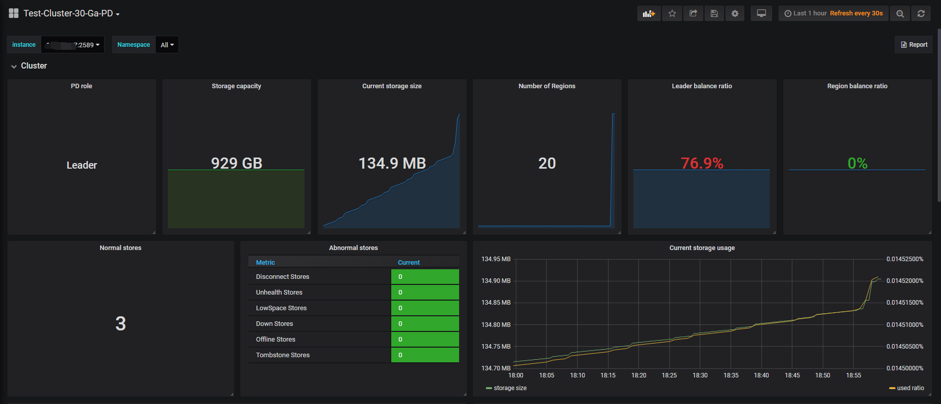
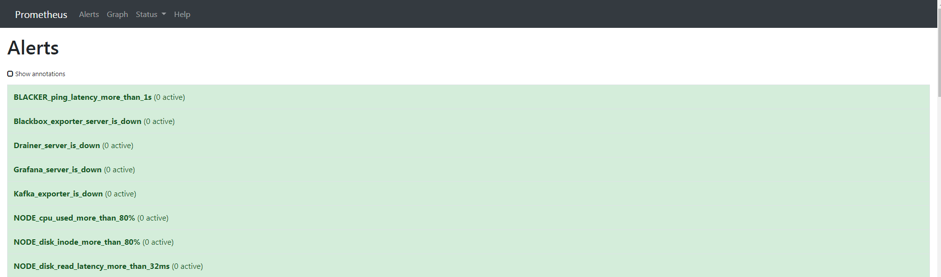
五、计划
版权声明:本文内容由网络用户投稿,版权归原作者所有,本站不拥有其著作权,亦不承担相应法律责任。如果您发现本站中有涉嫌抄袭或描述失实的内容,请联系小编 edito_r@163.com 处理,核实后本网站将在24小时内删除侵权内容。