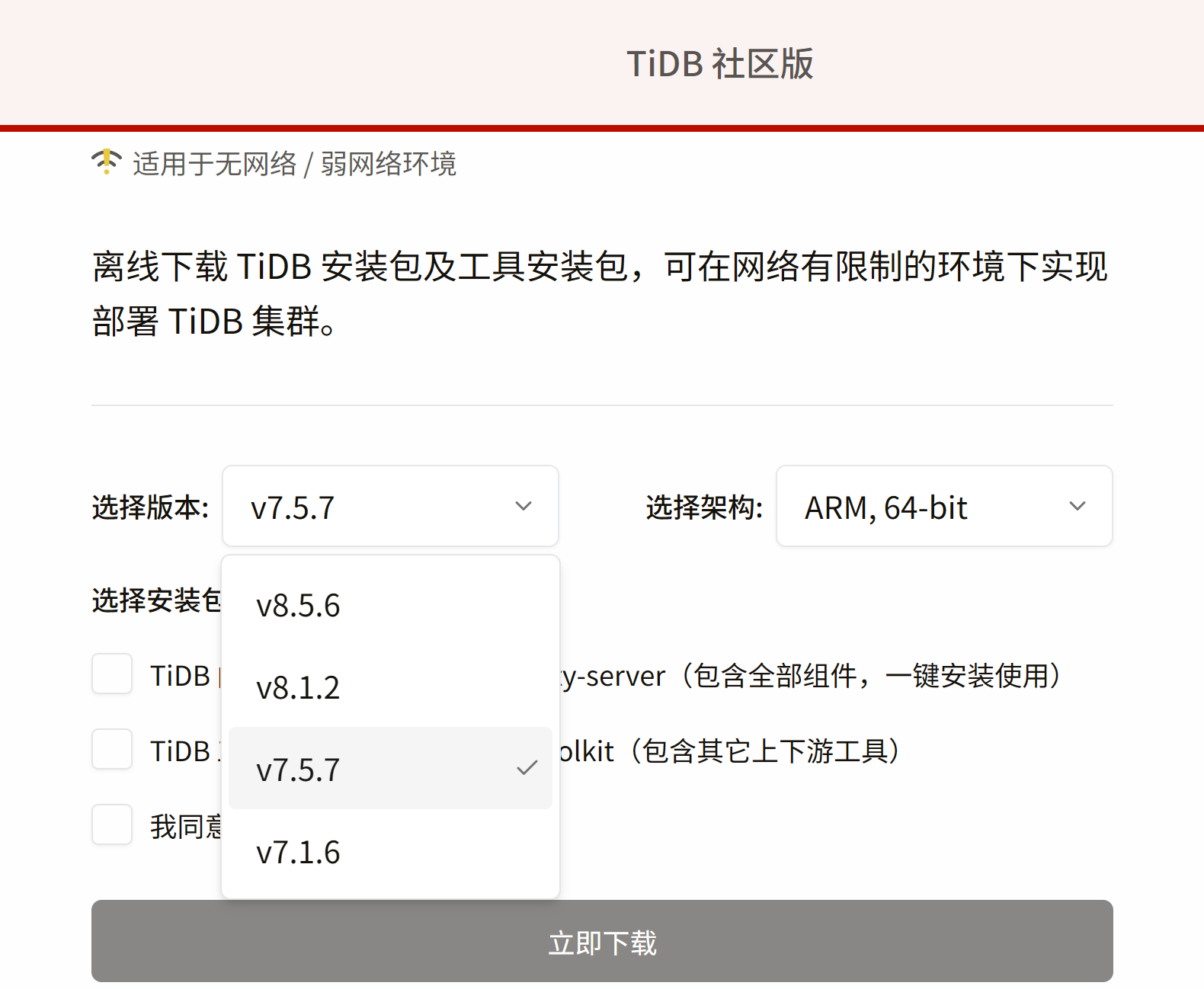
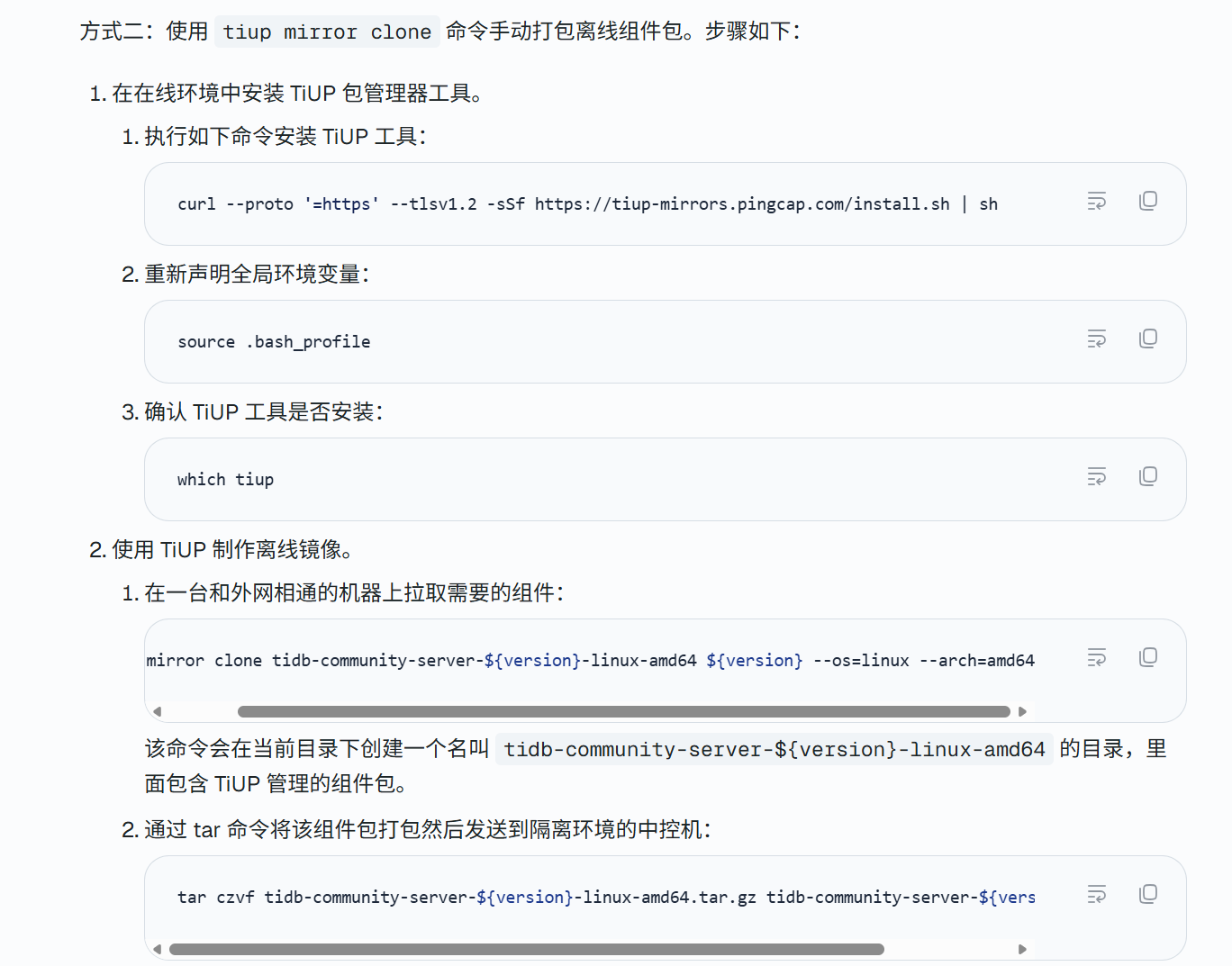
请问添加一台新的服务器,想把它当成tikv组件,加进tidb已经存在的tidb集群,tidb集群是使用tiup安装的。
请问如果不连接网络,如何单独安装这个组件?
请问添加一台新的服务器,想把它当成tikv组件,加进tidb已经存在的tidb集群,tidb集群是使用tiup安装的。
请问如果不连接网络,如何单独安装这个组件?
直接走扩容就行,不用特别配置,tiup控制台已经有相关安装包本地缓存了
使用 TiUP 扩容缩容 TiDB 集群 | TiDB 社区版
扩容不需要使用tiup install tikv 这么干吗?
扩容 tiup控制机已有相关组件缓存文件。直接分发到目标主机上。
是这个意思吗
写个配置文件scale-out.yml
内容就这样
tikv_servers:
然后tiup cluster check scale-out.yml --cluster --apply --user root [-p] 修改系统参数
tiup cluster scale-out scale-out.yml [-p] 部署
你直接看我发的文档操作就行,理论上不需要联外网
因为新服务器断网没法直接下软件,所以得先在有网的机器上打个包含TiKV的离线安装包,拷过去配置好本地源,再用TiUP扩容命令把它加进集群。
离线安装先把安装包下载到内网服务器,配本地YUM源或tmux加代理下载。
离线扩容 TiKV 可以:1)在有网机器用 tiup mirror clone 把对应版本组件包和 metadata 拉到本地 mirror;2)把 mirror 目录拷到新机器/中控;3)tiup cluster scale-out 时用 --mirror 指向离线 mirror,yaml 里配好新节点 host/ssh/labels;4)新节点仍需 tiup 能 ssh 连通。关键是版本与现有集群一致,离线 mirror 要包含 tikv 及依赖。不建议手工拷二进制,tiup 管生命周期更稳。
直接扩容是不能离线安装的,需要在线下载node_exporter和blackbox_exporter
[tidb@monitor ~]$ tiup cluster scale-out tidb-cluster scale-out-tiflash1.yml

+ Detect CPU Arch Name
  - Detecting node 192.168.1.186 Arch info ... Done

+ Detect CPU OS Name
  - Detecting node 192.168.1.186 OS info ... Done
Please confirm your topology:
Cluster type:    tidb
Cluster name:    tidb-cluster
Cluster version: v7.5.1
Role     Host           Ports                            OS/Arch       Directories
----     ----           -----                            -------       -----------
tiflash  192.168.1.186  9000/3930/20170/20292/8234/8123  linux/x86_64  /tidb/tidb-deploy/tiflash-9000,/tidb/tidb-data/tiflash-9000
Attention:
    1. If the topology is not what you expected, check your yaml file.
    2. Please confirm there is no port/directory conflicts in same host.
Do you want to continue? [y/N]: (default=N) y
+ [ Serial ] - SSHKeySet: privateKey=/home/tidb/.tiup/storage/cluster/clusters/tidb-cluster/ssh/id_rsa, publicKey=/home/tidb/.tiup/storage/cluster/clusters/tidb-cluster/ssh/id_rsa.pub
+ [Parallel] - UserSSH: user=tidb, host=192.168.1.190
+ [Parallel] - UserSSH: user=tidb, host=192.168.1.181
+ [Parallel] - UserSSH: user=tidb, host=192.168.1.182
+ [Parallel] - UserSSH: user=tidb, host=192.168.1.187
+ [Parallel] - UserSSH: user=tidb, host=192.168.1.180
+ [Parallel] - UserSSH: user=tidb, host=192.168.1.180
+ [Parallel] - UserSSH: user=tidb, host=192.168.1.180
+ [Parallel] - UserSSH: user=tidb, host=192.168.1.183
+ [Parallel] - UserSSH: user=tidb, host=192.168.1.184
+ [Parallel] - UserSSH: user=tidb, host=192.168.1.189
+ [Parallel] - UserSSH: user=tidb, host=192.168.1.188
+ Download TiDB components
  - Download tiflash:v7.5.1 (linux/amd64) ... Done
  - Download node_exporter: (linux/amd64) ... Error
  - Download blackbox_exporter: (linux/amd64) ... Error

Error: fetch /timestamp.json from mirror(https://tiup-mirrors.pingcap.com) failed: download from https://tiup-mirrors.pingcap.com/timestamp.json failed: Get "https://tiup-mirrors.pingcap.com/timestamp.json": dial tcp: lookup tiup-mirrors.pingcap.com on [::1]:53: read udp [::1]:43445->[::1]:53: read: connection refused

Verbose debug logs has been written to /home/tidb/.tiup/logs/tiup-cluster-debug-2026-07-05-13-39-14.log.
在联网机器上准备 TiKV 离线包 ,传输离线包至目标集群中控机
有办法的,你用tiup可以下载任意版本的安装包 具体操作如下
使用 TiUP 部署 TiDB 集群 | TiDB 社区版
已有 TiUP 在线部署的 TiDB 集群,离线新增一台 TiKV 节点,核心逻辑:
tiup cluster scale-out,全程不会联网下载;集群版本 = 离线镜像版本必须严格一致(例如集群是 v8.5.3,镜像必须拉 v8.5.3)
集群版本:v8.5.3(按你环境) 架构:linux/amd64 只需要扩容组件:tikv、tiup cluster 管理工具
离线安装先把安装包下载到内网服务器,直接copy 过去安装
离线扩容 TiKV 的常规做法:
1)在可联网环境用 tiup mirror / tiup cluster 准备离线组件包(与现网集群大版本一致的 tikv 等),拷到控制机
2)新机器做好免密、时钟、目录与端口,并把离线 mirror 配给 tiup
3)编辑拓扑增加该 TiKV 实例后执行:tiup cluster scale-out <topology.yaml> --offline(或按你们现网离线文档指定 component 目录)
4)scale-out 完成后用 tiup cluster display 确认状态,再观察 Region 调度是否均衡
关键是组件版本与现网一致,且控制机通过离线 mirror 安装,而不是在新机器上单独 yum/在线拉包。