
使用 TiFlash MPP 模式
本文介绍了 Massively Parallel Processing (MPP) 模式的 TiFlash 以及如何使用它。
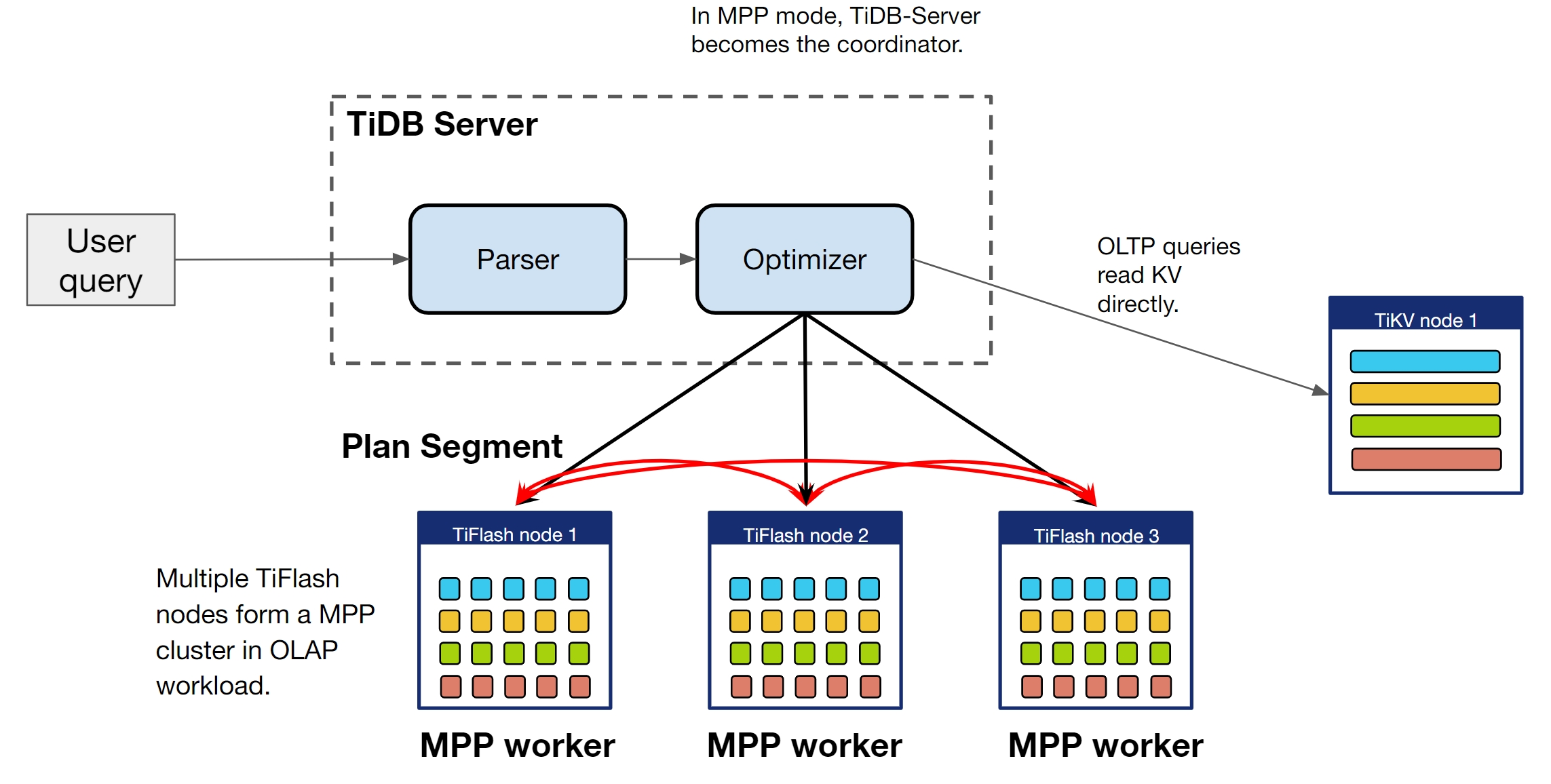
TiFlash 支持使用 MPP 模式执行查询,该模式引入了跨节点数据交换(数据洗牌过程)到计算中。TiDB 会通过优化器的成本估算自动判断是否选择 MPP 模式。你可以通过修改 tidb_allow_mpp 和 tidb_enforce_mpp 的值来改变选择策略。
下图展示了 MPP 模式的工作原理。
控制是否选择 MPP 模式
tidb_allow_mpp 变量控制 TiDB 是否可以选择 MPP 模式执行查询。tidb_enforce_mpp 变量控制是否忽略优化器的成本估算,强制使用 TiFlash 的 MPP 模式执行查询。
这两个变量所有取值对应的结果如下:
| tidb_allow_mpp=off | tidb_allow_mpp=on(默认) | |
|---|---|---|
| tidb_enforce_mpp=off(默认) | 不使用 MPP 模式。 | 根据成本估算由优化器选择 MPP 模式(默认)。 |
| tidb_enforce_mpp=on | 不使用 MPP 模式。 | TiDB 忽略成本估算,强制选择 MPP 模式。 |
例如,如果你不想使用 MPP 模式,可以执行以下语句:
set @@session.tidb_allow_mpp=0;如果你希望 TiDB 的基于成本的优化器自动决定是否使用 MPP 模式(默认),可以执行:
set @@session.tidb_allow_mpp=1;
set @@session.tidb_enforce_mpp=0;
如果你希望 TiDB 忽略优化器的成本估算,强制选择 MPP 模式,可以执行:
set @@session.tidb_allow_mpp=1;
set @@session.tidb_enforce_mpp=1;Note
当
tidb_enforce_mpp=1生效时,TiDB 优化器会忽略成本估算以选择 MPP 模式。但是,如果存在阻止 MPP 模式的其他因素,TiDB 也不会选择 MPP 模式。这些因素包括 TiFlash 副本不存在、TiFlash 副本未完成复制,以及包含不被 MPP 模式支持的操作符或函数的语句。如果 TiDB 优化器由于其他原因无法选择 MPP 模式,当你使用
EXPLAIN查看执行计划时,会返回警告以说明原因。例如:set @@session.tidb_enforce_mpp=1; create table t(a int); explain select count(*) from t; show warnings;+---------+------+-----------------------------------------------------------------------------+ | Level | Code | Message | +---------+------+-----------------------------------------------------------------------------+ | Warning | 1105 | MPP mode may be blocked because there aren't tiflash replicas of table `t`. | +---------+------+-----------------------------------------------------------------------------+
MPP 模式的算法支持
MPP 模式支持以下物理算法:Broadcast Hash Join、Shuffled Hash Join、Shuffled Hash Aggregation、Union All、TopN 和 Limit。优化器会自动判断在某个查询中使用哪种算法。要查看具体的执行计划,可以执行 EXPLAIN 语句。如果 EXPLAIN 的结果中显示有 ExchangeSender 和 ExchangeReceiver 操作符,说明 MPP 模式已生效。
以下示例以 TPC-H 测试集中的表结构为例:
explain select count(*) from customer c join nation n on c.c_nationkey=n.n_nationkey;
+------------------------------------------+------------+--------------+---------------+----------------------------------------------------------------------------+
| id                                       | estRows    | task         | access object | operator info                                                              |
+------------------------------------------+------------+--------------+---------------+----------------------------------------------------------------------------+
| HashAgg_23                               | 1.00       | root         |               | funcs:count(Column#16)->Column#15                                          |
| └─TableReader_25                         | 1.00       | root         |               | data:ExchangeSender_24                                                     |
|   └─ExchangeSender_24                    | 1.00       | mpp[tiflash] |               | ExchangeType: PassThrough                                                  |
|     └─HashAgg_12                         | 1.00       | mpp[tiflash] |               | funcs:count(1)->Column#16                                                  |
|       └─HashJoin_17                      | 3000000.00 | mpp[tiflash] |               | inner join, equal:[eq(tpch.nation.n_nationkey, tpch.customer.c_nationkey)] |
|         ├─ExchangeReceiver_21(Build)     | 25.00      | mpp[tiflash] |               |                                                                            |
|         │ └─ExchangeSender_20            | 25.00      | mpp[tiflash] |               | ExchangeType: Broadcast                                                    |
|         │   └─TableFullScan_18           | 25.00      | mpp[tiflash] | table:n       | keep order:false                                                           |
|         └─TableFullScan_22(Probe)        | 3000000.00 | mpp[tiflash] | table:c       | keep order:false                                                           |
+------------------------------------------+------------+--------------+---------------+----------------------------------------------------------------------------+
9 rows in set (0.00 sec)
在示例执行计划中,包含了 ExchangeReceiver 和 ExchangeSender 操作符。执行计划表明,在读取 nation 表后,ExchangeSender 操作符会将表广播到每个节点,HashJoin 和 HashAgg 操作在 nation 表和 customer 表上执行,最后将结果返回给 TiDB。
TiFlash 提供以下 3 个全局/会话变量,用于控制是否使用 Broadcast Hash Join:
tidb_broadcast_join_threshold_size:值的单位为字节。如果表的大小(以字节为单位)小于该变量的值,则使用 Broadcast Hash Join 算法,否则使用 Shuffled Hash Join。tidb_broadcast_join_threshold_count:值的单位为行数。如果连接操作的对象属于子查询,优化器无法估算子查询结果集的大小,因此以结果集中的行数为准。如果子查询的估算行数小于该变量的值,则使用 Broadcast Hash Join,否则使用 Shuffled Hash Join。tidb_prefer_broadcast_join_by_exchange_data_size:控制是否优先选择网络传输开销较小的算法。如果启用该变量,TiDB 会分别估算Broadcast Hash Join和Shuffled Hash Join需要交换的数据大小,然后选择较小的那个。启用后,tidb_broadcast_join_threshold_count和tidb_broadcast_join_threshold_size不再生效。
在 MPP 模式下访问分区表
要在 MPP 模式下访问分区表,首先需要启用 动态裁剪模式。
示例:
mysql> DROP TABLE if exists test.employees;
Query OK, 0 rows affected, 1 warning (0.00 sec)

mysql> CREATE TABLE test.employees
(id int NOT NULL,
 fname varchar(30) DEFAULT NULL,
 lname varchar(30) DEFAULT NULL,
 hired date NOT NULL DEFAULT '1970-01-01',
 separated date DEFAULT '9999-12-31',
 job_code int DEFAULT NULL,
 store_id int NOT NULL) ENGINE=InnoDB DEFAULT CHARSET=utf8mb4 COLLATE=utf8mb4_bin
PARTITION BY RANGE (store_id)
(PARTITION p0 VALUES LESS THAN (6),
 PARTITION p1 VALUES LESS THAN (11),
 PARTITION p2 VALUES LESS THAN (16),
 PARTITION p3 VALUES LESS THAN (MAXVALUE));
Query OK, 0 rows affected (0.10 sec)

mysql> ALTER table test.employees SET tiflash replica 1;
Query OK, 0 rows affected (0.09 sec)

mysql> SET tidb_partition_prune_mode=static;
Query OK, 0 rows affected, 1 warning (0.00 sec)

mysql> explain SELECT count(*) FROM test.employees;
+----------------------------------+----------+-------------------+-------------------------------+-----------------------------------+
| id                               | estRows  | task              | access object                 | operator info                     |
+----------------------------------+----------+-------------------+-------------------------------+-----------------------------------+
| HashAgg_18                       | 1.00     | root              |                               | funcs:count(Column#10)->Column#9  |
| └─PartitionUnion_20              | 4.00     | root              |                               |                                   |
|   ├─StreamAgg_35                 | 1.00     | root              |                               | funcs:count(Column#12)->Column#10 |
|   │ └─TableReader_36             | 1.00     | root              |                               | data:StreamAgg_26                 |
|   │   └─StreamAgg_26             | 1.00     | batchCop[tiflash] |                               | funcs:count(1)->Column#12         |
|   │     └─TableFullScan_34       | 10000.00 | batchCop[tiflash] | table:employees, partition:p0 | keep order:false, stats:pseudo    |
|   ├─StreamAgg_52                 | 1.00     | root              |                               | funcs:count(Column#14)->Column#10 |
|   │ └─TableReader_53             | 1.00     | root              |                               | data:StreamAgg_43                 |
|   │   └─StreamAgg_43             | 1.00     | batchCop[tiflash] |                               | funcs:count(1)->Column#14         |
|   │     └─TableFullScan_51       | 10000.00 | batchCop[tiflash] | table:employees, partition:p1 | keep order:false, stats:pseudo    |
|   ├─StreamAgg_69                 | 1.00     | root              |                               | funcs:count(Column#16)->Column#10 |
|   │ └─TableReader_70             | 1.00     | root              |                               | data:StreamAgg_60                 |
|   │   └─StreamAgg_60             | 1.00     | batchCop[tiflash] |                               | funcs:count(1)->Column#16         |
|   │     └─TableFullScan_68       | 10000.00 | batchCop[tiflash] | table:employees, partition:p2 | keep order:false, stats:pseudo    |
|   └─StreamAgg_86                 | 1.00     | root              |                               | funcs:count(Column#18)->Column#10 |
|     └─TableReader_87             | 1.00     | root              |                               | data:StreamAgg_77                 |
|       └─StreamAgg_77             | 1.00     | batchCop[tiflash] |                               | funcs:count(1)->Column#18         |
|         └─TableFullScan_85       | 10000.00 | batchCop[tiflash] | table:employees, partition:p3 | keep order:false, stats:pseudo    |
+----------------------------------+----------+-------------------+-------------------------------+-----------------------------------+
18 rows in set (0.00 sec)

mysql> SET tidb_partition_prune_mode=dynamic;
Query OK, 0 rows affected (0.00 sec)

mysql> explain SELECT count(*) FROM test.employees;
+------------------------------+----------+--------------+-----------------+---------------------------------------------------------+
| id                           | estRows  | task         | access object   | operator info                                           |
+------------------------------+----------+--------------+-----------------+---------------------------------------------------------+
| HashAgg_17                   | 1.00     | root         |                 | funcs:count(Column#11)->Column#9                        |
| └─TableReader_19             | 1.00     | root         | partition:all   | data:ExchangeSender_18                                  |
|   └─ExchangeSender_18        | 1.00     | mpp[tiflash] |                 | ExchangeType: PassThrough                               |
|     └─HashAgg_8              | 1.00     | mpp[tiflash] |                 | funcs:count(1)->Column#11                               |
|       └─TableFullScan_16     | 10000.00 | mpp[tiflash] | table:employees | keep order:false, stats:pseudo, PartitionTableScan:true |
+------------------------------+----------+--------------+-----------------+---------------------------------------------------------+
5 rows in set (0.00 sec)